The source code for this book is hosted in GitHub: https://github.com/ortus-solutions/commandbox-docs. You can freely contribute to it and submit pull requests. The contents of this book is copyright by Ortus Solutions, Corp and cannot be altered or reproduced without author's consent. All content is provided "As-Is" and can be freely distributed.
The majority of code examples in this book are done in cfscript.
External Trademarks & Copyrights
Flash, Flex, ColdFusion, and Adobe are registered trademarks and copyrights of Adobe Systems, Inc. Railo is a trademark and copyright of Railo Technologies, GmbH. Lucee is a trademark and copyright of Lucee Association Switzerland.
Notice of Liability
The information in this book is distributed “as is”, without warranty. The author and Ortus Solutions, Corp shall not have any liability to any person or entity with respect to loss or damage caused or alleged to be caused directly or indirectly by the content of this training book, software and resources described in it.
Contributing
We highly encourage contribution to this book and our open source software. The source code for this book can be found in our where you can submit pull requests.
Charitable Proceeds
15% of the proceeds of this book will go to charity to support orphaned kids in El Salvador - . Please donate and purchase the printed version of this book as every book sold can help a child for almost 2 months.
Shalom Children's Home
Shalom Children’s Home () is one of the ministries that is dear to our hearts located in El Salvador. During the 12 year civil war that ended in 1990, many children were left orphaned or abandoned by parents who fled El Salvador. The Benners saw the need to help these children and received 13 children in 1982. Little by little, more children came on their own, churches and the government brought children to them for care, and the Shalom Children’s Home was founded.
Shalom now cares for over 80 children in El Salvador, from newborns to 18 years old. They receive shelter, clothing, food, medical care, education and life skills training in a Christian environment. The home is supported by a child sponsorship program.
We have personally supported Shalom since 2006; it is a place of blessing for many children in El Salvador that either have no families or have been abandoned. This is good earth to seed and plant.
Luis Majano is a Computer Engineer with over 15 years of software development and systems architecture experience. He was born in San Salvador, El Salvador in the late 70’s, during a period of economic instability and civil war. He lived in El Salvador until 1995 and then moved to Miami, Florida where he completed his Bachelors of Science in Computer Engineering at Florida International University. Luis resides in Houston, Texas with his beautiful wife Veronica, baby girl Alexia and baby boy Lucas!
He is the CEO of Ortus Solutions, a consulting firm specializing in web development, ColdFusion (CFML), Java development and all open source professional services under the ColdBox and ContentBox stack. He is the creator of ColdBox, ContentBox, WireBox, MockBox, LogBox and anything “BOX”, and contributes to many open source ColdFusion projects. He is also the Adobe ColdFusion user group manager for the . You can read his blog at
Luis has a passion for Jesus, tennis, golf, volleyball and anything electronic. Random Author Facts:
He played volleyball in the Salvadorean National Team at the tender age of 17
The Lord of the Rings and The Hobbit is something he reads every 5 years. (Geek!)
His first ever computer was a Texas Instrument TI-86 that his parents gave him in 1986. After some time digesting his very first BASIC book, he had written his own tic-tac-toe game at the age of 9. (Extra geek!)
Keep Jesus number one in your life and in your heart. I did and it changed my life from desolation, defeat and failure to an abundant life full of love, thankfulness, joy and overwhelming peace. As this world breathes failure and fear upon any life, Jesus brings power, love and a sound mind to everybody!
“Trust in the LORD with all your heart, and do not lean on your own understanding.” – Proverbs 3:5
Brad Wood
Brad grew up in southern Missouri where he systematically disassembled every toy he ever owned which occasionally led to unintentional shock therapy (TVs hold charge long after they've been unplugged, you know). After high school he majored in Computer Science with a music minor at (Olathe, KS). Today he lives in Kansas City with his wife and three girls where he still disassembles most of his belongings (including automobiles) just with a slightly higher success rate of putting them back together again.) Brad enjoys church, all sorts of international food, and the great outdoors.
Brad has been programming CFML since 2001 and has used every version of CF since 4.5. He first fell in love with ColdFusion as a way to easily connect a database to his website for dynamic pages. Brad blogs at () and likes to work on solder-at-home digital and analog circuits with his daughter as well as building projects with Arduino-based micro controllers.
Brad's CommandBox Snake high score is 141.
Contributors
Jorge Reyes - ColdBox Aficionado
forEach Command
The foreach command will execute another command against every item in an incoming list. The list can be passed directly or piped into this command. The default delimiter is a new line so this works great piping the output of file listings directly in, which have a file name per line.
This powerful construct allows you to perform basic loops from the CLI over arbitrary input.
Most of the examples show file listings, but any input can be used that you want to iterate over.
This example will use the echo command to output each filename returned by ls. The echo is called
once for every line of output being piped in.
ls --simple | forEach
The default command is "echo" but you can perform an action against the incoming list of items.
This example will use "cat" to output the contents of each file in the incoming list.
ls *.json --simple | forEach cat
You can customize the delimiter. This example passes a hard-coded input and spits it on commas.
So here, the install command is run three times, once for each package. A contrived, but effective example.
If you want a more complex command, you can choose exactly where you wish to use the incoming item
by referencing the default system setting expansion of ${item}. Remember to escape the expansion in
your command so it's resolution is deferred until the forEach runs it internally.
Here we echo each file name followed by the contents of the file.
You may also choose a custom placeholder name for readability.
Iterating over JSON
The forEach can also iterate over JSON representations of objects or arrays. This means you can pipe in JSON from a file, a command such as package show or any REPL operation that returns complex data. The delimiter parameter is ignored for JSON input.
If iterating over an array, each item in the array will be available as ${item}. If iterating over a object, the object keys will be in ${item} and the values will be in ${value}.
You can customize the system setting name for value with the valueName parameter to forEach.
6.x Versions
In this section you will find the release notes for the 6.x version of CommandBox.
Welcome to the CommandBox Manual. CommandBox is a standalone, native tool for Windows, Mac, and Linux that will provide you with a Command Line Interface (CLI) for developer productivity, tool interaction, package management, embedded CFML server, application scaffolding, and sweet ASCII art. It seamlessly integrates to work with any of *Box products, but it is also open for extensibility for any ColdFusion (CFML) project as it is written in ColdFusion (CFML) using our concepts of CommandBox Commands.
What's New in 6.2.0
This release contains 9 tickets-- several bug fixes and a couple nice new features.
Jakarta Servlet support
Adobe CF 2025, Lucee 7, and BoxLang 1.0 are all using the Jakarta servlet spec now. CommandBox will now detect that and automatically download a Jakarta version of Runwar to start the server on first start.
What's New in 5.5.2
Release notes
Bug
Server shutdowns aren't always done cleanly
2.x Versions
In this section you will find the release notes for the 2.x version of CommandBox.
- Nov 2015
- Aug 2015
Auto Update Checks
Never miss an update again by installing the CommandBox update check module for ForgeBox. It will check for new versions of the core CommandBox CLI as well as any of your installed system modules once a day when the CLI starts up in interactive mode. Internet connection required.
Server Warmup URLs
CommandBox servers now support one or more warmup URLs which will be automatically fired after the server comes online to ensure it's warmed up, even if there is no external traffic. You can choose what happens to incoming requests prior to the completion of the warmup (queue, block, or allow) as well as whether the warmup URLs are fired sync or async. The warmup URL can also hit any endpoint, acting as a simple webhook to notify that the server has come online if you want.
Here are the requirements for installing and using CommandBox on your system. Notice some of these such as RAM and disk space depend on how many features you will plan on using. For instance, the shell only allocates about 256MB of RAM to run, but if you plan on starting embedded servers, that will spawn additional threads-- each of which will consume their own memory.
Operating System
Windows XP+
Mac OS
Linux
Hardware
256MB+ RAM
250MB+ free hard drive space
Multi-core CPU recommended
Software
A Java JRE is listed as a software requirement, but if you have a brand new PC with no JRE we have a download option that contains the Java Runtime bundled with it.
It is recommend to use Java 11, but there is preliminary support for Java 17. Keep in mind, not all CF engines support Java 17, so if you use it for the CLI, you may want to set your default server JRE to use Java 11.
We all make mistakes from time to time :) so why not let us know about it and help us out. We also love pull requests, so please star us and fork us: https://github.com/ortus-solutions/commandbox
Because of His grace, this project exists. If you don't like this, then don't read it, it's not for you.
"Therefore being justified by **faith**, we have peace with God through our Lord Jesus Christ: By whom also we have access by **faith** into this **grace** wherein we stand, and rejoice in hope of the glory of God." Romans 5:5
CommandBox is a Java-based tool that involves several pieces including native Java classes, CFML code, and the embedded Railo CLI. However, most changes are confined to the CFML code managed by WireBox. To determine what version you have installed, use the version command.
box version
The auto-upgrade commands shown below will not upgrade the main CommandBox Java Binary. If there are any major upgrades to this binary, you will see a message that you will need to download the new Java binary and replace your current one.
Stable
To upgrade to the last stable version of the shell and commands, use the upgrade command.
This command will connect to our server to determine the last stable build. If there is an upgrade, it will be downloaded and installed for you.
Bleeding Edge
To upgrade to the bleeding edge version of the shell and commands, use the latest flag.
This command will connect to our server to determine the latest build. If there is an upgrade, it will be downloaded and installed for you.
Use The Force
If you already have the latest version installed, but you still want to force an upgrade, use the force parameter.
Brute Force
Note, if you delete your {user}/.CommandBox folder and re-run the executable, the version of CommandBox in the executable will be unpacked regardless of any upgrades you may have installed in the mean time. On that note, another way to force an upgrade is to simply download the new executable, wipe the .CommandBox folder in your user directory and re-run. This will also erase any saved command history, embedded servers, or installed user commands.
Mac/ *Unix
If you have used Hombrew to install CommandBox you must use Homebrew for any upgrade, minor or major. To upgrade CommandBox with Homebrew:
Linux Update
(Debian)
Download
If you already have a Java JRE installed level 1.8 or higher (and set in your environment variables) you can download the non-JRE version for your Operating System. If you don't have a JRE installed or aren't sure, we would recommend you download the version with a JRE included. Below you will find the way to get the latest stable and bleeding edge releases. Please also note that in our installation page you will find much more detail information on how to install CommandBox with modern Operating System package managers as well.
Info The non-JRE versions are all around 80MB in size, while the embedded JRE versions will go up to 120MB in size.
Below you can see an image of the available downloads from the Ortus Solutions download page:
Stable Release
Stable versions of CommandBox can be downloaded from the downloads section of our product page.
Bleeding Edge
We use a Jenkins integration server to automate our builds. You can download a bleeding-edge version of CommandBox directly from our integration server here:
Info Keep in mind, bleeding edge builds may contain experimental features that are likely to change or bugs.
Auto Updates
Another way to get the bleeding edge version of CommandBox is to install the stable version and run our upgrade command using the latest flag. .
Info Please note that the upgrade command will not update the main CommandBox binary. If there are major updates or you get a message about updating the binary, you will need to download the latest binary and re-install it.
What's New in 5.4.1
Release Notes
Bug
COMMANDBOX-1374 Some installs unnecessarily write to the box.json
COMMANDBOX-1370 ConfigService::settingExists() fails in race conditions due to non-varscoped variables in JSONService
Improvement
Support excludePaths in watcher DSL and watch command
Ensure Adobe wars have a seeds.properties file
Add tab complete for "env clear" command
Ignore empty startScript on server start
sql Command
There is a sql command which will accept any sort of data as JSON, marshal it into a query object and allow you to alias, filter, order, and limit the rows on the fly using CFML's query of queries.
Parameters
data - The JSON to process
select - A SQL list of column names, eg. "name,version"
where - A SQL where filter used in a query of queries, eg. "name like '%My%'"
orderby - A SQL order by used in a query of queries, eg. "name asc, version desc"
limit - A SQL limit/offset used in a query of queries, eg. "5" or "5,10" (eg. offset 5 limit 10)
headerNames - An list of column headers to use (used for array of arrays)
When using an array of arrays and not specifying headerNames, the columns will be named col_1, col_2, col_3, etc...
Examples
Filter, sort, limit, and select extensions installed into the CLI (output as table)
Order and select JSON data from a file (output as JSON)
Limit JSON (output as table)
The sql command works very nicely with the tablePrinter command.
Release History
In this section you will find the release notes for each version we release under this major version. If you are looking for the release notes of previous major versions use the version switcher at the top left of this documentation book. Here is a breakdown of our major version releases.
In this section you will find the release notes for the 5.x version of CommandBox.
- August 2023
- May 2023
What's New in 6.3.0
Here's an overview of the new goodies in this release.
box-lock.json Package Lock File
This release introduces lock file support for CommandBox package management, ensuring consistent dependency versions across installations. When you use the new --lock flag with the install command, CommandBox creates a box-lock.json file that pins exact versions of your dependencies. The system intelligently maintains these locked versions during install, uninstall, and update operations while respecting your semver ranges—automatically updating the lock file when your requested version falls outside the locked range or when using force installs. This feature works seamlessly alongside existing workflows and has no impact on projects that don't use lock files.
Escaping Special Characters
If a value is a single word with no special characters, you don't need to escape anything. Certain characters are reserved as special characters though for parameters since they demarcate the beginning and end of the actual parameter and you'll need to escape them properly. These rules apply the same to named and positional parameters.
Spaces
If a parameter has any white space in it, you'll need to wrap the value in single or double quotes. It doesn't matter which kind you use and it can vary from one parameter to another as long as they match properly.
Expressions
Parameter values passed into a CommandBox command don't have to be static. Any part of the parameter which is enclosed in backticks (`) will be evaluated as a CommandBox expression. That means that the enclosed text will be first executed as though it were a separate command and the output will be substituted in its place.
Any valid command can be used as an expression, including calls to native OS binaries, CFML functions, or REPL one-liners. Note that any text that a command immediately flushes to the console during its execution (like a download progress bar) will not be returned by the expression, though it will display on the console.
Entire Parameter
Take for instance, this simple command that prints out the contents of a file:
CFML Functions
You can already execute CFML functions in the REPL command to play in a sandbox, but sometimes you want to go further and actually use CFML directly in the CLI. This is where the cfml command comes in handy. The following runs the now() function. It is the equivalent to repl now().
#function
As a handy shortcut, you can invoke the
Parameters
Many commands accept parameters to control how they function. Parameters are entered on the same line as the command and separated by a space and can be provided as named OR positional, similar to how CFML functions can be called. You cannot mix named and positional parameters in the same command though or an error will be thrown. There is also a concept of "flag" for boolean parameters that can be combined with named or positional parameters for brevity and readability.
Named Parameters
Named parameters can be specified in any order and follow the format name=value. Multiple named parameters are separated by a space.
Usage
Since CommandBox is a command line tool, it requires no GUI. If you are using an OS with a GUI (like Windows) and you run the box executable, the CommandBox interactive shell will open in a new window. CommandBox looks and behaves like a Bash or DOS window, but the command prompt is not your native OS-- it's CommandBox running INSIDE your native shell and interpreting what you type.
Interactive Shell
As such, operating system commands won't execute (unless we've implemented a similar one in CommandBox). However, we also have a command called
CFML Files
CommandBox's true power comes from it's command-based architecture, but we also support just running plain-jane .cfm files as well.
Running plain CFML files
Take the following file for example:
test.cfm
We can execute this file directly from our native OS prompt by simply passing the filename straight into the box binary.
Light and Thin Binaries
If you are just installing CommandBox to use on your PC as a local development tool, the standard version of the box binary should be fine. It contains a full version of Lucee with all its default extensions pre-installed. However, if you are creating an automation or a distributable such as a Docker container you may want to look into one of these alternative box binaries.
CommandBox Light
CommandBox Light does not include the full version of Lucee, but rather Lucee Light which only comes with the Compress extension (because CommandBox requires this extension to run). The CommandBox Light binary is roughly half the size of the normal version. The on-disk size of the CommandBox home is about 1/3rd of the size. This can be handy for places where disk size is very important.
Common Errors
Here are some common issues starting up CommandBox and troubleshooting help.
Could not load library. Reasons: [no jansi in java.library.path ... Access is denied]
If you have a Windows machine which has been locked down to not allow DLL files in the user's appData folder, you may receive a message similar to this when attempting to start CommandBox.
Command Help
Help is integrated at every level in CommandBox. You can help global help, namespace help, or command help at any time.
Global Help
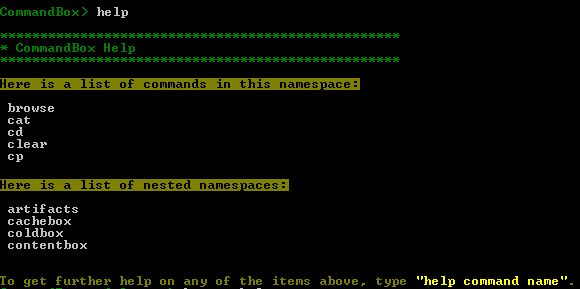
To get an overall list of all the commands you have available to run, simply type help at the shell.
Bullet Train Prompt
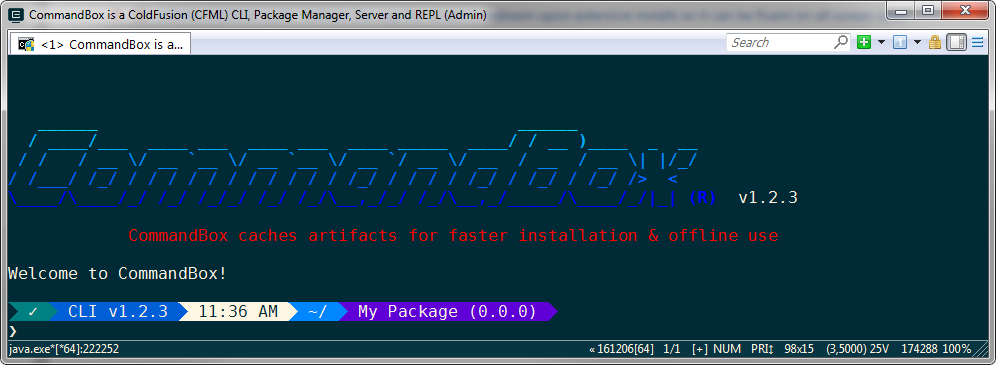
This module will customize your CommandBox prompt while in the interactive shell. It has multiple "cars" that are part of the train and each car can contribute some output to the prompt that is working directory-aware.
THIS MODULE REQUIRES COMMANDBOX 4.0.0!
This project is based on the Zsh Bullet Train theme which is based on the Powerline shell prompt. The goal is to add in additional information to your prompt that is specific to the current working directory, or the last command you ran.
What's New in 3.0.1
Properties weren't being read correctly from the server.json file. If you have been using server.json, please double check the format of the file here in our docs:
This fix will make this functionality work as expected:
A Little Fun
We believe all work and no play makes you a dull boy (or girl!). You'll notice the interactive shell has a handful of quotes and tips that show up when the shell starts. If you have ideas or suggestions for new ones, please send pull requests or let us know.
ASCII Art Stereograms
If you remember the "Magic Eye" books from your childhood, you'll be pleased to know CommandBox has an ASCII Art Stereogram for every day of the month. You'll find it hiding inside the info command. The image will change every day at midnight.
What's New in 3.8.0
Bug
[] - Relative SSL certFile or keyFile path in server.json isn't expanded
Piping into Commands
The CommandBox interactive shell already allows for a command to pipe data into another Command.
Since CommandBox commands don't have a "standard input", the output of the previous command is passed into the second command as its first parameter. In this instance, the grep command's first parameter is called input so it receives the value returned by the cat command. The "find me" text becomes the second parameter-- in this case, expression.
Even though you can run CommandBox from your favorite terminal window, there are a number of nice IDE integrations out there that are designed to allow you to run command line utilities from inside your favorite editor. Here's a few that we're aware of and how to use them. If you have more, please let us know!
If you don't have the option of changing the security controls on your PC, then you can try changing your Windows environment variables of
TMP
and
TEMP
to repoint to another folder which does not have this restriction.
/usr/bin/box: 87: exec: java: not found
If you receive a message like the one above, which was taken from a Linux machine, when starting CommandBox, this means that you do not have Java installed. You can solve this in three ways: 1. Download the JRE-included CommandBox install which comes with a folder called jre 2. Download your own jre and place it in a folder called jre in the same folder as the box binary. 3. install Java onto your machine and ensure the correct JAVA_HOME and JRE_HOME environment variables are set.
If you're not familiar with how to view these, you want to "diverge" your eyes. This is what happens when you look at something far away and it's the opposite of crossing your eyes. Start with your face closer to the monitor and looking square on. Relax your vision and look past the monitor until the image starts to overlap itself (that's your eyes diverging) until the repeated elements match up again (like the clouds above). Different parts of the image will appear to be different distances away from you.
If you can't see it right away, don't worry. Practice makes perfect and the more you do it, the easier it is. You'll get the hang of it, we promise!
When developing on BoxLang modules, you can now use the package link command to symlink those modules to your BoxLang home's modules folder.
Override Module settings with env vars
This didn't work in the past due to chicken/egg issues and the order things loaded. Now you can use global env vars to override how modules behave, which is nice for CI environments.
STOMP/Websocket heartbeat improvement
After some real-world testing with our STOMP/Websocket implementation, we've enhanced STOMP heartbeats to be replied to directly from Undertow/Java without hitting your CF code. This improves performance and removes clutter in your performance profiling tools.
Server Process Working Directory
When starting a server, the Java server process will be the directory that the server.json lives in, otherwise the web root. This affects how Java's default behavior of expanding relative paths works, and allows you to use the user.dir java system property in your config files for relative paths.
BoxLang-aware rewrites
The default rewrite rule will automatically use index.bxm instead of index.cfm when you start a BoxLang server which has an index.bxm file in the web root. You can now also override the front controller with a custom server rule.
Updated Dependencies
We've also updated to the latest Undertow and Lucee libraries. Note this Undertow update includes some security fixes from RedHat.
Quotes are actually allowed unescaped in a value, so long as they don't appear at the start of the string.
However, if the parameter contains white space and is surrounded by quotes, you'll need to escape them with a backslash.
Hint Only like quotes need to be escaped. Single quotes can exist inside of double and vice versa without issue. These examples below are perfectly valid.
Backticks
Backticks are used in parameter values to demarcate an expression to be parsed. Escape them with a backslash. All backticks need escaped regardless of whether they are encased on single or double quotes.
Equals Signs
If you have an equals sign in your value, you'll need to escape it with a backslash unless you've quoted the entire string.
Line Breaks
Line breaks can't be escaped directly as of Commandbox 4.0. Instead, most terminals let you enter a carriage return by pressing Ctrl-V and pressing enter. To enter a line feed, press Ctrl-V followed by Ctrl-J.
On ConEMU, which performs a paste operation with Ctrl-V, use Ctrl-Shift-V instead.
Tabs
A tab character can't be escaped directly as of CommandBox 4.0. Instead, most terminals let you enter a tab char by pressing Ctrl-V followed by tab. In ConEMU which allows pasting via Ctrl-V, you can use Ctrl-Shift-V and then press tab.
Backslash
Since the backslash is used as our escape character you'll need to escape any legitimate backslash that happens to precede a single quote, double quote, equals sign, or letter n.
This will print foo\=bar
It can be used as a dynamic parameter like so:
In the example above, the contents of the defaultServer.txt file will be passed in as the value of the "name" parameter to the "server start" command. If the contents of the file was the text myServer, the equivalent final command would be:
Inside Parameters
There can be more than one expression in a single parameter value. Expressions can also be combined with static text and they will all be evaluated in the order they appear:
That would output something similar to:
If you need to use an actual backtick in a parameter value, escape it with a backslash.
Which outputs
Express Yourself
This unlocks a new world of scripting potential when combined with other abilities like native OS binary execution and CFML functions from the CLI. Here's some examples to get your gears turning:
Set a package property in box.json equal to the current date passed through a CFML date mask
Set properties based on manipulations of previous values:
Perform CFML operations on local files:
Execute environment-aware install scripts based on local files. (isProduction.txt would contain the text true or false in this ex.)
cfml
command by simply typing the name of the CFML function, preceded by a
#
sign.
Function parameters
When you pass parameters into this command, they will be passed directly along to the CFML function. The following commands are the equivalent of hash( 'mypass' ) and reverse( 'abc' ).
Piping them together
This really gets useful when you start piping input into CFML functions. Like other CFML commands, piped input will get passed as the first parameter to the function. This allows you to chain CFML functions from the command line like so. (Outputs "OOF")
By piping commands together, you can use CFML functions to transform output and input on the fly to generate very powerful one-liners that draw on the many CFML functions already out there that operate on simple values.
Complex Values
Since this command defers to the REPL for execution, complex return values such as arrays or structs will be serialized as JSON on output. As a convenience, if the first input to an array or struct function looks like JSON, it will be passed directly as a literal instead of a string.
The first example averages an array. The second outputs an array of dependency names in your app by manipulating the JSON object that comes back from the package list command.
The sky is the limit with the mashups you can create. This example runs your native java binary, uses CFML functions to strip out the first line, and then grabs a portion of that string via regex in the sed command.
Named Parameters
You must use positional parameters if you are piping data to a CFML function, but you do have the option to use named parameters otherwise. Those names will be passed along directly to the CFML function, so use the CF docs to make sure you're using the correct parameter name.
Positional Parameters
Positional parameters omit the name= part and only use the value. They must be supplied in the order shown in the Command API docs or help command. We try to place the most common parameters at the beginning so you can use named parameters easily. Here is the equivalent of the named command above:
Of course, only the required parameters must be specified. I'm only including all of them here for the completeness of the example.
Required Parameters
If you do not provide a parameter that is required for the command execution, the shell will stop and ask you for each of the missing parameters before the command will execute.
Info It is not necessary to escape special characters in parameter values that are collected in this manner since the shell doesn't need to parse them. The exact value you enter is used.
Funky Parameters
In addition to quoting parameter values, parameter names can also be quoted. This is useful when setting keys into settings or JSON files that have spaces, hyphens or special characters. Each of these examples are supported:
Each of those examples will create this in your box.json
Flags
Any parameter that is a boolean type can be specified as a flag in the format --name. Flags can be mixed with named or positional parameters and can appear anywhere in the list. Putting the flag in the parameter list sets that parameter to true. This can be very handy if you want to use positional parameters on a command with a large amount of optional parameters, but you don't want to specify all the in-between ones.
You can also negate a flag by putting an exclamation point or the word "no" before the name in the format --no{paramName}. This sets the parameter to false which can be handy to turn off features that default to true.
Or, I can run it from within the CommandBox interactive shell using the execute command:
#! Goodness
Now, you people on Unix-based operating systems like Mac and Linux get a special treat. You can actually create natively executable shell scripts that contain CFML! Check out this file that has the special hash bang at top:
test
All we need to do is make it executable
And then just run it like any other shell script!
CFML Engine
The underlying engine used to execute your files will be the version of Lucee Server that the CLI is currently running on. Note, this can change between releases, and you can see the current version by running the info command. If you want to try to use the <cfadmin> tag to do things like create datasources, the default password for the Lucee server context is commandbox.
Hopefully this gives you a lot of ideas of how to start using CFML on your next automation task. And if you want even more control like print objects, object oriented code, and fancy parameters, look into making custom CommandBox commands.
<cfoutput>#now()#</cfoutput>
Upgrading
If you already have 3.0.0 then this fix only affects the CFML bits and is very easy for you to install. Simply run this command:
There is nothing special about a parameter that can received piped input. In fact, any command can receive piped input for its first parameter. The following commands all accomplish the same thing.
This allows you to get creative by combining commands together like so:
This takes a package name and replaces some text on output. One benefit is that Windows users don't have a native sed command in their OS, but those commands inside a CommandBox Recipe will execute consistently on any machine.
Piping From The OS
What if you aren't using the interactive shell and you want to pipe into CommandBox from your OS's native shell? This is also supported, and as long as there is a command specified, the piped input will become the first parameter as before.
If you pipe text directly into the box executable with no command specified in the parameters, each line of your piped text will be read from the standard input as a command.
Could not load library. Reasons: [no jansi in java.library.path, C:\Users\some.user\AppData\Local\Temp\1\jansi-64-9170657940034638384.dll: Access is denied]
at org.fusesource.hawtjni.runtime.Library.doLoad(Library.java:182):182
at org.fusesource.hawtjni.runtime.Library.load(Library.java:140):140
at org.fusesource.jansi.internal.CLibrary.<clinit>(CLibrary.java:42):42
at org.fusesource.jansi.AnsiConsole.wrapOutputStream(AnsiConsole.java:48):48
at org.fusesource.jansi.AnsiConsole.<clinit>(AnsiConsole.java:38):38
at jline.AnsiWindowsTerminal.detectAnsiSupport(AnsiWindowsTerminal.java:57):57
at jline.AnsiWindowsTerminal.<init>(AnsiWindowsTerminal.java:27):27
at sun.reflect.NativeConstructorAccessorImpl.newInstance0(Native Method):-2
at sun.reflect.NativeConstructorAccessorImpl.newInstance(Unknown Source):-1
at sun.reflect.DelegatingConstructorAccessorImpl.newInstance(Unknown Source):-1
at java.lang.reflect.Constructor.newInstance(Unknown Source):-1
at java.lang.Class.newInstance(Unknown Source):-1
at jline.TerminalFactory.getFlavor(TerminalFactory.java:211):211
at jline.TerminalFactory.create(TerminalFactory.java:102):102
at jline.TerminalFactory.get(TerminalFactory.java:186):186
at jline.TerminalFactory.get(TerminalFactory.java:192):192
at jline.console.ConsoleReader.<init>(ConsoleReader.java:243):243
at jline.console.ConsoleReader.<init>(ConsoleReader.java:235):235
at jline.console.ConsoleReader.<init>(ConsoleReader.java:227):227
at sun.reflect.NativeConstructorAccessorImpl.newInstance0(Native Method):-2
at sun.reflect.NativeConstructorAccessorImpl.newInstance(Unknown Source):-1
at sun.reflect.DelegatingConstructorAccessorImpl.newInstance(Unknown Source):-1
at java.lang.reflect.Constructor.newInstance(Unknown Source):-1
at lucee.runtime.reflection.pairs.ConstructorInstance.invoke(ConstructorInstance.java:52):52
at lucee.runtime.reflection.Reflector.callConstructor(Reflector.java:809):809
at lucee.runtime.java.JavaObject.init(JavaObject.java:295):295
at lucee.runtime.java.JavaObject.call(JavaObject.java:222):222
at lucee.runtime.java.JavaObject.call(JavaObject.java:259):259
at lucee.runtime.util.VariableUtilImpl.callFunctionWithoutNamedValues(VariableUtilImpl.java:743):743
at lucee.runtime.PageContextImpl.getFunction(PageContextImpl.java:1599):1599
at system.util.readerfactory_cfc$cf.udfCall(/commandbox/system/util/ReaderFactory.cfc:38):38
install --lock
package link ~/.boxlang/modules
box_config_modules_moduleName_settingName=value
framework-rewrite( 'myFrontController.bxm' )
echo 'Hello World'
echo "Good Morning Vietnam"
echo O'reilly
echo 'O\'reilly Auto Parts'
echo "Luis \"The Dev\" Majano"
echo "O'reilly Auto Parts"
echo 'Luis "The Dev" Majano'
echo "Nothing to \`see\` here"
echo 2+2\=4
echo "2+2=4"
echo foo\\\=bar
cat defaultServer.txt
server start name=`cat defaultServer.txt`
server start name=myServer
echo "Your CommandBox version is `ver` and this app is called '`package show name`'!!"
Your CommandBox version is 3.0.0 and this app is called 'Brad's cool app'!
echo "Nothing to \`see\` here"
Nothing to `see` here
package set createdDate="'`#now | #dateformat mm/dd/yyyy`'"
Set createdDate = 1/1/2016
package set name=brad
Set name = brad
package set name="`package show name` wood"
Set name = brad wood
package set name="hello world"
package show name | sed s/hello/goodbye/
C:\> echo coldbox | box install
C:\> echo reverse('this is a test') | box repl
C:\> echo version | box
C:\> box < commands.txt
run
(
) which can be used to run native commands from within CommandBox. Command input parameters and flags won't necessarily match your OS's native shell. CommandBox uses its own parser and commands/parameters will be formatted as documented here.
Selecting and copy/paste may differ based on your operating system and how it treats command windows. CommandBox uses some color and formatting in its output. This uses ANSI escape codes and will only work correctly if you're using an ANSI-compatible shell to run CommandBox from.
Starting and Stopping
If you have launched the CommandBox executable from your OS's GUI, it will run inside of a native shell window. When finished running commands, you can simply close the window, or type exit an the window will close for you. If you have a series of commands to run, this is the recommended approach.
If you manually open your native shell and execute the box executable, it will take over the screen and the prompt will now become a CommandBox prompt. When you type exit the CommandBox program will drop you back at your native OS shell.
One-Off Commands
You can also leverage CommandBox as another operating system binary if you want to execute one-off commands without having the need to go into the interactive shell. This is useful if you are integrating CommandBox with other system binaries, task runners, ANT, or you just want to execute a CFML template or CommandBox recipe.
Info Executing one-off commands might have a delay when executing as the CommandBox environment needs to load first.
Starting a default web server in CommandBox will give you a Lucee Light server, which may not run your app since it lacks extensions such as JBDC drivers and the admin. You can still ask for a specific version of Lucee with the cfengine parameter. If you delete the engine folder from a CommandBox Light installation, Lucee will not be able to work since the Lucee.jar file in CommandBox Light has had it's core.lco file removed to make it smaller. Deleting the entire .CommandBox folder will work however.
Any Task Runners or CLI automations in CommandBox light will also not be able to use things like JDBC drivers unless you install the extensions. Extensions can be installed by placing them in the CLI's server context deploy folder and waiting a minute:
You can download the CommandBox Light binary directly from our S3 artifacts repo:
box-light - Mac/Linux
box-light.exe - Windows
box-light.jar - Executable jar
CommandBox Thin
The CommandBox Thin binary cannot be used by itself as it contains nothing inside of it but the Java bootstrap. It does not contain any of the other libraries, jars, or Lucee versions that CommandBox needs to load. it is only 300KB in size. The way that the 'thin" binary is to be used is to first download and run the normal CommandBox or CommandBox Light binary which will extract itself into the CommandBox Home. Once this has been completed, you can delete that box binary and replace it with the box-thin binary (renamed to box ). The new thin binary will take up less disk space and will simply use the existing CommandBox home that has been extracted.
The thin binary does not care whether the CommandBox home was extracted with a full or "light" version. This can create additional disk savings in an environment like Docker, but would not serve much of a purpose on your local development PC. If you delete your .CommandBox folder, the CommandBox thin binary will not be able to recreate it.
You can download the CommandBox Light binary directly from our S3 artifacts repo:
box-thin - Mac/Linux
box-thin.exe - Windows
box-thin.jar - Executable jar
~/.CommandBox/engine/cfml/cli/lucee-server/deploy
Namespace Help
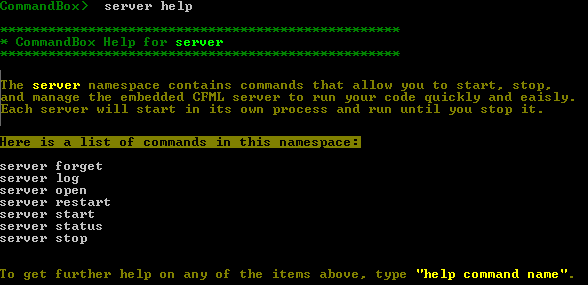
Next, drill down and get help on a specific namespace like server.
Namespace Help
Command Help
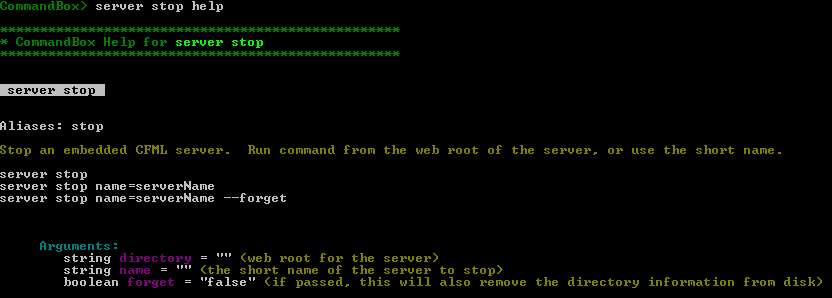
And finally, get help on a single command such as server stop. We can see the command is also aliased as just stop as well as all the possible parameters and their types along with a few sample ways to call the command.
Command Help
HTML Command API Docs
For a full list of all the commands that ship with CommandBox as well as all their paramaters and samples, please visit our Command API docs which are auto-generated each build. This is the same information available to you via the help command, but in a searchable format you can browse outside of the CLI.
Sometimes, you need to view the CommandBox log file. Maybe it is to debug a command you are writing or to submit a crash report. The system-log command outputs the path to the CommandBox log file. You can use it creatively by piping its output in to other commands:
This module uses some special Unicode characters to draw the prompt that may not be in your default terminal. You can turn off all Uniode chars and live with an uglier shell like so:
Or try a font like Consolas, DejaVu Sans Mono, or Fira Code. The best way to get all the characters to work is to install a "Powerline patched" font and set your terminal to use it. This may differ based on your operating system.
For Windows users, we also recommend using ConEMU as your terminal.
Usage
You don't need to do anything special. Just continue to use the CommandBox interactive shell like you always do.
You'll notice that the prompt is spanned across two lines and contains additional information.
Cars that do not apply to the current directory will simply not be displayed. Familiarize yourself with what each bullet train "car" represents and soon you'll be using the data in the prompt without even thinking about it!
Customize it!
You can customize the cars that show, change the colors of existing cars and even create your own custom additions to Bullet Train. Read all about it in the readme of the Module homepage on ForgeBox.
CommandBox Bullet Train Prompt
install commandbox-bullet-train
config set modules.commandbox-bullet-train.unicode=false
[COMMANDBOX-674] - propertyfile set errors if file doesn't exist
New Feature
[COMMANDBOX-675] - Allow relative property file paths in task runners
Improvement
[COMMANDBOX-666] - Allow custom tray contributions to have relative image path
Here's an overview of the notable changes in this release.
Install Lucee core/lex files
The install command will automatically find a local Lucee Server when installing a package that is a Lex file. There is also now a command called server lucee-deploy to help with installing Lex files (Lucee Extensions) and LCO files (Lucee Core).
It will accept an absolute or relative local file path:
server lucee-deploy myFile.lex
or an HTTP URL to download
server lucee-deploy https://domain.com/path/to/Lucee-core-patch.lco
You can also override the name of the CommandBox server to install into, regardless of what working directory the shell is in:
The command will copy the lex or lco file to the deploy folder of the chosen Lucee server
More info here:
Package Management binary hash verification
CommandBox now has the capability to verify the MD5 hash of a binary upon installation. When publishing packages to ForgeBox using ForgeBox's built-in S3 storage, the binary hash will be auto-calculated and stored in ForgeBox along with the package details and automatically checked on every future download.
More info here:
WebSocket Support
CommandBox supports WebSockets natively via our . The WebSocket server in CommandBox is not really a separate "server" per se, since it’s on the same port. It’s just an upgrade listener which will upgrade any WS requests.
This websocket integration will work for Lucee, Adobe, and BoxLang alike as it passes incoming messages to the app via an "internal" HTTP request to /WebSocket.cfc?method=onProcess where the CF/BL code can handle it. The incoming request will have all cookies, headers, hostname, etc that the original websocket connection was started with, so normal CGI variables and session scopes should work fine.
You need to create a custom /WebSocket.cfc class should extend one of the classes described below in this library which provides the base functionality.
More info here:
And here:
Library Updates
We've bumped the versions of several internal libraries including
Lucee (5.4.6.9)
JBoss Undertow (2.2.37.Final)
Bundled JRE (11.0.25+9)
Release Notes
Here is the full list of tickets closed in the 6.1.0 release.
New Feature
Updates to run BoxLang
Add command to deploy Lucee lex or lco files
Check if an entry has a hash associated to it and validate it
Create a hash of the binary when storing the zip and return it to ForgeBox
WebSocket Server
Improvement
Sort by date last started when finding a server by web root
Make semantic version prerelease identifiers not case sensitive
default servlet pass predicate include Boxlang files
Bug
Legacy SSL config doesn't respect enable = false
Static web server no longer works
second level dependencies inside of a top level dependency's box.json always install latest stable version
"Java search" returns no results
framework rewrites double-encode path info
CommandBox 6 not putting trailing slashes in URL
SES paths return false from is-file predicate for value files with a path info
backslash in JSON object keys not escaped when printing JSON
forgebox version-debug errors
Task
Update to Undertow 2.2.33.Final
Update to Lucee 5.4.6.9
Update bundled JRE to 11.0.23+9
What's New in 5.2.1
There is now a new "forgebox logout" command you can use for testing or just to remove your API token from the local CLI.
# Logout one user
forgebox logout username
# logout all users
forgebox logout
You can change CommandBox's default tab completion to be an inline list that follows your cursor. This setting requires you to close and re-open the shell to take affect.
We've added better debugging information for Server Profiles. If you add the --verbose flag to your server start, you'll be able to see what profile was detected for your server, and what baked-in rules have been turned on as a result.
|------------------------------
| √ | Setting Server Profile to [development]
| |------------------------------------------------------
| | Profile set from "environment" env var
| | Block CF Admin disabled
| | Block Sensitive Paths enabled
| | Block Flash Remoting enabled
| | Directory Browsing enabled
| |------------------------------------------------------
We've added a new Single Server Mode you can enable in the CLI to make using CommandBox in Docker images easier.
Read more here:
Release Notes
Here are the release notes for the 5.2.1 release.
Bug
[] - Installing via lex endpoint uses incorrect file extension
[] - Location of predicate file is in a folder that the Docker finalization script deletes
[] - Command alas for run command doesn't expand properly
New Feature
[] - Add config setting to activate JLine's AUTO_MENU_LIST
[] - forgebox logout command
Improvement
[] - verbose server start output for profile and security settings
[] - Extend ${} scopes to apply to any getSetting() call or "env show" command
[] - Modules aren't unloaded on reload or shutdown
What's New in 4.1.0
Release Highlights
Fixed the annoying "server spanner" error that *nix users saw when starting servers.
Updated CLI engine (and default server) version to Lucee 5.2.7.63 which includes an important security fix.
Added a new "noninteractive" setting to improve the output on build servers like Jenkins or Travis-CI
Task runner metadata changes picked up without needing to reload the CLI
Ability to load ad-hoc modules on the fly from Task Runners
Release Notes
Here's the full list of tickets we addressed in the 4.1.0 release. Thanks to those who send me pull requests for some of these fixes and features!
Bug
[] - server start on linux: "/bin/bash not found" message displays
[] - Improve port binding logic
[] - Task component metadata is not refreshed before each run
New Feature
[] - Localized CommandBox Modules
[] - Add new slugify function to the formatter utility
[] - When creating coldbox skeleton apps, clear out the basic name, slug, version, location and scripts so the user can configure them
[] - Added ability to visualize the exception stacktraces with a configurable depth.
[] - Add setting to force "non interactive" shell that disables fancypants progress output
Using a DB in CFML scripts
One common question is how to access the database from one of these scripts. Your code is executed on Lucee Server (version 4.5 at the time of this writing) which is the version of Lucee that the core CLI runs on. The CLI has the full power of a Lucee server running under the covers, but there's no web-based administrator for you to acess to do things like adding datasources for your scripts to use. It would considered poor form anyway since standalone scripts are best if they're self-contained and don't have external dependencies like server settings necessary to run.
Lucee allows datasource to be a struct
So the easiest way to accomplish this is simply to exploit a little known but very cool feature of Lucee that allows the datasource attribute of most tags to be not only a string which contains the name of the datasource, but also a struct that contains the _definition_ of the datasource. This will create an on-the-fly connection to your database without any server config being necessary which is perfect for a stand-alone script. Here is what that looks like. Note, I'm using queryExecute(), but it would work just as well in a cfquery tag.
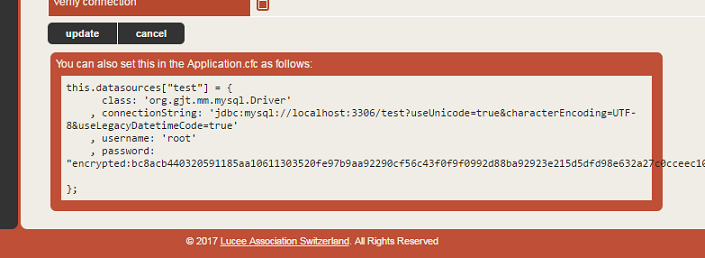
So, the first block simply declares a struct that represents a datasource connection. Then I use that struct as my datasource. You might be thinking, "where the heck did he get that struct??". Glad you asked. Start up a Lucee 4 server, edit a datasource that has the connection properties you want and then at the bottom of the edit page you'll see a code sample you can just copy and paste from. This is the code for an `Application.cfc`, but you can re-use the same struct here.
Another method
There are a couple tags inside Lucee that don't support this just yet. `<CFDBInfo>` is one of them. [ In this case, you need a "proper" datasource defined that you can reference by name. Lucee has some more tricks up its sleeve for this. You can simulate the same thing that happens when you add a datasource to your `Application.cfc` with the following code. This will define a datasource for the duration of the time the CLI is running in memory, but it will be gone the next time you start the CLI.
So let's break this down real quick. First we get the current settings of the CLI Lucee context and the list of current databases (may be null). Then we simply add the same datasource definition as above to the struct with the name we wish to use to reference this datasource. And finally we `update` the application with the new struct of datasources. Now we can use this datasource name just we would in a "normal" web application.
Notes
The internal CLI of CommandBox still runs on Luce 4.5 so make sure you copy the data source definitions from a Lucee 4.5 server, and not a 5.0 server. Also, you'll note I used encrypted passwords above. You can also just put the plain text password in. Just omit the `encrypted:` text like so:
What's New in 2.1.0
Specifying a max heap size for your embedded server
CommandBox> start heapSize=768
And finally, the ability to install packages from a Git repo is here!
install git://github.com/username/repoName.git
And this nice shortcut for installing from GitHub:
install username/repoName
If you've not used CommandBox yet, check out our getting started guide here:
You can download CommandBox 2.1.0 here on our product page:
Release Notes
Bug
[] - Piping content to box repl
[] - Lucee default error template is broken in CLI
[] - OWASP jars corrupt
Improvement
[] - Improve parameter escaping when running commands from native OS
[] - Make ColdBox skeleton hints dynamic by reading folder instead of hard-coded values
[] - Increase the size/resolution of the icon
New Feature
[] - Additional install endpoints
[] - Git endpoint
[] - Update all tray icons to CommandBox latest icons
Commands
Commands
CommandBox uses its own command parser that should be similar to what you're used to in other shells. Commands are not case-sensitive and don't contain any special characters except an occasional dash (-). Each command and its parameters will be entered on a single line. Press enter when you are done typing to execute that command. If you ever need to include a line break in a parameter value, quote the value and use the escape sequence.
For a full list of all the commands that ship with CommandBox as well as all their parameters and samples, please visit our Command API docs which are auto-generated each build.
Namespaces
To help organize our commands, we introduced the concept of namespaces. this means that commands can contain spaces and be comprised of more than one word. This is to keep things readable. Several commands that are all related will start with the same word, or namespace. An example of this is the namespace. It contains several commands inside of it including , , and . Calling each of them would look like this:
Hint the text artifacts itself is not a command and you will receive an error if you hit enter after just typing that text. Context-specific help is available for all namespaces by typing help after the namespace.
Namespaces can be more than one level. Another example would be which contains commands such as , , and .
Aliases
Commands can be aliased so you can call them more than one way, ever wanted to run an ls command in Windows or a dir command in Unix? . Check the or the CLI help command to see if a command has aliases. For instance, the command is aliases as q for quick typing. Another example would be the command that is aliased to just init.
File Paths
Many Commands accept a path to a folder or file on your hard drive. You can specify a fully qualified path that starts at your drive root, or a relative path that starts in your current working directory. To find your current working directory, use the pwd command (Print Working Directory). To change your current working directory, use the cd command.
Absolute
Here are examples of fully qualified paths in Windows and *nix-based:
Windows:
Info Note that if you start a path with a single leading slash in Windows, it will be an absolute path using the drive letter of the current working directory.
*nix:
Relative
For a relative path, do not begin with a slash.
File system paths will be canonicalized automatically which means the following is also valid:
UNC Server paths
If you are on Windows, CommandBox supports UNC server shares bu accessing the name of the server or the IP address. Note, you can use forward or backslashes in Windows, but a UNC path MUST start with two backslashes.
Backslashes need to be escaped from the command line and in JSON, so most usage of UNC server paths will require you to type four slashes like \\\\ which will properly escape to \\
You cannot directly list the contents of a server like \\webdev01 as that is not a true directory. You always need to access a specific share like \\webdev01/webroot.
Permissions
By default, CommandBox will access UNC paths using the same permissions of the user that the box process was started with. There's no way to specify a user, so if you need to use a custom user, you'll need to run native NET USE command from the CLI first to change how it is authenticating. Unfortunately, this is a limitation of how Java accesses UNC paths so CommandBox has little control over it.
What's New in 5.7.0
Check Out The New Stuff
The notable updates include:
Updated version of JBoss Undertow, which contains security fixes
What's New in 3.4.0
Bug Fixes
This release fixes an issue where Adobe CF servers will not start if you're machine is offline and also fixes a bug where the previous version of CommandBox didn't correctly remove old versions of jar files on upgrade.
Non-Oracle JREs
In the past, 99% of people used the Oracle (previously SUN) version of Java for all their Java needs. As of January 2019, the license is changing on Oracle Java which makes it no longer free for commercial use as well as the end of updates for Java 8. This has led to many people looking at alternatives to Oracle. Java itself is open source, so it will always be free and there are several other organizations offering their own builds of Java. If you want support, it matters which provider you get Java from.
This page is a work in progress to track the non-Oracle JREs and how to use them. Please send pull requests to this page with any additional information you have as this is a changing landscape right now.
You can read more about Oracle's changes in this post:
Environment Variables
CommandBox allows you to access Java System Properties from the CLI and environment variables from your operating system via the ${name_here} mechanism. But CommandBox also gives you the ability to create variables of your own directly in the shell. The scope (life) of these environment variables depends on how and where they are declared.
Shell Environment Variables (Global)
Every shell instance has its own set of environment variables you can set and read. These live for the duration of the shell and have the same lifespan as Java system properties in the CLI. There is an env
What's New in 2.2.0
Release Notes
Bug
Updated version of Lucee to 5.3.10 which also contains library security updates
New "artifacts prune" command to remove older artifacts that haven't been used recently
Improved "upgrade" command which can also update new jars (you'll be able to use this in the NEXT update!)
Support for PFX cert file for server SSL
And here are the full release notes:
New Feature
COMMANDBOX-1535 update coldbox resources to support api resources
CommandBox is a Java-based executable that will run on most recent desktop operating systems (Linux, Mac OS X, Windows). Since it is a command line tool that uses a shell interface, it does not even require an operating system using a GUI. CommandBox can be used as a development aid and automation tool alongside your favorite CFML engine and IDE, but neither of those are requirements for installation of CommandBox.
1.x Versions
In this section you will find the release notes for the 1.x version of CommandBox.
namespace of commands for dealing with environment variables.
To set a new variable, you can run this:
You can view the contents of that variable from anywhere in the same shell session like so:
Clear out an environment variable like so:
Per-Command Environment Variables
In addition to the global shell environment, each executing command receives its own set of environment variables that go away when the command finishes executing. Unlike Bash, the parent variables are not copied into each command, but a hierarchy is maintained and when a variable is not found, the parent command is checked and so on until the global shell variables. After that, the Java system properties and then OS's actual environment is checked.
Here is a contrived example of an echo command that run a sub command as part of a command expression (backtick expansion). The sub command sets an environment variable and then outputs it.
The first line will output the text "Cheese" but the second line will output the default value of "myDefaul" since the variable only existed in the inner context of the expression and isn't visible to the outer shell.
Recipes
Recipes behave like a subshell and any variables set in a recipe will live for the duration of that recipe but will be gone once the recipe exits.
Viewing Variables
To view the environment variable for the current command context, run:
The output is a JSON serialized struct, which makes it suitable for programmatically accessing.
There is a command to help you debug what variables are set in each command context as well as the global shell. Here we pipe some commands into a recipe for execution. The context for the env debug command has no variables, the recipe command has a variable called inRecipe and the global shell as the 2 variables from the example above.
Native Binaries
Any environment variables you set in the CommandBox shell will be available to the native process that your OS binary runs in. Here's a Windows and *nix example of setting an env var in CommandBox and then using it from the native shell.
Passing Environment Variables to Servers
Any ComandBox environment variables present in the shell will automatically be passed to the environment of the server process. This means, given an example like this:
The CFML code running that server process will be able to "see" the foo environment variable.
Git tags when bumping a package command can have a custom prefix now. Tab completion options are also alphabetized. Ctrl-C is also handled better on Unix and actually works in Windows! Also, the timestamp on your sever.json file won't be updated unless the contents of the file actually changed.
Release Notes
Here is the full list of everything that changed in the CommandBox 3.4.0 release.
[] - Also negate boolean options with "no" in front
[] - Stop model scaffolding with empty names
[] - Handle Control-C better in the shell
[] - Improve check for previously-installed package
[] - Don't update modified date of server.json unless actually modified.
[] - Starting named server inherits same server.json settings
Amazon Corretto
Corretto is a build of OpenJDK maintained by Amazon. It is free and will have long term support. Initial tests show that Corretto 1.8 works with CommandBox and ACF 11.
OpenJDK
OpenJDK is Oracle's free version of Java. it comes with a 6 month support window. CommandBox has received a fair amount of testing on OpenJDK and everything seems to work.
Azul Zulu
Zulu is free and offers long term support. Zulu provides supported builds of OpenJDK. Initial tests show that Corretto 1.8 works with CommandBox and ACF 11.
Installing on Windows
When running box.exe on Windows, the registry is used to determine the current versions of java that are installed. If you install a some non-Oracle JRE such as Corretto, you will not currently have the necessary registry entries created for box to find Java.
Oracle - No manual action needed
Azul - No manual action needed
OpenJDK - Manual creation of registry keys required
Corretto - Manual creation of registry keys required
You can manually create the needed keys by modifying and running the following registry entries. (Contributed by Jim Pickering)
Installing on *nix
The box binary on *nix uses your OS environment variables to locate Java. In the absence of an env var called JAVA_HOME, box will look for java in the default system path.
Oracle - No manual action needed
Azul - No manual action needed
OpenJDK - Manual creation of JAVA_HOME required
Corretto - Manual creation of JAVA_HOME required
To manually configure the JAVA_HOME env var on a *nix system, edit your /etc/profile file to have these lines. Adjust the path as necessary based on your installation.
The JRE Folder
And as always, on any operating system and with any JRE provider, you can override what version of java is used by creating a folder called JRE in the same directory as the box or box.exe binary that contains the JRE you wish CommandBox to use. This will bypass all registry and env var checks above.
For macOS users who have installed CommandBox via HomeBrew, the installer creates a boxalias in /usr/local/bin/ which points to the boxbinary in the /usr/local/Cellar/commandbox/<version>/bin/ directory. If you want CommandBox to use a particular version of the JRE then put the jre folder in the /usr/local/bin/ directory. If you want CommandBox to have a different home .CommandBox directory, place your commandbox.properties file in the /usr/local/Cellar/commandbox/<version>/bin/libexec/bin/ directory.
If you want to debug what JRE is being used by the CommandBox CLI, use the -clidebug flag when starting CommandBox and the first few lines will tell you what version of Java is being used, and where on disk it lives.
JavaSoft-Registry-Keys.reg
Windows Registry Editor Version 5.00
[HKEY_LOCAL_MACHINE\SOFTWARE\JavaSoft]
[HKEY_LOCAL_MACHINE\SOFTWARE\JavaSoft\Java Development Kit]
"CurrentVersion"="8.0.192"
[HKEY_LOCAL_MACHINE\SOFTWARE\JavaSoft\Java Development Kit\8.0.192]
"JavaHome"="C:\\Program Files\\Amazon Corretto\\jre8"
"RuntimeLib"="C:\\Program Files\\Amazon Corretto\\jre8\\bin\\server\\jvm.dll"
You've been able to run OS binaries from the CommandBox interactive shell for a while now which is great for adding native CLI calls to your recipes.
CommandBox> !git push
The biggest problem with this though was that no output shows on the screen until the OS command is completely finished and if your OS command blocks for interactivity or just never ends, the CommandBox shell will just "hang" with no output. All that is a thing of the past now. The standard input and output of the OS process is now bound to the standard input and output of your CommandBox shell. That means that you see output as soon as the binary outputs it and if it stops to ask you for input, you can provide it. This opens up a world of possibilities.
You can ping an address and watch the output stream as the packets return.
You can do a Git commit and interact with the VI window that appears to capture your commit message.
You can actually open a bash/DOS shell right inside of CommandBox and then "exit" back to box when you're done.
Run native commands that collect input from you to continue like a sudo password.
This has been tested and works pretty well on Mac and Windows. Note, we've seen some issues on Linux where output is streamed, but input is not captured.
New interceptor points
- Always fires before attempting to forget a server whether or not the forgetting is actually successful
- Fires after a successful server forget. If the forget fails, this will not fire.
Allow spaces in user home directory
This was supported in CommandBox 3.4.0, but we had a regression in 3.5.0 that caused issues for users who have a space in their path to CommandBox's home dir. This has been fixed along with some related issues with the FusionReactor module. Make sure you have the latest Fusion Reactor module once you upgrade to CommandBox 3.6.0.
New Lucee version
The core version of Lucee that the CLI runs on has been updated to 4.5.5.006. Please note this means the default version of Lucee that starts up for your server when you don't specify otherwise will change. If you have settings like datasources and such that you want to keep, make sure you lock in your exact version of Lucee or check into our new CFConfig project for exporting/importing your server settings.
Incorrect exit code from "testbox run"
The testbox run command would return an exit code of 0 when your tests had in fact failed. This has been fixed so you can trust a proper exit code from the process when running your tests inside a Jenkins or Travis CI build.
Global default for HTTP port in config settings
Previously, you couldn't set a global default HTTP port for all your servers. This was on purpose since it didn't really make sense since one one server can use a port at a time. Now, with the introduction of Chris Schmitz's host updater module, you can more easily run each server on a dedicated host name which is added to your host file for you and bound to a unique port. This allows you to run all your local servers on port 80 which is great for cleaning up your local dev. As such, we've added the ability to set the global HTTP port now in your config setting's server defaults.
Release Notes
Here's the full release notes for the 3.6.0 release.
Bug
[] - Windows CommandBox upgrades fail silently if servers are left running
[] - Box start error
[] - All semicolons removed in REPL which breaks some code
Improvement
[] - improve execution of OS binaries in "run"
[] - Add xxxServerForget interceptors to the Server lifecycle
[] - Improve port binding detection
Installation
Regardless of where you place the box binary, the first time you execute it, a .CommandBox folder will be created in your user's home directory and CommandBox will be extracted into that location. If you delete this directory, it will be replaced the next time the CommandBox executable is run.
You can specify a different install location by adding -commandbox_home=E:\CommandBox when you run the box binary.
To avoid specifying the commandbox_home variable every time you can create a file called commandbox.properties (case sensitive) in the same directory as the binary, and fill it with this line:
commandbox_home=E:\\CommandBox
The CommandBox home can also be a path relative to the location of the commandbox.properties file.
Windows
Extract the executable box.exe from the downloaded zip file, placing it anywhere you prefer where you can then execute it when needed, such as from the Windows command line/terminal. You can also run it directly Windows File Explorer, where you would just double click on the exe,which will open the CommandBox shell in a new terminal window.
Warning On Windows 10 and above, the first time you try to run via Windows File Explorer an exe that you've downloaded, Windows Defender Smartscreen will popup with a warning that "Windows protected your PC". You will need to choose the offered "More info" link and then the offered "Run anyway" button, to proceed.
Hint When running from the Windows command line/terminal, you can make it so that you can run box.exe while you are in any folder (not just the one where you placed it), by simply adding the exe's location to the Windows PATH system environment variable. See
When you are finished running commands in the CommandBox shell, type exit. Or if you ran the box.exe from within Windows File Explorer, you can just close the terminal window which that opened.
Mac/ *Unix
Homebrew (Mac)
is a great Mac package manager, it can easily install and keep your CommandBox installation up to date (even binary releases), just run the following for stable releases:
To stay with current bleeding edge releases use the following:
Then run the box binary to begin the one-time unpacking process.
Versions will be installed in /opt/homebrew/Cellar/commandbox. To switch between versions, you will need to install the new version - either using the bleeding edge tap or the main repo. For example to switch to a (very) old version:
If you are using a tap, and want to revert back to the current stable version
If you want to use a commandbox.properties file as mentioned above, even though the symlink is added in /usr/local/bin, your boxbinary file will be in the /opt/homebrew/Cellar/commandbox/<version>/libexec/bin/ directory where you should place your commandbox.properties file. There will also be a boxbinary in the /opt/homebrew/Cellar/commandbox/<version>/bin/ directory where you should place the jre if you want CommandBox to use a version of Java that is different from your default version reported by java -version.
When using Homebrew to install CommandBox you must use Homebrew for any upgrade, minor or major. To upgrade CommandBox with Homebrew:
NOTE: If you use Homebrew to upgrade your version of CommandBox it will erase your /opt/homebrew/Cellar/commandbox/<current_version>/ folder. So before upgrading, take a copy of your /opt/homebrew/Cellar/commandbox/<current_version>/libexec/bin/commandbox.properties file to drop back into /opt/homebrew/Cellar/commandbox/<new_version>/libexec/bin/ before running box for the first time after upgrading.
Manual Installation
Unzip the binary box and just double click on it to open the shell terminal. When you are finished running commands, you can just close the window, or type exit.
Hint You can place the binary in your /usr/local/bin directory so it can be available system-wide via the box command in any terminal window.
Linux apt-get
Please note that if you are running Ubuntu 18.04 or greater, or Debian 8 (Jessie) or greater, it's necessary to have the libappindicator package in order to have the tray icon working correctly.
For older versions of Ubuntu/Debian use libappindicator-dev
For newer versions of Ubuntu/Debian use libappindicator3-dev
Run the following series of commands to add the Ortus signing key, register our Debian repo, and install CommandBox.
Stable
( This first install routine also works for the Raspberry Pi. )
If you do not have Java installed you can install it with the following command.
Then run the box binary to begin the one-time unpacking process.
Linux yum
Stable
Add the following to: /etc/yum.repos.d/commandbox.repo
Then run:
Debian Linux manual install
After you have downloaded the commandbox.deb file, install it using the dpkg command.
Run the box binary to begin the one-time unpacking process.
Redhat Linux manual install
After you have downloaded the commandbox.rpm file, install it using the rpm command.
What's New in 5.9.0
Java 17 Support
Java 17 was a breaking change for Java users as it now blocks illegal reflective access. Both Adobe and Lucee have been slow to address this. Lucee 5.3.10 mostly seems to run on Java 17, but only the public beta of ColdFusion 2023 (Fortuna) supports Java 17. You may want to start testing Java 17 out, so the CommandBox CLI and its servers seem to have basic support for running on Java 17 now. Note, you may need to add additional JVM args to any servers based on the specific Java libraries you use.
Library Updates
We've bumped library versions such as Redhat Undertow to stay current with recent CVE fixes.
Override package install paths
If you have a project and want all packages of a certain type to use a different-than-normal default install location, you can override each package type just for that project. Create an installPathConventions key in the containing package's box.json which is an object containing keys for each package type you wish to override package install paths for.
Read more:
ls --tree
You can get recursive file listings now in a tree view by using the --tree flag
Tree Print Helper
In task runners and custom commands, you can now tap into the same tree printer that the "package list" and "ls --tree" use to output your own ASCII trees.
which outputs
Read More:
Column Print Helper
There is also a print helper method for task runners and custom commands as well as a CLI command you can use that accepts an array or list of simple values and prints them in a column format based on the widest value and the available terminal width.
Read More:
unansi Command
This command will accepted piped text and strip any ANSI formatting from it. Especially useful if piping the text to a native OS binary which doesn't handle formatting well.
clipboard Command
We've introduced a new command for piping text onto your native operating system's clipboard.
Release Notes
Here's the full list of all the changes in CommandBox 5.9.0.
Exit Codes
CommandBox follows the standard system of exit codes. In Bash or DOS, every process has an exit code that is available to the shell after execution is complete. The are as follows:
0 - Success
Any other number - Failure
This slightly counterintuitive to CFML developers since we are used to positive numbers as being truthy and zero as being falsely, but it is the industry standard for shells. It makes more sense if you think of it in terms of what Windows calls it-- %errorlevel%. if the error level is 0 there was no error!
Command Exit Codes
Every command that executes has an exit code. Usually the exit code is 0 if the command ran as expected. If an error of any kind was encountered, then the exit code will be a non-zero number. Often times 1. You can easily see this if you install the module as it shows you the exit code of the last command to run. Commands such as testbox run will return a failing exit code if the tests being run didn't all pass.
You can access the last exit code from CommandBox in a called exitCode.
Shell Exit Code
The CommandBox shell also keeps track of exit code of the last command. When the shell exits, it will report that last exit code to the OS. When running a one-off command from your native shell, the exit code of that command will be passed straight through to your native shell. This means that running something like
from a Travis-CI build will automatically fail the build if the tests don't pass.
Manual Exit Code
You can manually return an exit code from the shell passing the desired number to the exit command and the native OS will receive that code from the box binary.
Command Chaining
Similar to bash, CommandBox allows you to chain multiple commands together on the same line and make them conditional on whether the previous command was successful or not.
&&
You can use && to run the second command only if the previous one succeeded.
||
You can use || to run the second command only if the previous one failed.
;
You can use a single semi colon (;) to separate commands and each command will run regardless of the success or failure of the previous command.
Chaining Commands
You can have more than two chained commands, and the command chain will keep executing so long as the next part is compatible with the previous exit code. Ex:
Assertions
With the above building blocks, we can get clever to create simple conditionals to only run commands if a condition is met. Or these can simply be used to cause recipes to stop execution or to fail builds based on a condition. The following commands output nothing, but they return an appropriate exit code based on their inputs.
pathExists
Returns a passing (0) or failing (1) exit code whether the path exists. In this example, we only run the package show command if the box.json file exists.
You can specify if the path needs to be a file or a folder.
assertTrue
Returns a passing (0) or failing (1) exit code whether truthy parameter passed. Truthy values are "yes", "true" and positive integers. All other values are considered falsy
assertFalse
Returns a passing (0) or failing (1) exit code whether falsy parameter passed. Truthy values are "yes", "true" and positive integers. All other values are considered falsy
assertEqual
Returns a passing (0) or failing (1) exit code whether both parameters match. Comparison is case insensitive.
assertNotEqual
Returns a passing (0) or failing (1) exit code whether both parameters DO NOT match. Comparison is case insensitive.
What's New in 4.7.0
Here's the full list of what we've packed into the 4.7.0 release. Click any ticket link for more details.
Bug
[COMMANDBOX-962] - CommandBox not recognizing implicit folder endpoint
[] - Update semver for fix in prerelease comparison
[] - Tokenizer breaks "run" command with odd syntax
[] - init-wizard command is incorrectly aliasing as init
[] - File watcher that modifies the file system triggers the watcher again
[] - bump command doesn't work on a submodule
[] - Text on standard input causes banner and prompt to be blank
[] - Inconsistent behavior of "run" command.
[] - Tab completion incorrect for some partial command names
[] - Interactive jobs are not thread safe
Improvement
[] - Leading zeros in semver prevent them from being matched
[] - Allow --verbose flag on uninstall command
[] - Add --roundup flag to indents command
REPL
CommandBox contains a REPL command which is a powerful tool to execute ad-hoc CFML code from the command line. A REPL reads user input, evaluates it, prints the result, and then repeats the process. The CommandBox REPL supports the inline execution of both CF script or tags.
CFSCRIPT-REPL: 5+5
=> 10
Script REPL
The default mode of the REPL command is to accept script. You can enter most any CF Script into the prompt for execution. If the script is an expression that returns a value, or sets a variable, that value/variable will be output. Variables that you set will be available to you until you exit the REPL command.
Multi-line
Multi-line statements are also allowed. If you have typed a starting { without an ending }, the REPL will keep accepting lines until it has determined the statement to be finished. The prompt changes to ... until the statement is finished.
If you would like to abort a multi-line statement, simply type exit at the prompt.
Tag REPL
You can also enter tags at the REPL. Switch to this mode by setting the script flag to false.
Any output from the tags will be returned to the console.
Multi-line statements are not currently supported in the tag REPL.
History
The script and tag REPL have their only history. Use the up and down arrows to access previous things you typed. Your REPL history can be viewed and managed by the history command (once you exit the REPL).
Tab completion is currently not supported in either of the REPLs.
Environment Variable Expansions
You can use environment variable expansions in the REPL with the same syntax that works in the CLI and JSON files. Consider this example which sets an environment variable in the shell and then enters the REPL command and references the variable. Note, the variable is expanded in-place, so you still need to wrap it in quotes so the resulting CFML code is valid.
Escapes work the same way in the REPL
What's New in 2.1.1
This fixes a bug in the "update" and "outdated" commands that caused them to error after you had installed packages from an endpoint other than ForgeBox. Note, packages installed from HTTP(S) and Git endpoints will always show as outdated and will always update since those endpoints don't provide a way to know what version they're hosting without downloading the entire package anyway.
We also included a small enhancement to the Git endpoint to allow for authentication via public/private SSH keys. As long as you have a public key configured on your Git server and the private key is stored in ~/.ssh/ using a standard name, SSH-based clones should automatically authenticate. Please see the docs for more info.
The new Lucee version affects the core CLI runtime as well as the default server you get when running "server start" with no cfengine specified. Possible compatibility issues related to the major bump in Lucee version:
This Lucee version does not include Hibernate, so the Ortus Hibernate extension is installed. We will stop doing this in 6.0
This Lucee version has strict XML parsing settings on by default which may affect any servers you start which parse XML containing DTDs.
If you do run into XML errors, this code may help you in your Application.cfc, which allows DTDs, but still disallows XML external entities (XEE).
Release notes
Task
Update bundled JRE to 11.0.20+8
Update to Lucee 5.4.3.2
Overview
CommandBox CLI
CommandBox is a standalone, native Command Line Interface (CLI), Package Manager, Embedded CFML Server and Read Eval Print Loop (REPL) aimed to help ColdFusion (CFML) developers become more productive through automation, dependency management, command line-based tools, and ASCII snake games.
Features at a Glance
CommandBox is an amalgamation of many different tools and borrows concepts from NPM, Grunt/Gulp, Maven, Bower, and Node. Features include:
Command Line for ColdFusion (CFML)
Operating System integration for executing commands
Ability to create and execute commands built using ColdFusion (CFML)
ForgeBox integration for cloud package management and installations
ColdBox Platform, TestBox, and ContentBox CMS Integrations
Integrated servlet server with rewrite capabilities
Ability to create command recipes and execution
REPL (Read-Evaluate-Print-Loop) console for immediate ColdFusion
(CFML) interaction
Ability to interact with user via CLI and create workflows and
installers
Ability to execute workflows and tasks
Built-in Help system
What's New in 5.4.2
There is a fix for a regression introduced in 5.4.0 where updating the version of a CF engine doesn't work without forgetting the server first.
There is also an important security improvement to CommandBox servers. Thanks to Abram Adams for reporting this to Ortus so we could address it.
Release notes
Note, the details of the security improvement have been tracked privately.
Bug
Java path shows up twice in "server info --verbose"
Updating server in-place keeps old web.xml path
recipe with multiple "install" instructions fails
Improvement
Add additional interceptData to server interceptors
Update to WireBox 6.5.2
Immediately activate modules after installation
Improve multiselect DSL
Story
Add JSON and Properties output for info command
What's New in 5.1.1
This release was primarily to address a regression in 5.1.0 affecting Mac OS users who tried to start Lucee servers. If you see an error similar to this on a Lucee server and you're running a Mac and CommandBox 5.1.0, then this release will fix it for you.
lucee.runtime.exp.NativeException: mac os x is not a supported OS platform.
If you are upgrading from CommandBox 5.1.0, there are only a handful of tickets which are listed below. If you are updating from an earlier version of CommandBox, please check out our 5.0.0 and 5.1.0 release blogs.
Release notes
Bug
[] - Overzealous gitignore matching of parent directories when zipping up for ForgeBox storage
[] - Enabling SSL results in some CFHTTP requests to fail.
[] - writedump failing in Lucee
Improvement
[] - Allow for verbose startup without debug logging of requests
What's New in 4.5.0
The main features of CommandBox 4.5.0 are:
Ability to install OpenJDK automatically for your servers to use ()
Environment Variables in the shell ()
What's in 1.0.0
After almost a year in development, we are so excited to finally announce the release of . This has been definitely one of the most challenging and fun projects we have overtaken here at Ortus. We had a vision of how we could accelerate not only development, tools and ultimately the ColdFusion (CFML) landscape by building a tool that could put us up to par with many other technologies. I am glad to say we have now a great foundation to move forward. CommandBox brings CFML to any Operating System and even embedded systems like the Raspberry and Banana Pi. It also gives ColdFusion (CFML) developers a much better workflow to work with their projects and a sense of community we lovingly call .
With anything we do here at Ortus, it is fully documented using our new book formats. So head on over to to download or read the entire CommandBox documentation. In the next coming weeks we will begin our CommandBox 5-week roadshow that will include weekly blogging tutorials and video presentations, so stay tuned as each week progresses. So without further ado, I present to you project Gideon: CommandBox CLI!
Recipes
If you want to automate several commands from your native shell, it will be faster to use our command that allows you to run several CommandBox commands at once. This will allow you to only load the CommandBox engine once for all those commands, but still be dumped back at your native prompt when done. Recipes can also just be useful for a series of commands you run on a regular basis.
Read more about the recipe command in our .
Ingredients
Think of a recipe as a simple batch file for Windows or a shell script for Unix. It's just a text file where you place one command on each line and they are executed in order. Enter the commands exactly as you would from the interactive shell.
What's New in 4.4.0
Iterate over JSON with foreach command
The foreach command which was introduced recently and allows you to iterate over any list of input and run a command using each item in the list has been enhanced to also allow you to iterate from the CLI over any JSON string that you pipe in.
System Settings
Now that we're starting to use CommandBox in a lot of cloud scenarios like Docker, we're looking for more and more ways to have dynamic configuration. The most common way to do this is via Java system properties and environment variables. We've wrapped up those two into a new concept called System Settings. Now any time you use ${mySetting} in a command parameter, a box.json property, server.json property, or a Config Setting, that place holder will be replaced with a matching JVM property or env var (in that order) at runtime. This is great for setting things like ports, default directories, or passwords and other secrets as an env variable so it can be different per server and not part of your code.
watch Command
There are some specific commands that make use of the Watcher library in CommandBox such as testbox watch and coldbox watch-reinit. However, there is also a generic watch command that will run any arbitrary command of your choosing when a path matching your file globbing pattern is added/updated/deleted.
The following environment variables will be available to your command
watcher_added - A JSON array of relative paths added in the watch directory
Globbing Patterns
When a command has an argument with a type of Globber for a file path, that means you can use file globbing patterns to affect more than one file at a time. Globbing patterns are common in Bash as well as places like your .gitignore file. They use common wildcard patterns to provide a partial path that can match zero or hundreds of files all at the same time.
"?" matches a single character
If a globbing pattern contains a question mark, that will match any single character. So a pattern of ca?.txt
256 Color Support
CommandBox has support for 256 colors in the console, but this is limited by the terminal in use. For instance, SSHing into a Linux server with PutTTY only supports 8 colors. Windows cmd only supports 16 colors. Most Mac terminals seem to support 256 colors by default.
For Windows users, we recommend using an add-on terminal like ConEMU which has good 256 color support out of the box. To find out how many colors your terminal supports, you can run this command:
This will show you at the top how many colors are supported. It will also output a sample of each of the 256 colors. Terminals that support less than 256 colors will "round" down and show the next closest color automatically. Some darker colors might turn to black. Note, some advanced terminals allow the user to choose color themes which will also change the default colors. CommandBox has no control over how colors show up for you.
4.x Versions
In this section you will find the release notes for the 4.x version of CommandBox.
Technically a recipe can have any file extension, but the default recommendation is .boxr which stands for "box recipe". Lines that start with a pound and whitespace characters (e.g. "# My Comments") will be ignored as comments. The pound character followed immediately by word-like characters is the mechanism for invoking CFML functions.
buildSite.boxr
Get Cooking
Execute your recipe with the recipe command, giving it the path to the recipe file.
If any commands in the recipe stop and ask for input, the recipe will pause until you supply that input. All commands that have confirmations, etc should have a --force flag for this purpose so you can run them headlessly without requiring your input. See the rm command above for an example.
Spice It Up
You can also bind the recipe with arguments that will be replaced inside of your recipe at run time. Pass any arguments as additional parameters to the recipe command and they will be passed along to the commands in your recipe.
Named arguments
If you use named arguments to the recipe command, they will be accessible via environment variables inside the recipe as ${arg1Name}, ${arg2Name}, etc.
Consider the following recipe:
notifyWinner.boxr
You would call it like so:
Output:
Note, all parameters to the recipe command needed to be named, including the recipeFile.
Positional Parameters
Now let's look at the same recipe set up to receive positional parameters.
You would call it like so:
Output:
Missing Args
If an argument is not passed, you can use the default value mechanism:
Is there an echo in here?
You can use echo on and echo off in recipes to control whether the commands output to the console as they are executed. This can be useful for debugging or confirming the success of commands with no output. Echo is on by default.
Note, echo off doesn't suppress the output of the commands, just the printing of the command and its arguments prior to execution. This does not use the actual echo command and is a feature that only applies during the execution of recipes.
Output:
Exiting a recipe
You can use the exit command in a recipe and instead of leaving the entire shell, the recipe will simply stop execution right there. If an exit code is passed, it will become the exit code of the recipe command as well as the entire shell.
Any command that errors or returns a non-0 exit code will end the recipe immediately and the recipe command will inherit that exit code. This line in a recipe will stop the recipe if there is not a foobar property in your box.json, but not before outputting a message.
On The Fly Commands
In addition to passing a file path to the recipe command for execution, you can also pipe the contents of a file directly into the command. if the input does not match a file path, it is assumed to be executable commands.
This can also give you some interesting ability to do dynamic evaluation of command strings.
You can test it out easily by outputting your system path like so:
Default values
If a system setting can't be found in a Java property or an environment variable, an empty string will be returned. You can provide a default value like so.
This does assume that your system setting name will never contain a colon! Also do not use inner single quotes for system setting name nor the default value.
Lookup Order
System settings are looked up in the following order. If the same variable exists in more than one place, the first one found will be used:
Environment variables for the currently executing command
Environment variables for the parent (calling) command (if applicable)
Global shell environment variables
JVM System Properties in the CLI process
Environment Variables from your actual operating system
For example, if you run the following it will output the contents of your OS's PATH environment variable.
However, if you set a shell environment variable from inside CommandBox called path and then output it, you will see the contents of your variable since it overrides.
Using system settings in JSON files
When box.json or server.json files are read, they automatically have all system setting setting placeholders swapped out. For instance, you can specify the port for your server in your server.json like so:
Note, we escaped the system setting by putting a backslash (\) in front of it. That's because we wanted to insert the actual text into the file and not the value of it! The resultant server.json is this. Note the system setting needs to be encased in quotes so it's just a string for the JSON.
Now, if your server has an environment variable called WEB_PORT, it will be used as the port for your server.
System settings can also be used in object key names as well in your JSON files. Here is an example of a .cfconfig.json file with a dynamic datasource name.
Note if there are duplicate key names after the system settings are expanded, the last one expanded will win.
In the REPL
You can use system settings and environment variables in the REPL using the same syntax as the CLI
Manual system setting replacements
If you're writing a custom command or task runner that reads a JSON file of your own making, you can do easy system setting replacements on the file.
In a complex data structure
In a string
The expandDeepSystemSettings() method will recursively crawl the struct and find any strings with system setting placeholders inside them. Be careful not to write back out the same struct after you've done replacements on it. Otherwise, you'll overwrite the placeholders with the current values!
You can also manually replace system setting placeholders in a single string like so:
Programmatic access
The SystemSettings service also gives you programmatic access to individual system settings in your custom commands and task runners.
watcher_removed - A JSON array of relative paths removed in the watch directory
watcher_changed - A JSON array of relative paths changed in the watch directory
Since escaping meta characters can get tricky with nested strings, you can declare the command as an environment variable and then just reference it like so:
That example runs the foreach command over each item in the watcher_added array and then runs an echo statement to output the name of each added path.
Note that the "paths" here work more like .gitignore entries and less like bash paths. Specifically:
A path with a leading slash (or backslash), will be evaluated relative to the current working directory. E.g. watch /foo will only watch files in the directory at ./foo, but not in directories like ./bar/foo.
A path without a leading slash (or backslash) will be applied as a glob filter to all files within the current working directory. E.g. watch foo will result in the entire working directory being watched, but only files matching the glob **foo will be processed.
If your watcher seems slow, unresponsive, or is failing to notice some file change events, it is likely that you have it watching too many files. Try specifying more specific paths to the files you want to process, and use leading slashes in your arguments to avoid watching all files in the current working directory.
Parameters
paths - An array of file globbing paths, or any number of string globbing arguments to watch relative to the working directory, defaults to **
excludePaths - Comma-delimited list of file globbing paths to exclude relative to the working directory.
command - The command to run when the watcher fires
delay - How may milliseconds to wait before polling for changes, defaults to 500 ms
directory - Working directory to start watcher in
verbose - Output details about the files that changed
would match
car.txt
, and
cat.txt
, but not
cart.txt
. You can use a wildcard more than once.
p?p?.cf?
would match files named
papa.cfm
and
pipe.cfc
.
"*" matches any number of characters within name
If a globbing pattern contains a single asterisks, that will match zero or more characters inside a filename or folder name. So d*o matches doodoo, dao, and just do. The wildcard only counts inside a file or folder name, so models/*.cfc will only match cfc files in the root of the models folder.
"**" matches any number of characters across all directories
To extend the previous example, if we did models/**.cfc that would match any cfc file in any subdirectory, no matter how deep.
Globbing examples
Here's some examples of what file globbing might look like:
Here's some more examples of how the wildcards work
Since the Globber library can handle more than one globbing pattern, any command that uses a Globber type can accept a comma-delimited list of patterns. The following will list any .cfm AND .md files in the directory.
# Start with an empty folder
rm mySite --recurse --force
mkdir mySite
cd mySite
# Initialize this folder as a package
init name=mySite version=1.0.0 slug=mySlug
# Scaffold out a site and a handler
coldbox create app mySite
coldbox create handler myHandler index
# Add some required package
install coldbox
install cbmessagebox,cbstorages,cbvalidation
# Set the default port
package set defaultPort=8081
# Start up the embedded server
start
recipe buildSite.boxr
echo "Hello there, ${name}, You've won a ${prize}!"
// Match any file or folder starting with "foo"
foo*
// Match any file or folder starting with "foo" and ending with .txt
foo*.txt
// Match any file or folder ending with "foo"
*foo
// Match a/b/z but not a/b/c/z
a/*/z
// Match a/z and a/b/z and a/b/c/z
a/**/z
// Matches hat but not ham or h/t
/h?t
dir *.cfm,*.md
Support for Forgebox Enterprise (TBA soon)
JRE Bundled CommandBox installs now use OpenJDK instead of Oracle JDK
Note, there are two backwards incompatible changes. The first is we turned OFF directory browsing by default on servers. You can easily get the old behavior back with
The second is that unhandled errors in the shell no longer show the stack trace (you probably wouldn't have noticed if I didn't tell you!) Get the old behavior back with:
Release Notes
Here's the full list of everything that went into this release.
Bug
[COMMANDBOX-784] - editing in the shell prompt is buggy while using Gitbash in VSCode
[COMMANDBOX-895] - Passing positional args to task errors with required param
[COMMANDBOX-897] - Passing command string as single arg to box fails
[] - Exitting recipe with exit code errors
[] - external module mappings broken in CommandBox 4
[] - Incorrect behavior when parsing unmatched quotes
[] - Cruft left in temp folder
[] - Silence annoying ESAPI warnings
[] - Warnings on java 11 about illegal reflective access
New Feature
[COMMANDBOX-516] - Add concept of env vars for commands to use
[COMMANDBOX-906] - Add preCommandParamProcess interception point
[COMMANDBOX-907] - outdated commands now verify packages in parallel
[] - Automatically download JRE for server if specified by version range
[] - Support multiple ForgeBox endpoints
[] - New Java endpoint that ties into the AdpotOpenJDK builds
[] - Make exit code of native binary from run command available in the exception that is thrown
[] - Pull Code Coverage data on "testbox run"
[] - Allow recipe args to be used as environment variables for that command
Improvement
[COMMANDBOX-896] - Add ETA to progress bar when downloading
[COMMANDBOX-898] - Improve default handling of JVM heap size
config set server.defaults.web.directoryBrowsing=true
config set verboseErrors=true
CommandBox
CommandBox is a standalone, native tool for Windows, Mac, and Linux. It provides a Command Line Interface (CLI) for developer productivity, tool interaction, package management, embedded CFML server, application scaffolding, and some sweet ASCII art. It includes a plethora of commands to interact with your Operating System, TestBox, ForgeBox, ContentBox, CacheBox, etc. Built-in help is completely integrated for every command. You can pop open a CommandBox shell in your terminal window and manually type commands, or even automate things externally via the CommandBox binary with your OS's native shell.
So one of the biggest things we think the CFML community was missing, was a true package management platform. With this in mind, CommandBox + ForgeBox now includes full package management control for ANY ColdFusion (CFML) application. We have created a spec for a box.json file which will go in the root of CFML packages to describe metadata about the package, how it should be installed, and dependencies that the package requires to run. CommandBox is getting a tight integration with the ForgeBox REST API to search, view, and install packages/modules directly into your app from the command line.
REPL: Read-Evaluate-Print-Loop
The CommandBox CLI also leverages a REPL console for executing a-la-carte CFML commands. You can use it in script or even tag mode with full command history as well. Each REPL instance also has included memory, which means you can declare functions, datasources, etc and leverage them within the same command executions. We even support multi-line statements.
Application Scaffolding
CommandBox has tons of commands for quickly building out applications. Create a new ColdBox app with coldbox create app, add a handler with coldbox create handler. You can even get actions added to it, views created, and BDD integration tests stubbed out at the same time. This can bring new productivity for people who like to live on the command line and especially for those who want to be able to automate stuff they do a lot of.
Extensible
CommandBox has a thin Java layer and a rich CFML command suite built using WireBox dependency injection. This allows for any CFML developer to contribute and write out their own commands. You can even register your commands in ForgeBox and have them available to any CommandBox installation. This means that any application or framework author can contribute their own suite of commands for their community.
Automation
CommandBox also leverages the concept of CommandBox Recipes which allows you to create reusable command files with a box extension. You can execute this recipes and even do argument-binding for further reusability. You can even shared them in ForgeBox as well. It also natively integrates into your operating system you can even use CommandBox for Unix shell scripting or just plain template executions: box myfile.cfm or even use argument-binding box execute file=mayflies.cfm var1=hello name=luis and we will bind those variables into the variables scope for you.
Embedded Server
One of the cool things CommandBox brings to the table is the ability to spin up an ad hoc, lightweight, CFML server in any directory from the command line. Simply change your working directory to the root of your app, type server start and a super fast CFML server spins up on a new port running your code. When you're done type server stop from that directory or use the little icon that's showed up in your system tray.In our final release we even included SSL and full URL rewrite support as well.
Auto Updates
We have spent considerable time in our auto-update capabilities so users can transition to patches and updates with ease. We have even created two channels for updates:
Stable : Stable releases
Bleeding Edge : Bleeding edge releases
So from you console you can type: box upgrade --latest for bleeding edge releases or box upgrade for stable releases.
Future RoadMap
In the next coming months, ForgeBox 2.0 will be released with many more features to help developers manage their contributions, multiple version control, CommandBox integration, private repositories and much more. We will also be using the URL forgebox.io instead of embedding it in the ColdBox site; time for separation. We also have tons of features planned for CommandBox, here are a few teasers:
Multiple version and fuzzy version package management
WAR packager
Package signing
Much More
So as you can see, so much work to be done. I leave you with one final note, we highly encourage you to support us in any way you can as ultimately we offer these tools as professional open source and they need your support in order to continue with their development. Enjoy and go code something!
Now when you create a directory watcher in a task runner or custom command, you can not only get notified when something in that directory changes, but you also now receive a list of files added, removed, and modified.
New "coldbox watch-reinit" command
Thanks to Scott Steinbeck, we have a new command called coldbox watch-reinit. This will watch for changes to certain files in your project and will automatically issue a framework reinit when you edit things like configs or services.
Color all the JSONs
Thanks to John Berquist, CommandBox now has sweet color coding any time it outputs JSON to the screen. Try it out by running something like "server show".
Users can also customize the colors they see for JSON with the following config settings:
json.ansiColors.constant
json.ansiColors.key
json.ansiColors.number
json.ansiColors.string
Setting values can be any color name from the system-colors command.
New Gist endpoint
Thanks to Jason Steinshouer we have a new Gist endpoint for installing code from a public Gist.
watch()
.onChange( function( paths ) {
print
.line( '#paths.added.len()# paths were added!' )
.line( '#paths.removed.len()# paths were removed!' )
.line( '#paths.changed.len()# paths were changed!' ) ;
} )
.start();
package set reinitWatchPaths= "config/**.cfc,models/**.cfc,ModuleConfig.cfc"
coldbox watch-reinit
install gist:b6cfe92a08c742bab78dd15fc2c1b2bb
Color Names
The names and numbers of each color are unique and important if you want to do any Task Runners, custom commands that make use of these colors. Modules like Bullet Train also allow you to customize their colors. You can specify a color by its name like LightGoldenrod5 or its number (221).
In a Task Runner or custom command, the print helper would look like this:
Here's an example of customizing your Bullet Train module to use fancy colors. (Color 21 is Blue1)
system-colors
256 Color support from ConEMU in Windows
print.lightGoldenrod5Line( 'This is pretty' );
print.color221( 'This is the same color as above' );
config set modules.commandbox-bullet-train.packageBG=lightGoldenrod5
config set modules.commandbox-bullet-train.packageText=color21
What's New in 6.0.0
There are a lot of new features in CommandBox 6. Here's an overview of the biggest ones. Check out the release notes for the full list.
Multi-Site Servers
This one is huge. It's the hallmark feature of CommandBox 6 and allows you to easily run as many web sites (with different web roots) in a single CommandBox server. This finally gives you the same behavior you get with Adobe ColdFusion and IIS or Lucee/Tomcat and Apache with mod_cfml. CommandBox has had built-in ModCFML support for a while, but it still needed a web server in front to work fully. CommandBox Multi-Site gives you a fully powered web server that allows you to define as many separate web sites as you like, each with COMPLETE configuration control, all inside a single server process.
Rewrites
web aliases
security profile
HTTP/SSL/AJP bindings
SSL Certs
welcome files
MIME types
GZIP settings
Basically everything can currently configure under the "web" object of your server.json can be set on a per-site basis!
CommandBox is now truly a One-Stop-Shop for running your apps from development to production. You don't need Apache, Nginx, IIS, or Tomcat!
Read more here:
Enhanced Server Bindings
Going hand-in-hand with our Multi-Site features, is the ability to bind to more than one HTTP port, more than one SSL port and more than one AJP port. You can configure proper host name matching on any binding, and even have multiple SSL certs. This new feature is available not only for Multi-Site but also for single site servers. The new server bindings come with a new JSON syntax in the server.json (we still support the old one too)
Read more here:
SSL SNI Support
Going hand-in-hand with our enhanced server bindings, is the ability not only to be able to specify multiple SSL certs per site, but also multiple SSL certs per SSL binding. CommandBox automatically enables SNI (Server Name Indication) which will choose the proper cert based on the incoming host name. With support for PEM files, DER formats, and PFX formats, this really opens up a lot of capabilities.
Read more here:
Rewrite Maps
We added a popular feature from Apache's mod_rewrite called rewrite maps. This allows you to create a simple text file of values you can reference in your rewrite rules to map incoming URL values to another value.
Read more here:
Publish command directly uploads to S3
This is a nice little productivity enhancement. When you run the publish command, the CLI will now directly upload your zip file to S3 instead of sending it to ForgeBox first. This improves the speed and efficiency of your deployments.
Add a proxy server rule alias
This is a simple one. If you want to create a simple reverse proxy to a single back-end server, we've created an alias for the existing load-balanced-proxy() handler called just proxy which accepts a single host with less verbosity.
Read more here:
Specify Package and Server scripts as an array
You're already familiar with specifying package scripts and server scripts in your box.josn and server.json as a string containing one or more commands. Instead of using && for multiple commands, you can also do this by specifying an array of strings instead of a string like so:
This can be much more readable for multiple commands. Note, this is functionality equivalent to using &&, which means any erroring command will stop execution.
Read more here:
ColdBox, TestBox and ContentBox commands are now modules
CommandBox still bundles helpful scaffolding commands for your favorite MVC framework Testing framework, and CMS, but these commands are no longer part of the core CommandBox source code. We've given them new life as independent modules. They are installed by default, but they now have their own lifecycle and can get releases at any time. You can view and update them with the rest of your system modules.
Read more here:
Adobe CF Script Alias
CommandBox adds a /cf_scripts/scripts alias for you any time you start an Adobe CF server. This alias points to the same folders in the root of the Adobe WAR. If you set a custom scripts src path in the CF administrator then you'll want to ensure CommandBox uses the expected alias. There is now a setting called web.adobeScriptsAlias which allows you to control the public, web-accessible path to the scripts folder that CommandBox creates for you. And better yet, if you're using CFConfig, will automatically update the Adobe script source setting to match and vice versa.
Read more here:
CommandBox Pro Config settings auto-sync
As a perk of CommandBox pro, once you log into the CLI with your ForgeBox Pro account, your config settings will now automatically sync to and from ForgeBox. This is a great way to keep multiple CLI instances across computers up to date.
Read more here:
Release Notes
Here are the full release notes for CommandBox 6.0.0
Bug
Some server.json config options unavailable as environment variables
Runwar doesn't load servlet filter mappings correct in web.xml override
semantic version parsing ignores part of pre-release IDs with hyphen
Stackoverflow when using serverinfo system setting expansion in a server script
Lucee Light Engine
Installing package crashes when PackageService cannot delete tmp folder
New Feature
Add a `proxy` server rule alias to `load-balanced-proxy` which takes in one item instead of an array.
Add Rewrite Map feature similar to Apache
Multi-Site mode
CommandBox Pro users get config auto sync
Improvement
box install <package>: constrain to version already defined in box.json
Publish command directly upload to S3
Allow the scripts key under the server.json and box.json to use an array of scripts to run under the same script key name
XML formatting in print helper can kick in a bad time
Allow control over undertow' s transferMinSize
Provide way to escape literal colon (:) command parameter name
Remove contentbox, coldbox, etc modules from the core
Customize Adobe cf scripts alias
Task
Update bundled JRE to 11.0.22+7
Update to Lucee 5.4.4.38
OS Binaries
If you want to execute a native binary from inside the interactive shell or as part of a CommandBox recipe, we allow this via the run command. You can read the API docs for runhere.
Hint This behavior is dependent on your operating system.
Using run binary
Execute an operation system level command using the native shell. For Windows users, cmd.exe is used. For Unix, /bin/bash is used. Command will wait for the OS command to finish.
The binary must be in the PATH, or you can specify the full path to it. Your keyboard will pass through to the standard input stream of the process if it blocks for input and the standard output and error streams of the process will be bound to your terminal so you see output as soon as it is flushed by the process.
Using !binary
A shortcut for running OS binaries is to prefix the binary with !. In this mode, any other params need to be positional. There is no CommandBox parsing applied to the command's arguments. They are passed straight to the native shell. As such, you don't need to escape any of the parameters for CommandBox when using this syntax.
Current Working Directory Aware
OS Commands you run are executed in the same working directory as CommandBox. This means you can seamlessly invoke other CLIs without ever leaving the interactive shell.
Building On
The output of native calls can be used in or piped into other commands. Here's a Unix example that uses from the command line to parse the parent folder from the current working directory:
Parsing Rules
When passing a command string for native execution, ALL REMAINING TEXT in the line will be "eaten" by the native execution and passed to the OS for processing. This is so the CommandBox parser doesn't "'screw up" any special syntax that your OS command processor is expecting. That means any use of piping or && will get passed straight to the OS. On Windows, the following string will run the ver command twice in Windows.
In the event you want to pipe the result of an OS binary to another CommandBox command or chain another CommandBox command on the end, you can workaround this by echoing out the string and then piping that to the run command. This example will run the Windows ver command followed by the CommandBox ver command.
Additionally, any or will not be processed by CommandBox, but will be passed to the native OS directly. This Windows example won't do what you might think since the backticks are passed, untouched to the OS (so the OS can expand them if it needs):
Instead, you can pass the command text through echo to have CommandBox process the backtick expansions first before sending it off to the OS for processing.
In the above example, written for Windows, the output of the echo command has the package show name expression expanded into the string and then the ENTIRE string is piped to run where the pipe and the find command are processed by Windows. Note, there is no need for preceding the command with ! when passing to run since ! is just an alias for run.
When you prepare the native binary ahead of time and then pipe it into the run command, you are allowed to pipe the result back into another CommandBox command in that specific case. This is only possible when run appears with nothing after it.
Piping to the native binary's standard input
You can pipe the output of a previous command in CommandBox directly to a native binary like so:
In this case, clip is a Windows binary that will read the standard input and place that text on the clipboard. When the run command receives two inputs, it will assume the first input is the piped input and the second input is the actual command to run.
For the macOS, replace clip with pbcopy, so #createguid | !pbcopy would place the text on the clipboard.
You can even pipe commands to an interpreter that normally reads from a keyboard on the standard input, but be aware that some binaries such as Windows cmd require line breaks after the input or it won't process. In the specific case of Windows cmd it seems to require at least two line breaks for some reason (this is also true outside of CommandBox)
In the previous example we use a backtick expansion to grab a line feed from the CFML chr() function.
Limitations of piping
There are limitations. When you pipe into the run command, the command will not also be able to read from your keyboard (this is true of any shell) and it will execute in a non-interactive manner, which means the ping's output above would appear all at once as opposed to flowing in one line at a time.
When piping into the run command you cannot also pipe the output of the run command like so:
As soon as any text appears after run or !, then the rest of the line is "eaten" and passed to the native shell.
Also you cannot build up a command like so and also pipe input into the native binary at the same time:
This is because only one parameter can be piped into a command at a time.
Debugging
If you're having issues getting a native binary to run, you can turn on a config setting that will echo out the exact native command being run including the call to your OS's command interpreter.
Setting the Native Shell
You can override the default native shell from /bin/bash to any shell of your choosing, like zsh. This will let you use shell specific aliases. You can set your native shell property using the config set command (i.e., config set nativeShell=/bin/zsh)
Exit Codes
If the native binary errors, the exit code returned will become the exit code of the run command itself and will be available via the usual mechanisms such as ${exitCode}.
CLI Environment Variables
Any environment variables you set in the CommandBox shell will be available to the native process that your OS binary runs in. Here's a Windows and *nix example of setting an env var in CommandBox and then using it from the native shell.
What's New in 2.0.0
We Love Lucee
The biggest feature is the switch-over from Railo to Lucee as the underlying CLI engine that powers the REPL and commands. The embedded server now also runs Lucee 4.5 as well. If you require a Railo embedded server, you will need to stay on CommandBox 1.1.1 for now.
Endpoint Support
Another major new feature is support for different endpoints when installing packages in addition to ForgeBox. Now packages can be installed from the following locations:
Local zip file
Local folder
HTTP/HTTPS URL that points to a package zip
The ForgeBox endpoint now also has rudimentary support for targeting a specific version. If you request a specific version of a package to be installed, and it is in your artifacts cache, no network calls will be made. This allows completely offline installations! Here are some examples:
We also have a nice collection of bug fixes. Below are the full release notes for CommandBox 2.0.0.
Release Notes - CommandBox - Version 2.0.0
Bug
[] - CommandBox caches .cfm files between executions
[] - Lucee version leaves tons of old jars on upgrade
[] - Script repl confused on paranthesis or quotes
New Feature
[] - Switch CommandBox core to Lucee
[] - Multi Endpoint support
3.x Versions
In this section you will find the release notes for the 3.x version of CommandBox.
For a task that has more than one target (method) you can specify dependencies that will run, in the order specified, prior to your final target. Specify task target dependencies as a comma-delimited list in a depends annotation on the target function itself. There is no limit to how many target dependencies you can have, nor how deep they can nest.
Given the above Task Runner, typing
would run the
Getting Started Guide
Congratulations on your choice of CommandBox, the next generation of CFML productivity tooling! We're pleased you've chosen this product and we can't wait to help you get started with it. Setup is easy and painless. We'll walk you through the steps you need to become the jealous rage of your peers with the class of a Java guru, the hipster appeal of a Rubyist, and the ASCII art fetish of a Node.js developer.
Your CommandBox download was quality checked and shipped from our integration server with the following items. You'll want to check the contents of the package to ensure you received everything.
CLI
What's New in 5.5.1
ModCFML Support
ModCFML is a popular standard for running a CF server behind IIS or Apache web server and allowing your virtual hosts configured in the web servers to control the web root of the CF server so you can run more than one site on a single CF instance. CommandBox has historically only had a single web root per server, but now you can use a single CommandBox instance to power as many Adobe CF or Lucee Server sites as you like. CommandBox's ModCFML just needs to be enabled and can work with BonCode, mod_cfml or Nginx.
server.json
Read more here:
Interactive Shell Features
When you run box without any parameters, you get the CommandBox interactive shell. We use a library called JLine for this interaction and it has a number of bash-like behaviors to make you more productive. CommandBox also bundles several bash-like commands to give you a consistent shell regardless of whether you're on Windows or Linux.
Ctrl-C & Ctrl-D
Pressing Ctrl-C will send an interrupt signal to the terminal which will end any currently executing command and exit you back to the shell's prompt. Pressing Ctrl-C if you're already at the prompt won't do anything at all.
Do you also always type certain parameters every time you run a command, like always typing --force after rm? Any command parameter can be defaulted at a global level so you don't have to type it every time. These defaults will always be overridden if you actually supply the parameter when running the command.
config set command.defaults.rm.force=true
rm myFile.txt
The above example is the same as running rm myFile.txt --force since we've defaulted the force parameter to always be true when not otherwise specified. If you wanted to override your default, you could do so by actually specifying the parameter from the CLI like this:
rm myFile.txt --NoForce
jGit - 5.11.0.202103091610-r
Launch4j - 3.14
JANSI - 2.3.2
Recursive jar scanning libDirs
When you configure libDirs for a server, CommandBox used to only load jar files found in the root. Now it will include sub directories which gives you more flexibility around how to install your jars.
New printTable Command
In the previous release, we introduced a new helper for printing ASCII Art tables in your custom commands and task runners. We've taken this a step further and wrapped the table printer utiilty in a new command so you can use it from the CLI directly. We've also expanded its functionality to accept ANY data in as JSON and it will marshall it into a query for you. This means it can be a query, an array of structs, an array or arrays, and more. You can now get quick and easy visualization of any data right from the CLI or in builds.
New sql command for on-the-fly manipulation of data
As if the previous command isn't cool enough, we've also added a new "sql" command which will also accept any sort of data as JSON, marshall it into a query object and allow you to alias, filter, order, and limit the rows on the fly using CFML's query of queries!
The sql command works very nicely with the new tablePrinter command, and truly makes JSON a first class citizen of the CommandBox CLI.
Small change to print.table() helper
We've made a small adjustment to the print.table() helper that was introduced in CommandBox 5.3.1 as follows. The old method signature is
And the new method signature is:
The parameters to the new printTable command matches the NEW method signature of the print.table() helper as well.
Format XML in REPL
When working with XML in the REPL, formatting is now applied when the XML is printed out to the console, making it easier to read (same as JSON)
Release Notes
Bug
COMMANDBOX-1320 Server stop doesn't message user when it fails
COMMANDBOX-1319 Stop loading cfusion/lib in system class loader
COMMANDBOX-1318 5.3.0 errors with commandbox-dotenv 1.x versions due to WireBox change
COMMANDBOX-1314 When building Lucee war from local jars, seeded web.xml file is ignored
COMMANDBOX-1302 app.libDirs does not load jars/classes recursively from sub folders
COMMANDBOX-1210 Allow for relative URLs when defining trayoption elements
COMMANDBOX-1194 Add Libraries To Runwar Necessary For URLRewrite Proxy
New Feature
COMMANDBOX-1324 New "printTable" command to add CLI usage of table printer
COMMANDBOX-1323 New "sql" command to filter tabular data with SQL
COMMANDBOX-1321 Add --verbose to 'server stop' to see raw output
COMMANDBOX-1309 Add printTable command that proxies to print.table() helper
Log4j 1.x is gone!
CommandBox's core is now 100% free of 1.x versions of the Log4j library. Note, if you start an older Lucee server or any Adobe ColdFusion server, they may still have Log4j 1.x bundled with them.
There is now a handy little handler you can put in your server rules to view a console dump of all the header data related to your request and response.
server.json
OpenJDK Downloads
The java API has been moved from AdoptOpenJDK to the Eclipse Adoptium project. This is basically the same project, it just changed names.
assertFalse command
Opposite of assertTrue. Returns a passing (0) or failing (1) exit code whether falsy parameter passed. Truthy values are "yes", "true" and positive integers. All other values are considered falsy
assertNotEqual command
Opposite of assertEqual. Returns a passing (0) or failing (1) exit code whether both parameters DO NOT match. Comparison is case insensitive.
Better command chaining
You can have more than two chained commands, and the command chain will keep executing so long as the next part is compatible with the previous exit code. Ex:
cfpm improvements
We now set the JAVA_HOME for the cfpm command if it doesn't exist
An Adobe server no longer needs to be the default server for that web root
If cfpm is run as part of a package or server script, it will default to the using the server currently doing something
box.exe finds Java better on Windows
Previous versions of Launch4j only used the Windows registry to find the installed version of java. The following environment variables are now also checked in this order to attempt to find a JRE to use.
JAVA_HOME
JRE_HOME
JDK_HOME
PATH
head Command
Does the same basic thing as the tail command, but it reads from the top of the file or input.
X-Forwarded-For support disabled by default
For better security, CommandBox servers will not automatically obey X-Forwarded-For HTTP headers unless you enable it.
Only enable this setting if your CommandBox server is behind a trusted proxy which always sets this header. Otherwise, a malicious client could spoof a trusted IP an bypass IP access control.
Relaxed semantic version parsing
Both of these commands will now do the same thing. The second one used to error with version not found.
XML Love
XML formatting is now a first-class citizen of the print helper and the REPL. You can pass a parsed XML doc and they will be formatted upon display.
Mac Tray Icon Disabled
Due to lack of Java 9+ support in the Java library that creates tray icons, we've disabled the tray icon by default on MacOS. If you want to brave the possibility of it not working or spilling errors in the console, you can re-enable it like so:
Hopefully when the library gets updated, we'll be able to re-enable the tray icon by default.
Release Notes
Here is the complete list of all tickets closed in this release
Pressing Ctrl-D from a prompt sends an OEF signal and will exit out of the shell entirely, just like if you had run the exit command.
History Search
CommandBox allows you to re-run items from your command and/or REPL history by pressing the up arrow to cycle through previous commands. You can type a partial command like cd and then hit up arrow and the history items will be filtered to items starting with that. You can also use what's commonly known as i-search. Press Ctrl-Shift-R to open a search from the console where you can search your entire command history by keyword. Keep pressing Ctrl-Shift-R to cycle through the results. Press Ctrl-Shift-S to cycle backwards through the results.
Change to Previous Directory
Like Powershell or Bash, you can type the following to switch back to the previous working directory:
If you run this same command more than once, you will keep toggling between the same two directories (bash behavior)
# Jar installs to lib/jline-3.0.0.M1/jline-3.0.0.M1.jar
install "jar:https://search.maven.org/remotecontent?filepath=jline/jline/3.0.0.M1/jline-3.0.0.M1.jar"
# Load up the jar when the server starts
server set app.libDirs=lib
# array of structs
printTable [{a:1,b:2},{a:3,b:4},{a:5,b:6}]
╔═══╤═══╗
║ a │ b ║
╠═══╪═══╣
║ 1 │ 2 ║
╟───┼───╢
║ 3 │ 4 ║
╟───┼───╢
║ 5 │ 6 ║
╚═══╧═══╝
# array of arrays
printTable data=[[1,2],[3,4],[5,6]] headerNames=foo,bar
╔═════╤═════╗
║ foo │ bar ║
╠═════╪═════╣
║ 1 │ 2 ║
╟─────┼─────╢
║ 3 │ 4 ║
╟─────┼─────╢
║ 5 │ 6 ║
╚═════╧═════╝
# Query object
#extensionlist | printTable name,version
╔═════════════════════════════════════════╤═══════════════════╗
║ name │ version ║
╠═════════════════════════════════════════╪═══════════════════╣
║ MySQL │ 8.0.19 ║
╟─────────────────────────────────────────┼───────────────────╢
║ Microsoft SQL Server (Vendor Microsoft) │ 6.5.4 ║
╟─────────────────────────────────────────┼───────────────────╢
║ PostgreSQL │ 9.4.1212 ║
╟─────────────────────────────────────────┼───────────────────╢
║ Ajax Extension │ 1.0.0.3 ║
╚═════════════════════════════════════════╧═══════════════════╝
# JSON list of all servers
server list --json | printTable name,host,port,status
╔══════════════════════════════╤═════════════════════════════╤═══════╤═════════╗
║ name │ host │ port │ status ║
╠══════════════════════════════╪═════════════════════════════╪═══════╪═════════╣
║ servicetest │ 127.0.0.1 │ 54427 │ stopped ║
╟──────────────────────────────┼─────────────────────────────┼───────┼─────────╢
║ servicetest2 │ 127.0.0.1 │ 52919 │ stopped ║
╟──────────────────────────────┼─────────────────────────────┼───────┼─────────╢
║ FRDemos │ 127.0.0.1 │ 50458 │ stopped ║
╚══════════════════════════════╧═════════════════════════════╧═══════╧═════════╝
# filter, sort, limit, and select extensions installed into the CLI (output as table)
#extensionlist | sql select=id,name where="name like '%sql%'" orderby=name limit=3 | printTable
# order and select JSON data from a file (output as JSON)
cat myfile.json | sql select=col1,col2 orderby=col2
# limit JSON (output as table)
sql data=[{a:1,b:2},{a:3,b:4},{a:5,b:6}] where="a > 1" | printTable
public string function print(
required any headers,
array data=[],
string includeHeaders
) {
public string function print(
required any data=[],
any includedHeaders="",
any headerNames="",
boolean debug=false
) {
The web server in CommandBox is capable of enabling GZIp compression to reduce the size of HTTP responses. To enable GZip compress on your CommandBox server, add a web.gzipEnable setting in your server.json file.
When you get a directory listing in CommandBox, you can add the --simple flag which will only output the file and folder name without any other information. This feature was added to compliment the feature below.
forEach Command
The foreach command will execute another command against every item in an incoming list. The list can be passed directly or piped into this command. The default delimiter is a new line so this works great piping the output of file listings directly in, which have a file name per line.
This example will find all JSON files in a directory and run the cat command against them.
This is still a little experimental since it hasn't gone through full testing, but we upgraded to Lucee 5.2.9.31 in the core CLI which has support for the newer versions of Java. We've removed the checks that previously preventing CommandBox from even trying to run on versions of Java later than 8 and at first glance it seems to be working though there's been some flakiness on Java 11. Please help test these later Java versions and remember that if you spin up a server, you'll want to still dial in Java 8 for Adobe CF 2016 and prior and Lucee 5.2.8.50 and prior even if you have the CLI running on Java 9+.
Docs for setting custom Java version in your server:
If you already have Java 1.8 or higher installed on your PC, choose the No JRE Included download for your operating system. Otherwise, you can grab the With JRE Included for a single-download solution.
You're well on your way now. While you wait for arrival you might want to secure any loose hair or shirt sleeves and clear a clean space to work on your desktop. Safety first!
2. Unzip & First Run
Setup
Your CommandBox is sent to you via a zip archive. Decompress the archive to a location of your choice. The No JRE Included download will only have one file in it named box. For Windows users, this will be an exe file. For unix-based users, it will be an executable binary. The With JRE Included version will have a jre folder. You can move box.exe, but keep the jre folder in the same relative location as the executable so it can be found.
CommandBox Icon
Now just double click the file from your GUI, or execute it via a console window. This will start a short, quick, one-time process of unpacking CommandBox into your user's home directory. Congratulations, CommandBox is now installed! You'll still run the same executable binary every time you want to use the CLI, but the extraction process won't need to happen again.
First Run
The green CommandBox> prompt is what we call the interactive shell. Type exit to close the window or be returned to your OS's native shell.
3. Setup & Usage
Start Using
To open up the interactive shell at any time, just double click on the box executable. If you prefer to stay in your OS's native shell, then just place the box file in your system path and add it before any CommandBox commands like so:
The rest of this guide, however, will assume you're sitting at the interactive shell, where you can enjoy cross-platform command consistency, custom history, and tab completion.
The first command you'll want to try out is help. Type it after a command, or even a partial command to get context-specific assistance. Check out the help for the version command and then run it to see what you get.
Now, let's see if your installation is up to date with the upgrade command:
Looking good. Let's try a bit of CFML code from the REPL, shall we? Type the repl command to be dropped into the REPL prompt.
Type these lines one at a time and press enter to see what you get.
When you're done, just type quit to exit the REPL. How does it feel to master CFML from the command line?
Package Manager
Embedded Server
It's about time we did something useful. CommandBox allows you to install stuff and it makes it really easy. You now have ForgeBox on speed dial. Let's create a little playground to experiment in. Adjust these paths accordingly for Unix-based OS's.
I wonder how many projects Luis Majano has posted on ForgeBox. We can look with the forgebox search command: Hint, try pressing tab while typing a command for auto-completion.
Wow, that Luis guy is busy! Let's install the the ColdBox MVC Platform. Don't worry, this won't hurt a bit.
We can create a skeleton ColdBox app really easy with the ColdBox generator commands. Let's give them a try:
Embedded Server
Embedded Server
Now that we have a nifty little test app, let's give it a spin. Wait, you don't need to install a CF server, CommandBox has one built in! You can start up an ad-hoc server in any folder on your hard drive simply by typing start. It really couldn't be any simpler.
In a few seconds, a browser window will appear with your running application. This is a full server with access to the web administrator where you can add data sources, mappings, or adjust the server settings. Notice the handy icon added to your system tray as well. You can even edit the files in your new site from the command line:
When you're done playing, just shutdown your server with the stop command. It will save all of its settings for the next time you start it. Feel free to delete the playground directory at any time. It won't break a thing.
Next Steps
Next Steps
You're well on your way to becoming a more productive you. Experiment with CommandBox to see what else you can do with it. This rest of this documentation book is a good place to start. Also, we have full documentation of every command in our Command API Docs.
If you run into issues or just have questions, please jump on our CommandBox Google Group and ask away.
CommandBox is Professional Open Source under the LGPL license. We'd love to have your help with the product. Commands are actually implemented in CFML which means you can write your own and share them on ForgeBox. See if you can figure out how to find and install the "Chuck Norris" or "Image To ASCII" commands. Also, the snake game is a good way to cure boredom. These should give you some ideas of how you can contribute.
In The Package
C:\ > box version
CommandBox 1.2.3.00000
C:\ > _
CommandBox> version help
CommandBox> upgrade
CommandBox> repl
Enter any valid CFML code in the following prompt in order to evaluate it and print out any results (if any)
Type 'quit' or 'q' to exit!
CFSCRIPT-REPL: _
fruits = [ 'apples', 'oranges' ]
fruits.append( 'bananas' )
( fruits.len() ? 'Start eating!' : 'Time to run to the store' )
for( fruit in fruits ) {
echo( fruit & chr(10) )
}
CommandBox> mkdir C:\playground
CommandBox> cd C:\playground
CommandBox> forgebox search lmajano
CommandBox> install coldbox
CommandBox> coldbox create app MyApp
CommandBox> start
CommandBox> edit views/main/index.cfm
CommandBox> stop
CommandBox> cd ../
CommandBox> rm playground --recurse --force
Java 14 is now supported in CommandBox 5.1.0. In order to support Java 14, we had to stop using Pack200 which means the binary sizes have grown a little. The good news is CommandBox will start up a little faster on its first run since there's less to unpack now.
Start pure HTML Server
You can start up a lightweight server that only serves static files now with CommandBox.
New CommandBox Light and CommandBox Thin Binaries
In pursuit of the smallest possible Docker images, we have CommandBox light which is built on Lucee Light. We also have a box "thin" binary you can swap out with the full self-extracting binary when using CommandBox in custom docker images. Check out Pete Freitag's to see both of these in use in a super tiny 78 Meg docker image. More docs here:
Force working directory when starting
If you're using box in an integration where you want it to start up in a specific working directory, there is a new bootstrap CLI arg for that.
Server tray menu item custom commands
You've always been able to specify custom menu items in your server.json or global config settings, but we've kicked it up a notch. Not only can you contribute to existing sub menus now, you can execute arbitrary native commands synchronously or async.
Release Notes
Here's the full list of tickets closed down in the 5.1.0 release.
Bug
[] - Runwar deadlocks when using Lucee server warmup flag
[] - Server start console output isn't always formatted correctly
[] - Boolean env var causes error on server start
New Feature
[] - Allow arbitrary actions for menu items
[] - Allow to start a pure HTML server
[] - Update ColdBox Templates to new standards
Task
[] - Add Java version as info log
Improvement
[] - Provide way to disable server instance icon in MacOS dock
[] - Add --full flag to dir command to output full path
[] - Rework the server list command so it is more performant
Execution
There are two ways to run commands via CommandBox: inside the CommandBox interactive shell, or one-at-a-time commands from your native shell.
Multiple Commands
If you open the interactive shell, you will see the CommandBox splash screen (ASCII art) and then you'll be presented with the CommandBox> prompt. You can enter as many commands as you wish in order and after each command is finished executing, you will be returned to the CommandBox prompt. If you have multiple commands you want to execute manually, this is the fastest method since CommandBox only loads once. This is also the only way to make use of features like tab complete and command history.
This example show running the box.exe executable from a Windows DOS prompt, executing the , , and commands, and then exiting back to DOS.
One-Off Commands
You can also spin up CommandBox from your native shell to execute a single command inline. You can do this if you only have one command to run, or you want to automate a command from a Unix shell script or Windows batch file. This mode will not show the ASCII splash screen, but keep in mind it still loads CommandBox up and unloads it in the background. Any output from the command will be left on your screen, and you will be returned to your native OS prompt.
Here is an example of running the version command from a Windows DOS screen. Note, you'll need to either do this from the directory that holds the box executable, or add the executable to your default command path so it is found.
The box text is calling the CommandBox binary, and the version bit is passed along to the CommandBox shell to execute once it loads.
Debug Mode
You can also activate CommandBox in debug mode by passing the -clidebug flag in the command line. This will give you much more verbose information about the running CommandBox environment. This only one-off commands
Output
Output from commands will be ANSI-formatted text which, by default, streams directly to the console. When in the interactive shell, you can capture the output of commands and manipulate it, search it, or write it to a file. Use a pipe (|) to pass the output of one command into another command as its first input. Output can be piped between more than one command. Use a right bracket (>) and double right bracket (>>) to redirect output to the file system.
Search
Pipe output into the command to apply a regex upon it. will only emit lines matching the regex.
Pagination
Pipe output into the command to output it line-by-line or page-by-page. Press the spacebar to advance one line at a time. Press the Enter key to advance one page at a time. Press ESC or “q” to abort output.
Redirection
Redirect output into a file, overwriting if it exits like so:
Use the double arrows to append to an existing file.
Tail files
You can pipe a large amount of text or a file name into the tail command to only output the few lines of the text/file. Adding the --follow flag when tailing a file will live-stream changes to the file to your console until you press Ctrl-C to stop.
Head Command
Similar to the tail command you can also capture the TOP x lines of a file.
Ad-hoc Java properties for the CLI
If you want to add ad-hoc Java Properties to the actual CLI process, you can set an environment variable in your OS called BOX_JAVA_PROPS in this format:
That would create a property called foo and a property called brad with the values bar and wood respectively. This environment variable works the same on all operating systems.
Ad-hoc JVM args for the CLI
Similar to above, you may want to add ad-hoc JVM args to the java process that powers the CLI. The steps differ per operating system. For *nix (Linux, Mac), set an environment variable called BOX_JAVA_ARGS in the environment that box will run in.
For Windows, create a file called box.l4j.ini in the same directory as the box.exe file and place a JVM arg on each line. Escape any backslashes with an additional backslash like a properties file format.
Both of those examples would set the min/max heap size of the CLI process and also set a Java System Property called "foo" equal to "bar". There is no effective difference between setting system properties this way as opposed to using BOX_JAVA_PROPS as shown in the previous section, but actual JVM -X settings must be set as described in this section.
Noninteractive Mode
If you are using CommandBox in a continuous integration server such as Jenkins or Travis-CI, you may find that features like the progress bar which redraw the screen many times create hundreds of lines of output in the console log for your builds. You can enable a non interactive mode that will bypass the output from interactive jobs and the download progress bar.
If there is no nonInteractiveShell setting, CommandBox will automatically default it to true if there is an environment variable named CI present, which is standard for many build servers such as Travis-CI.
Custom working directory
CommandBox will start its current working directory in the same folder that you started the box process from. Once you are in the interactive shell, you can always change the current working directory with the cd command. If you want to change the default working directory or just want to run a one-off command in another folder, you can use the -cliworkingdir flag to the box binary when you start it.
System Setting Expansion Namespaces
The default namespace when using the ${foo} system setting expansion syntax is box environment variable, Java system properties, and OS environment variables.
It is also possible to leverage built-in namespaces to allow expansions that reference:
server.json properties
box.json properties
arbitrary JSON file properties
Config settings (like the config show command)
Server info properties (like the server info property=name command)
Other properties in the same JSON file
server.json properties
If the current working directory of the shell contains a server.json file, you can reference any property in it with the serverjson. namespace.:
if you have a server json file with a non-default name such as server-custom.json then you can access it with the serverjson. namespace.:
box.json properties
If the current working directory of the shell contains a box.json file, you can reference any property in it with the boxjson. namespace.:
Arbitrary JSON file properties
You can can reference properties from any JSON file with either a relative path (to the current working directory) or an absolute path with the json. namespace..
Config settings
You can expand any valid config setting with the configsetting. namespace. So getting the same value you get when you run the command
can be expanded like this:
Server info properties
You can expand any valid server info property with the serverinfo. namespace. So getting the same value you get when you run the command
can be expanded like this:
To see all the possible properties you can acess in the serverinfo namespace, run this command:
Every key in the outputted struct is a valid serverinfo property.
By default, the expansion looks at the default server in the current working directory. To grab a server property by server name, use this syntax:
If a ${serverinfo.xyz} expansion is resolved in the context of a server specific package script or server script, it will use that server's details, regardless of what the current working directory is.
Other properties in the same JSON file
You can self-reference other properties in the same JSON file using the @ namespace. So given the following JSON file:
The expansion of ${@appFileGlobs} self-references the appFileGlobs property inside the same file, allowing for easy re-use of that value.
Custom namespaces
Modules can register an onSystemSettingExpansion interceptor to contribute custom system setting namespace expansions. The interceptor gets the following data in interceptData
setting - The name of the setting to be expanded (with ${} and :defaultValue removed)
defaultValue - The default value, or empty string if none specified
resolved - A boolean that should be set true if the interceptor was able to resolve the setting
A hypothetical example would be:
And then we would use our hypothetical namespace to reference any Lucee information like so
It's important if you implement your own onSystemSettingExpansion interceptor that you check the incoming setting to see if it applies to you. If you process the system setting, you must place the final expanded value back in the interceptData.setting struct key, set interceptData.resolved to true and return true from the interception method so the chain stops processing.
What's New in 4.6.0
Release Notes
Bug
[] - Server commands can have huge delay on Windows
[] - List artifacts alphabetically.
[] - /usr/bin/open on Linux
[] - Errors in command CFCs can cause box to exit completely during tab complete
[] - Running native binary that returns lots of text can perform poorly
[] - Interceptor service blows up if you register a module with an interceptor not matching any current states
[] - Allow modules to register an interceptor with no currently valid states
[] - Catch errors from desktop.isDesktopSupported()
New Feature
[] - Allow system setting (env var) expansions in REPL
[] - Improve task DSL to allow access to exit code
[] - Add config setting to debug raw native command being used in the "run" command
Improvement
[] - Enforce correct casing conventions on scaffolding commands
[] - Update propertyFile core module
[] - Improve default ignores in box.json from init command.
We know this stuff may seem boring, but it's super important to ensure you stay safe and secure on the latest versions of our bundled libraries. We updated the following libs in this release:
org.lucee:lucee
Tab Completion
One of the most productive features of the shell is tab completion. This means you can type a partial command and hit the tab key on your keyboard to be prompted with suggestions that match what you've typed so far. If there is only one match, it will be finished for you. This can save a lot of typing and will be a familiar concept to those already living in a CLI environment.
When "tab" is pressed, the text you've entered so far is run through the CommandBox command parser to see if it can match a namespace, command, or parameters. If you press tab at an empty prompt, all top level commands and namespaces will display. Since tab completion is run through the standard command parser, that means it works on command aliases as well.
The tab completion options are broken up into groups to visualize the commands, parameters, flags, etc. As you type, the list of available options will auto-filter for you. You can keep hitting tab to toggle through the available options and you can press enter to select the one you want.
printTable Command
CommandBox has a helper for printing ASCII Art tables in your custom commands and task runners called print.table(). We've taken this a step further and wrapped the table printer utility in a new command so you can use it from the CLI directly. The printTable command will accept ANY data in as JSON and it will marshal it into a query for you. This means it can be a query, an array of structs, an array or arrays, and more. You can now get quick and easy visualization of any data right from the CLI or in builds.
Over half of the tickets in this release were bug fixes to keep the CLI running smoothly on all operating systems. You can check out the full list of ticket below to see the screws we tightened.
New Server Security System
CommandBox servers have an exciting new weapon in their arsenal, and that is a new system of security that allows you to protect certain parts of your site from the general public. This could be CF admins, private dashboards, or a subfolder of sensitive files.
You'll find a new section in the server.json called web.security where these settings live. You can leverage the power of our Server Rule predicates to match whatever requests you want to secure, based on folder, HTTP method, remote IP, HTTP headers and more.
That authPredicate would require authorization for any pages in the Lucee admin unless you were on localhost. NOTE: path-prefix is case sensitive, so on Windows you'd want to use a regex() based check such as regex( pattern='^/lucee/admin/.*', case-sensitive=false )
When a request is marked as requiring authentication, you can enable one or more auth mechanisms to challenge the user as discussed below.
CommandBox has supported basic auth for a while, but it was a simple all-or-nothing implementation. Basic auth has been revamped and rolled into the new security system. If no authPredicate is defined, it will still apply to the whole site. But when an authPredicate is declared in your server.json, it will only kick in for those pages.
We've also moved the basic auth settings in server.json to here:
Don't worry, the old location still works too for now. We won't remove support for it until the next major release of CommandBox. If both the settings exist (Ex: web.basicAuth.enable and web.security.basicAuth.enable), the new location will be given precedence.
Adding support for client SSL certs was one of our largest undertakings and is a very exciting new feature for government shops who use PKI based authentication, often times in the form of DoD CAC (cards) which are physical cards containing a private PKI cert that identifies the user. This feature was one of the last reasons to need IIS or Apache in your mix, but now CommandBox can do it all!
Client certs have two part-- first is the ability of the web server to prompt the user's browser to ask for a client cert to send. This requires configuring a trust store or a list of trusted CA certs to accept. When the user sends a cert, it automatically makes a number of CGI and request variables available to your CF code. You can configure your SSL connection to accept or require client certs like so:
Some of the CGI variables which are automatically created when a client cert is present are
CGI.CERT_SUBJECT - The Subject distinguished name of the client cert (CN=foo, O=bar, OU=baz)
CGI.CERT_SERIALNUMBER - The serial number of the cert in the format 91-7e-5f-a5-b2-20-a1-8b-4c-d0-40-3b-1c-a1-a8-58
CGI.CERT_ISSUER - The Issuer distinguished name of the client cert (CN=foo, O=bar, OU=baz)
CGI.SSL_CLIENT_VERIFY - Matches Apache HTTP. Values will be "SUCCESS" or "NONE"
The second part of client certs is the ability to use that client cert information as an authentication mechanism to enforce your authPredicate automatically. (When CommandBox's security system is unable to authorize a user, it stops the request before it ever even reaches CF!)
When authorizing based on client certs, you can have 4 levels of checks:
Any user with a cert is allowed. (Remember, the client cert must always be trusted by one of your configured trusted CA certs)
Subject Distinguished Name (DN) matches one or more complete or partial DNs you specify
Issuer Distinguished Name (DN) matches one or more complete or partial DNs you specify
Or disable the web.security.clientCert.enabled setting and allow all requests to reach CF where you can write your own checks.
CommandBox also supports SSL Renegotiation which allows you to not force the client cert right away until the user gets to a page on the site that kicks in the authPredicate and then their browser will prompt them then. This is a popular configuration since the user can hit your login page first and then be prompted for their cert once they login.
As Task Runners become more popular and people combine them with more modules to perform their operations, you run into the need to load a list of modules all at the same time which may have interdependencies. There is now a new loadModules() method available to Task Runners which accepts an array of module paths. Each module is first registered, and then each module is activated.
If your text matches only command, namespace, or alias, it will be auto-filled in for you. For instance, if you type the following and press tab...
the coldbox namespace will be filled in and followed by a space so you are ready to continue typing.
If you then press tab again, you will be presented with a list of second-level namespaces inside of coldbox and the same prompt will be output again below it so you can continue typing.
Parameters
If the parser finds a complete command, it will move on to parameter completion which is slightly more complicated since at first, there is no way to tell if you are going to named parameters, positional parameters, and/or flag. Based on what parameters you've typed so far, if any, CommandBox will do it's best to give you only relevant options. If it is unsure, it will provide you with every possibility it can think of. Don't be afraid to try pressing tab while typing parameters, you may be surprised how often we can guess where you're going!
Here is CommandBox giving every option possible for the delete command. Note, force and recurse are booleans, so they can be specified as flags.
Named
If you have started typing named parameters, CommandBox will only suggest unused named parameters and flags.
If you are using named parameters, and you have typed the name of a parameter followed by an equals sign and no space, CommandBox will attempt to prompt valid values. This includes but is not limited to booleans and file system paths.
Here, true and false are offered as possible values for the force parameter.
Here, all files and folders in the current working directory are offered as possibilities for the path parameter of the delete command.
Positional
Tab completion for positional parameters works the same as the "value" portion of named parameters. Parameter names will also show up when you hit tab even when using positional parameters. This is on purpose to remind you of what options you have, but you obviously won't type them.
Flags
Tab completion will always work for flags if your command has any boolean parameters. Here we type -- in the delete command and we are prompted with --force and --recurse.
Custom
Commands have the ability to give hints in the form of a static list or a runtime function with dynamic output.
Here the forgebox show command dynamically provides completion for its type attribute based on the current types returned by the ForgeBox REST API.
REPL
When writing code inside the REPL, you can also press tab to get completion on
CFML function names
Member function names like .append()
Variable names you have created as part of your REPL session
data - JSON serialized query, array of structs, or array of arrays to represent in table form
includeHeaders - A list of headers to include.
headerNames - A list/array of column headers to use instead of the default specifically for array of arrays
debug - Only print out the names of the columns and the first row values
When using an array of arrays and not specifying headerNames, the columns will be named col_1, col_2, col_3, etc...
Examples
Terminal Width
If you are running inside a build server, the terminal width will use a default setting, which may be smaller than you wish. Terminal width can be overridden for entire CLI
# Pass file name
system-log | head
# Pass text directly
cat data.txt | head lines=5
BOX_JAVA_PROPS="foo=bar;brad=wood"
BOX_JAVA_ARGS="-Xms1024m -Xmx2048m -Dfoo=bar"
box
box.l4j.ini
-Xms1024m
-Xmx2048m
-Dfoo=bar
config set nonInteractiveShell=true
box -cliworkingdir=C:/my/path/here/
# This works too
box -cliworkingdir C:/my/path/here/
# And can be coupled with a command to run
box -cliworkingdir C:/my/path/here/ install
CommandBox> coldbox
Commands
help
reinit (This command will reinitialize a running ColdBox application if a server was started with CommandBox)
Namespaces
create
CommandBox> delete
Flags
--force (Force deletion without asking) --recurse (Delete sub directories)
Parameters
path= (file or directory to delete.) recurse= (Delete sub directories)
force= (Force deletion without asking)
CommandBox> delete path=myDir force=true
Flags
--recurse (Delete sub directories)
Parameters
recurse= (Delete sub directories)
# Query object
#extensionlist | printTable name,version
╔═════════════════════════════════════════╤═══════════════════╗
║ name │ version ║
╠═════════════════════════════════════════╪═══════════════════╣
║ MySQL │ 8.0.19 ║
╟─────────────────────────────────────────┼───────────────────╢
║ Microsoft SQL Server │ 6.5.4 ║
╟─────────────────────────────────────────┼───────────────────╢
║ PostgreSQL │ 9.4.1212 ║
╟─────────────────────────────────────────┼───────────────────╢
║ Ajax Extension │ 1.0.0.3 ║
╚═════════════════════════════════════════╧═══════════════════╝
# JSON list of all servers
server list --json | printTable name,host,port,status
╔══════════════════════════════╤═════════════════════════════╤═══════╤══════════╗
║ name │ host │ port │ status ║
╠══════════════════════════════╪═════════════════════════════╪═══════╪══════════╣
║ servicetest │ 127.0.0.1 │ 54427 │ stopped ║
╟──────────────────────────────┼─────────────────────────────┼───────┼──────────╢
║ servicetest2 │ 127.0.0.1 │ 52919 │ stopped ║
╟──────────────────────────────┼─────────────────────────────┼───────┼──────────╢
║ FRDemos │ 127.0.0.1 │ 50458 │ stopped ║
╚══════════════════════════════╧═════════════════════════════╧═══════╧══════════╝
config set terminalWidth=150
#extensionlist | printTable width=150
print.table( data=qry, width=150 )
What's New in 3.7.0
What's New
Task Runners - Run ad-hoc builds from the CLI written in CFML (Read more)
Manage System Packages - update, list, and uninstall system modules
File Globbing - Use place holders like **.cfc for file operations to affect more than one file at a time.
Command Aliases - Alias your favorite commands for easy access in the future
Global Command Parameter Defaults - Set common parameters to have a given value at a global level
System Settings - Utilize environment variables to make your package and servers more dynamic
Testbox Run - Improved, minimalist output to the "testbox run" command
TestBox Watchers - Watch a directory for file changes and run your unit tests
Customize REST Servlets - Customize or disable the REST servlet paths on Lucee and Adobe servers
Custom Java Versions - Start your CF servers with any version of Java you want
Property files - New commands and helper libs for dealing with property files
Basic Authentication - Enable basic security on your servers with unlimited users
Custom URL to Open - Customize the browser URL that opens when you start a server
Disable Tray Icon - Turn off the system tray icon for your servers entirely
Show Proxy IP - Servers pass through the original user IP through proxies
Jar Endpoint - Install 3rd party jars into your projects
Release Notes
Bug
[] - Server start tries to open HTTP URL even if it's disabled
[] - testbox run with runner urls that have a query string fail
[] - cf_scripts folder not working on Adobe 2016
New Feature
[] - Allow file globbing patterns in file/folder operations
[] - Create BaseTask
[] - Add "task" command to run tasks
Task
[] - Better error message for invalid JSON in a server.json file
Improvement
[] - Update debian build signing to be higher than SHA-256
[] - If publishing but not logged into forgebox, prompt for login instead of just erroring
[] - Clean up SSL cert and key file parameters for server start
Ad-hoc Command Aliases
Do you ever get tired of typing some built in commands and you'd like to just alias them as something simpler? You can create arbitrary alises now that reduce the amount of typing you do.
config set command.aliases.cca="coldbox create app"
cca myApp
In the above example, it's the same thing as typing coldbox create app myApp.
Aliases are treated as in-place shell expansions so you can alias anything including default parameters as well as multiple commands chained together.
config set command.aliases.foobar="echo brad | grep brad | sed s/rad/foo/ > foo.txt && cat foo.txt"
foobar
In the above example, typing foobar is the same as running the giant command string that's being set into the alias.
If you create an alias that matches an existing command name, your alias will take precedence since aliases are expanded before commands are resolved.
Here we can change the name of a common command like echo that we really wish had been named print.
Let's take it a step further and alias the alias!
Running cout brad is the same as running print brad which is the same as running echo brad. Try not to get dizzy when doing this, please.
What's New in 3.9.0
UNC Network path support
This has been pretty big for Windows users who access files on their servers over a UNC network path like \\server-name\foo\bar. You can now cd into paths starting with \\, perform file operations like cat against those paths, etc. Note backslashes need escaped in the CommandBox shell.
This was pretty straightforward since Java already supports this, but I had to change a lot of core path handling to make sure the correct slashes were preserved. This needs a fair amount of testing to make sure we nailed it down for good. If your network share requires permissions, you'll need to have saved those in Windows Explorer already or execute a "net use" OS command from the shell.
When running a task from the CLI, the user will be automatically prompted if they don't supply all the required args. This is just like commands work now.
We also fixed several bugs with passing positional parameters and flag to task runners.
"package link" and "package unlink" for module development
This has been a long time coming, but if you want to work on a CommandBox module now, you don't have to keep copying files over to your CommandBox installation just to test. Instead, just run this from the root of your module's repo:
This will symlink (works on Windows and *nix) your module into the core CLI's modules folder and reload the shell so you can immediately start testing. When you're done, just run package unlink. If you'd like to use this same feature, but to link a ColdBox module's repo over to a test application so you can test it without making a copy, you can pass in the path to the remote modules folder you'd like to link to.
This is a little easier than using your OS's native symlink commands and can be used in recipes that will work across operating systems!
box install returns failing exit code if a package install fails. This helps builds fail correctly if things go wrong
When prompted to type in something like a missing parameter, your answer is no longer added to the command history
The --debug flag works correctly when starting a server from your OS shell like $> box server start --debug
box.json dependencies are stored with forward slashes so Mac and Windows devs stop fighting over which file to commit
config set no longer prints out the value to avoid leaking secrets in build script output.
Updating a package now uninstalls the previous version first to ensure a fresh start since the new version may have removed files.
If you're setting CommandBox behind an AJP proxy, we exposed the flag and ports for that as first class citizens of server.json.
Visual markers for private packages in the forgebox search command.
The package init command creates a valid slug for private packages in the @user/slug format.
work on all the aliases for a command now.
New --local flag to server list to show all servers that have been started in the current working directory
If for some reason you want to supply some ad-hoc JVM args to the actual CLI process, you can create a new environment var called BOX_JAVA_PROPS="foo=bar;brad=wood"
You can now touch files in a non-existent directory and it will create the directory instead of erroring.
Viewing a ForgeBox package via package show with a markdown based description, now has basic formatting in the CLI
The default URL rewrite file doesn't try to rewrite requests to /favicon.ico even when it doesn't exist.
Our CF11 servers no longer have secure profile enabled. That was causing issues due to some of the settings like returning 200 on error. If you were making use of that default, please use to set what you need.
At John Farrar's request, several URLs in output messages have had space put before and after them so capable shells will auto-link them correctly.
Improved the Java networking error messages on server start if the host name wasn't correct in your host file and you were letting CommandBox pick a random port for you.
Prevented unnecessary saves to box.json when installing to keep file updated dates from being touched.
Added friendly check for Java 9 since it's not supported yet and the error that displayed made zero sense.
Commands like forgebox show and forgebox list now can provide their data in JSON format. ex: forgebox show coldbox --json
Bug
[COMMANDBOX-579] - --debug flag is eaten when running CommandBox from native OS
[COMMANDBOX-640] - Ensure clean install/update of packages
[COMMANDBOX-681] - Touching file in nonexistent directory errors instead of creating directory
[] - CommandDSL that errors out doesn't reset CWD
[] - positional task args don't work
[] - cp command doesn't work for folders
[] - CommandBox Modules customInterceptionPoints can't accept an array
[] - CommandBox has no `processState` method on the InterceptorService
[] - Flags aren't passed correctly to task runners
[COMMANDBOX-663] - Update server list and server info to be able to show all the servers on a particular directory
[COMMANDBOX-668] - New package link and package unlink commands
[] - Add ad-hoc JVM props via an environment variable
Improvement
[COMMANDBOX-178] - Don't store text entered to "ask()" command in history
[COMMANDBOX-565] - Handle minor version updating a bit better
[COMMANDBOX-607] - Always store dependency install paths with forward slashes
[] - Have a setting to not show secrets when printing out the config
[] - Support UNC file paths on Windows
[] - JSON format for forgebox endpoints
[] - Ask user for required params to task runners
[] - Visually show if a package is private when listing or showing
[] - make package init create correct slug for private package
[] - Make default command parms work on aliases
[] - Box install failures to produce non-zero exit codes so build fails instead of continuing installation.
[] - Provide ANSI formatting for markdown package descriptions
[] - box.json template isn't proper JSON
[] - Remove background color from CommandBox ASCII art
[] - Default rewrite rules to ignore favicon.ico
[] - Disable Secure Profile on CFEngine WARs
[] - Leave space around URLs so some consoles will be clickable
[] - Improve performance of package install ignores
[] - Improve error message in ServerService.getRandomPort()
[] - Prevent unnecessary writes to box.json file when installing dependencies
[] - Improve formatting when asking for required param that has no hint
[] - Add Java 9 check to CommandBox until its supported
CommandBox> cd \\\\server-name/share
CommandBox> cd \\\\192.168.123.105/share
CommandBox> task run myTask
Please enter required field "Foo": _
# positional
CommandBox> task run taskFileName targetName value1 value2 true
# named
CommandBox> task run taskFile=taskFileName target=targetName :param1=value1 :param2=value2 :param3=true
# Use a Flag
CommandBox> task run taskFileName targetName value1 value2 --:param3
CommandBox> task run taskFile=taskFileName target=targetName :param1=value1 :param2=value2 --:param3
CommandBox> package link
CommandBox> package link /path/to/test/app/modules
Now CommandBox will not only start up Lucee 4 servers with a single command, but you can start up Adobe ColdFusion, Railo, and even Luce 5 servers all at the same time. Now it's easier than ever to test your code across multiple platforms. CommandBox's embedded server makes for a fast and easy development machine too regardless of what CF engine you need.
What's new in 4.8.0
Cached HTTP Downloads
You can now cache downloads using the HTTP(S) endpoints using the following syntaxes:
We'v released a brand new ForgeBox.io site with a new UI, fresh features, and a shiny new API. CommandBox 3.1.1 is now powered by the new ForgeBox site and API which includes features like having more than one version for a package.
Semantic Versioning support
When you install packages from ForgeBox, you can use fancy semver ranges to specify the versions of a package you're willing to install. CommandBox will automatically grab the latest version that satisfies your version range. This also applies to the "update" command which makes keeping your projects' dependencies up-to-date even easier.
Create user from CLI
Another feature of the new ForgeBox site is the ability to create a new ForgeBox user right from the CLI. After creation, you'll be logged in with your ForgeBox API Key which let's you update your packages.
Publish packages from the CLI
You no longer need to visit the ForgeBox web site to publish new or updated packages to ForgeBox. This is all available from the CLI once you've logged in. This means you can even automate the process of publishing to cut down on the number of manual steps it takes you to update your projects and share those changes with the community.
Interceptor-based CLI scripts
You can now run commands of your choosing automatically when certain events in the CLI happen (like publishing a package, or starting a server). You can also create ad-hoc collections of commands to run whenever you want to help automate things like building your projects or publishing to ForgeBox.
Have Fun
We hope you enjoy playing with the new features. As always, jump on our mailing list, or the CFML slack team with any questions or feedback. And remember, we provide tools like CommandBox CLI free of charge to the community as professionally-supported open source. If you have specific needs in the form of features or training for your team, Ortus is here to help you. Contact us with any questions.
Release Notes
Bug
[COMMANDBOX-347] - CFML Function commands do not work on recipes
[COMMANDBOX-348] - box update pulling down dev dependencies
[COMMANDBOX-350] - Exception in packageservice determining testbox slug runner
[] - Git clone doesn't obey commit hash
[] - tail command doesn't handle CR and LF correclty
[] - Linux: CommandBox 3.1.0-1: Fails to start
[] - Linux distros: /usr/bin/box created with wrong permissions
[] - Progress bar errors if console is too small
[] - Slug auto-complete doesn't work with ForgeBox 2.0
[] - "forgebox search" doesn't work with ForgeBox 2.0
[] - bump command creates invalid version if it starts blank.
[] - CF servers create WEB-INFcfform directory in server root
[] - Modify build to include sdk format of Unix binary
[] - Improve error message when using "box" from interactive shell
[] - Convert all existing ForgeBox calls to new API format.
[] - Improve messaging and logging when errors connecting to Forgebox
[] - Enhance semver logic for satisfying versions
[] - Allow param completion UDF to see typed text
[] - Capture full java exception stack from Jgit errors
[] - Convert CF Engine downloads to S3/ForgeBox
[] - Fix right click options on server tray icon to be non-Lucee
[] - Allow masking of user input
[] - Auto-correct rewritesEnabled to be rewritesEnable in the start command
[] - Update module scaffolding to create in modules_app folder.
[] - Make help for commands more intuitive
[] - Don't create init methods for models if included in the method list
[COMMANDBOX-390] - Switch create controller command to create handler command
# Start the latest stable Railo engine
CommandBox> start cfengine=railo
# Start a specific engine and version
CommandBox> start [email protected]# Start any Java WAR
CommandBox> start WARPath=/var/www/myApp.war
# A specific version
CommandBox> install [email protected]# Any version with a major number of 4 (4.1, 4.2, 4.9, etc)
CommandBox> install [email protected]# Any version greater than 1.5.0
CommandBox> install foo@>1.5.0
# Any version greater than 5.2 but less than or equal to 6.3.4
CommandBox> install "foo@>5.2 <=6.3.4"
Thanks to a pull request from John Berquist, we've borrowed a Bash and Powershell feature of being able to change back to your previous working directory by typing this:
Better Tab Completion
Thanks to more pull requests from John Berquist, you can use file and folder based tab completion when typing native binaries from CommandBox
And tab completion also works better now when typing a quoted string such as a file path that contains a space. This is a huge timesaver!
Access to Intercept data in package scripts
Package scripts that are fired from internal interception points, can access any intercept data via environment variables. This example writes a file into a server home directory when the server starts, using an environment variable to dynamically find the correct path.
Release Notes
Here are the full release notes for CommandBox 4.8.0:
package set scripts.onServerStart="touch \$ {interceptData.SERVERINFO.serverHomeDirectory}/hi.txt"
What's New in 3.3.0
Server Enhancements
The embedded CommandBox server have seen a number of nice enhancements to make it easier for you to use CommandBox for super easy local development.
Fusion Reactor Module
The more people begin to use CommandBox for local development, the more interested they became in being able to run on their dev servers to help trouble shoot their code. That's why we created a module. It's not part of the core, but can be installed in a single command and will attach FusionReactor's server monitor to every server you start. You'll need to have a to use it.
Web Aliases
CommandBox allows you to create web aliases for the web server that are similar to virtual directories. The alias path is relative to the web root, but can point to any folder on the hard drive. Aliases can be used for static or CFM files. To configure aliases for your server, create an object under web called alises. The keys are the web-accessible virtual paths and the corresponding values are the relative or absolute path to the folder the alias points to.
Here's what your server.json might look like.
Here's how to create aliases from the server set command:
Custom Error Pages
You can customize the error page that CommandBox servers return. You can have a setting for each status code including a default error page to be used if no other setting applies.
Create an errorPages object inside the web object in your server.json where each key is the status code integer or the word default and the value is a relative (to the web root) path to be loaded for that status code.
This is what you server.json might look like:
You can set error pages via the server set command like this:
Custom tray menu items
You can customize these tray menus and add your own option for your convenience. To add a menu contribution to an individual server, add the following to your server.json:
Tray menu makeover
We've updated to a new library that creates the tray icon for your running servers and the menu that appears when you right click. In addition to better support for some Linux distros, we've added some nice new icons to the menus.
Pre/Post package scripts
Before any package script is run, CommandBox will look for another package script with the same name, but prefixed with pre. After any package script is run, CommandBox will look for another package script with the same name, but prefixed with Post. So if you have a package that contains 3 package scripts: foo, preFoo, and postFoo, they will run in this order.
preFoo
foo
postFoo
This works for built-in package script names as well as as doc package scripts. It also works on any level. In the example above, if you created a 4th package script called prePreFoo, it would run prior to preFoo.
Better ForgeBox Login management
If you use more than one ForgeBox login, perhaps a personal one and a company one, it can be a pain to keep logging in. It's also hard to remember the last user you logged in with. We've introduced two new commands to help with this. Run this to tell you who you are logged in as:
Run this to switch between users that you've previously logged in with:
onRelease interceptor/package script
We've added a new "onRelease" interceptor and package script to help with the workflow of publishing packages. Here's a run down of the three key points when bumping a package version.
preVersion - Announced before the new version is set using the bump command
postVersion - Announced after the new version using the bump command but before the Git repo is tagged.
onRelease - Announced after a new version is set using the bump command and after the Git repo is tagged.
Here is a typical package script work flow for working with a package that's hosted on GitHub and published to ForgeBox:
Then when you want to publish a new version of your package, commit your changes to Git and run the following commands:
Those two commands, in combination with your package scripts, would accomplish the following:
Run the package's test suite (a failure will abort the process)
Increase the minor version of the page
Tag the Git repo
onInstall interceptor/package script
Announced while a package is being installed, after the package endpoint and installation directory has been resolved but before the actual installation occurs. This allows you to override things like the installation directory based on package type. Any values updated in the interceptData struct will override what the install command uses.
CLI Engine Update
The Lucee version that the CLI runs on has been updated to be 4.5.3.020 which is also now the default engine to be used when you use the "server start" command and don't specify a cfengine. If you still want to start a web server on Lucee 4.5.2.018, then simply to this:
Release Notes
There are tons of little bug fixes in this version that you can view in our release notes.
Bug
[] - error when updating forgebox when slugname changes
[] - Empty command CFCs with no functions throw an error starting box
[] - Error "key [FUNCTIONS] doesn't exist" thrown when trying to start command box
New Feature
[] - Add Fusion Reactor support for server
[] - Starting server in web root with WEB-INF treats CWD as war
[] - Add "open" flag to touch/new command.
Improvement
[] - Catch error scenario when user tries to start a server with a WEB-INF
[] - Upgrade to latest Runwar with several bug fixes
[] - Refactor string similarity to use external library
What's New in 5.4.0
web.xml Overrides
When you start an Adobe or Lucee CF Engine, the WAR CommandBox uses has a stock web.xml baked into it. Sometimes you may want to add custom servlets, servlet mappings, etc into your server. You can override the stock web.xml in part or in total with a file of your own which you specify in the server.json like so:
In addition to quoting parameter values, parameter names can also be quoted. This is useful when setting keys into settings or JSON files that have spaces, hyphens or special characters. Each of these examples are now supported:
More info here:
Library updates
Lucee Server has been updated to 5.3.8.201 and JBoss Undertow has been updated to 2.2.10.Final. The Lucee update, as usual, applies to the CLI as well as the default server you get when you run server start.
Smarter Jar Endpoint
When you install a Jar via HTTP URL and the version number is baked into the URL, the jar endpoint now makes more assumptions about what the version of the package is that allows it to optimize the update checks and eliminate unnecessary downloads.
More info here:
ask and confirm commands
Here are some fun commands for user interactivity in the shell. You can use these as part of a recipe or a nice "one-liner".
ask
The ask command is similar to the ask() method in Task Runners. It requires an interactive terminal and will ask the user a question and return their answer. It is meant to be changed with other commands.
or with default values
or with masked input
Or fun stuff like this
confirm
The confirm command will ask the user a yes/no question and return a passing or failing exit code from the command based on the answer.
Remember the && operator will only execute the second command if the first command returns an exit code of 0.
More info here:
server prune command
You can easily forget all servers which have not been started for a certain period of time with the server prune command. It accepts the number of days that need to have passed since a server was last started in order to prune it.
More info here:
Release Notes
Here are the full release notes for CommandBox 5.4.0
Bug
Cancelling a prompt with active job doesn't clear job logs
Param tab completion is off-by-one when piping
Can't list files in directory with brackets ( [ or ] ) in the name
forgebox timeout is too small when publishing packages
dir command returns no results in drive root
Summary over 200 chars in box.json causes error when publishing
Addition of Apache logging classes breaks 3rd party libs using it
Installing a system module as one-off command doesn't clear wirebox metadata cache
Commenting server rules doesn't work correctly in text files
CommandDSL doesn't handle struct args
create a server prune command
Server start can hang when CF engine blows up
Tab complete doesn't work after a pipe
Working dir of server custom menu items doesn't default properly
Error when setting failing exist code in Task Runner
updating commandbox to 5.3.1 via Homebrew breaks with a java error
Rewrite rule with query string doubles up question mark
printTable column validation breaks with spaces in list
Directory listing not showing folders properly when names are numeric
Certain Java installs fail version check
Improvement
ask and confirm command to capture user input from shell
Improve version handling in JAR endpoint
Update to Lucee 5.3.8
Support dots in struct keys with set/show/clear commands
printTable custom header names for non-array input
Add printTable check for data with no columns
Sort column names in printTable --debug
New Feature
Set env vars directly in server.json for local one-off overrides
Support web.xml Overrides
Task
Update to Undertow 2.2.10.Final
What's New in 3.2.0
Offline Server Starts
One of the biggest pieces of feedback we got from the CommandBox 3.1 release was that it requires an Internet connection to start a server. Since you can specify the version of the server you want to start, including semver ranges like 5.x, this required a trip to ForgeBox to check and see what the best version match was since it might have changed since the last time you started the server.
Now, if you provide an exact CF engine version number (meaning you give us a major, minor, AND patch version) CommandBox will skip phoning home to ForgeBox and will just continue with that version.
Remember that the version "5" de-sugars to "5.x.x" so you need to have all three numbers even if they're "0"
Failsafe Server Starts
We even went a step further. Sometimes ForgeBox may be down for maintenance or due to an outage and it was preventing people from being able to start their servers. If ForgeBox can't be reached for some reason while starting the server, we'll try again by comparing the version range you provided with the CF Engines already cached in your local artifacts cache. If we can find a version that satisfies what you asked for, we'll use it to start the server. That means you might not be getting the latest version of the engine from ForgeBox, but at least your server will start with that is has downloaded already.
Unpublish Packages
Unpublishing a package should be something you rarely need to do since once a package is published, someone else may be depending it for their app to run. However, we now have an unpublish command you can run from the CLI to remove a specific version of a package, or the entire package itself from ForgeBox.
New Server Updates
We've also included the latest versions of Adobe ColdFusion 10, 11, and 2016 on ForgeBox. This is something we can update separately from our CommandBox releases, but they came at the same time so I bundled the announcements together :) Here are the latest Adobe versions available:
Adobe CF 10.0.20+299202
Adobe CF 11.0.09+299201
Adobe CF 2016.0.02+299200
Bug Fixes
We also fixed a few bugs too. For example, targeting a Git tag stopped working in version 3.1 due to a library update, plus CommandBox's proxy settings weren't being used for all HTTP requests.
Release Notes
Here's the full list of everything in version 3.2.0 of CommandBox. Click on the ticket numbers for more details in JIRA.
Bugs
[] - Box install throws exception on git endpoint with commit-ish syntax
[] - Starting server from diff directory by name uses wrong web root
[] - semver isExactVersion returns true for 3 and 3.4
New Features
[] - Unpublish command
[] - Show package URL location after publish, some consoles allow you to click and visit
[] - Show number of packages in forgebox types
Tasks
[] - Add new patches for Adobe CF 10, 11, and 2016 to forgebox
Improvements
[] - Add Offline Ability for cfengine Server Start
[] - Add box.json data to pre/post publishing interceptors
We upgraded to a new version of the underlying library that handles the CLI interactions which brought a number of nice things.
The cls command now clears background colors that used to be left on the screen
Tab completion works better when two folders with different case were in the same directory
When developing commands, default text can be placed in the buffer when asking the user for input.
Fixed some instances where undesired spaces would get added when hitting tab completion
We also made the following improvements to the CLI shell environment
You don't need to escape an equals sign that's part of a quoted parameter value
Removed extra line break when piping the output of the "run" command
Fixed some regressions when piping text to the box binary
Tail Command
The tail command used to only take a file as input, but now you can pipe raw text in as well.
When tailing a file, you can specify the --follow flag and any new text added to the file will live stream to your console until you press Ctrl-C to stop. This is perfect for tailing application logs while your code is running to see new entries.
The server log command also has a new --follow flag added to it which will live stream a running server's console log to the shell until you press Ctrl-C to stop it.
Package Management
The artifact storage location is now customizable thanks to Chris Schmitz, allowing you to store your artifacts on another drive, or even a network share so your coworkers can all use the same "local" copies.
CommandBox will always re-download snapshot versions of packages to make sure you get a fresh version.
When you try to install a package and CommandBox is offline, instead of giving up, we'll now look in your local artifacts cache for a satisfying version. If we find a package that works in your artifacts, we'll install it instead.
Server Starting
We added a few new ways to start up a server. You can use the --debug flag when starting a server to see additional information and the foreground process also waits for the server to start before finishing. Now when starting in debug mode this output will stream to the console as it becomes available instead of showing up all at the end. This is great to troubleshoot errors that are happening on server start as well as finding the slow parts of the startup sequence.
By default, your servers fire up in a new process that runs independently from the CLI. There is now a new flag called --console that will start the server up in the foreground and stream the console output to the CLI for you to watch. The start command will not end and will keep streaming the console output until you press Ctrl-C to stop it. You can also use --debug alongside the console flag for even more information.
Server Welcome Files
If you have an app that uses a default welcome file other than index.cfm, you can control that now.
Better SES URLs
This is one that you take for granted if you've always used Adobe ColdFusion, but for any CF server not running on Adobe's custom version of Tomcat, you can't use SES URLs in a subfolder like this without adding custom mappings to your web.xml:
We've added just a dash of servlet fairy dust that now makes this possible. Note, if you want to hide the index.cfm with URL rewrites, you'll need a for it to work in a subfolder.
Server Configuration
All server engines and versions have been standardized to install into the same reliable directory structure to make it easier for you to script config file replacements.
For Adobe CF WARs, the xml config files are located in the WAR here: /WEB-INF/cfusion/lib/neo.*.xml
For the Lucee server context, the xml config file is located in the WAR here: /WEB-INF/lucee-server/context/lucee-server.xml
For the Lucee web context, the xml config file is located in the WAR here: /WEB-INF/lucee-web/lucee-web.xml.cfm
To find the folder where your WEB-INF lives (as well as lots of other information about your server) you can use the server info command to get useful properties about a starting or started server.
Combining these allows you to do some nice one-liners like scripting out the copying of config settings when the server starts up. Hint: !
Read more about this here:
Custom Server Home
Until now you've had to live with the special directory that CommandBox uses to install your servers into. Now you can get full control over where the server goes which is perfect for creating a folder "seeded" with config files that you want the server to use when it first starts. This trick (with some ) will also allow you to commit changes to your config files back to the repo while ignoring the rest of the engine.
Customize Lucee's server context folder with the serverConfigDir setting
Customize Lucee's web context folder with the webConfigDir setting
Customize where the entire WAR explodes to for any server with the serverHomeDirectory setting
This is very powerful since it gives you full control over the server deployment. Server installs have also been changed to NOT overwrite existing files when they unzip, so any config files you place in the server home prior to starting the server will be left in place and used by the server when it starts up. This means you can have datasources, mappings, and more start out-of-the-box for your site on a fresh install.
Read more about this here.
A Few Changes
There were a few small changes in the "undocumented" core of CommandBox that got rearranged to make more sense. There's a small chance you may have been relying on one of them, so take note:
The serverHome property that comes back from server info has been renamed to serverHomeDirectory.
The webConfigDir property used to point to the server home, but this was incorrect. The property will now be blank unless specified. Use serverHomeDirectory instead.
The default Lucee server used to have a non-standard folder structure, but now matches the WAR folders of all other servers
Release Notes
Bug
[] - `box reload` doesn't clear background colors from buffer on Windows
[] - tab completion doesn't always work on paths
[] - CommandBox timeout is shorter than runwar timeout when starting Adobe servers
New Feature
[] - ability for server start to deploy web-inf locally instead of server location
[] - Control list of welcome files
[] - Make artifacts path customizable
Improvement
[] - Support for double wildcard servlet mappings
[] - Set default password Lucee CLI context
[] - absolute paths on Windows don't follow the same rules as DOS
What's New in 3.0.0
Config Settings
CommandBox now has a JSON file of settings that can be used to configure any kind of behavior we want. We're still working on implementing features that actually use the settings, but the first will be the ability to set up a proxy server for your corporate network. Config settings give us a place to store ad-hoc settings like this as well as an API for retrieving them. What's great is the settings JSON file can store ANY information, including complex structs and arrays so feel free to use it for your own purposes as well. You can interact with config settings like so:
jq Command
JSON Query command for filtering data out of a JSON Object, file, or URL. jq is a query language built specifically for interacting with JSON type data. More information can be found at as well as an online version to test your query Pass or pipe the text to process or a filename
Using jq with a file
Added better BOM detection when tailing files
cp command will create destination directories
Windows paths that start with \ or / will be treated as absolute (like DOS works)
All OS's will expand ~ to the current user's home directory
The web context in Lucee servers used to be in a folder named after a random hash which was kind of silly (and impossible to find). It's now always under /WEB-INF/lucee-web
All "internal" Lucee servers used to share a single server context (and settings). All servers are now separate. Use the serverConfigDir setting to point more than one server at a single server context or use one of the new options for copying configs.
The core CLI server context now has a default password of "commandbox" set. This would apply if you wanted to use the tag from .cfm files executed via the shell or a custom command.
Several new properties were added to the server info data for your convenience. Check them out by starting a server and running server info --JSON.
[COMMANDBOX-505] - BOM interferes with commandbox.properties
[COMMANDBOX-507] - Staring server with defautlPort in box.json, adds optional keys back in.
CommandBox> server start --console
CommandBox> server start --console --debug
CommandBox> server set web.welcomeFiles="go.cfm,main.cfm,index.cfm,index.html"
site.com/myFolder/index.cfm/home/login
# Find the "home" directory for a server (where the WEB-INF lives)
CommandBox> server info property=serverHomeDirectory
# Find the out log file
CommandBox> server info property=consoleLogPath
# Get all possible values as JSON
CommandBox> server info --JSON
CommandBox> cp neo-datasource.xml '`server info property=serverHomeDirectory`/WEB-INF/cfusion/lib/neo-datasource.xml'
> jq "https://official-joke-api.appspot.com/jokes/ten" [].join('.....',[setup,punchline])
=> [
"Lady: How do I spread love in this cruel world?.....Random Dude: [...\ud83d\udc98]",
"Why are skeletons so calm?.....Because nothing gets under their skin.",
"How come a man driving a train got struck by lightning?.....He was a good conductor.",
"What do you call a pig with three eyes?.....Piiig",
"How do you steal a coat?.....You jacket.",
"Did you hear about the submarine industry?.....It really took a dive...",
"What does a pirate pay for his corn?.....A buccaneer!",
"A programmer puts two glasses on his bedside table before going to sleep......A full one, in case he gets thirsty, and an empty one, in case he doesn’t.",
"How did the hipster burn the roof of his mouth?.....He ate the pizza before it was cool.",
"Did you hear the news?.....FedEx and UPS are merging. They’re going to go by the name Fed-Up from now on."
]
> jq '{"a": {"b": {"c": {"d": "value"}}}}' a.b.c.d
=> value
# jsonfile.json
CommandBox> jq box.json pluck(@,'name') # only show 'name' key
CommandBox> jq box.json omit(@,'name,version') # show all keys except 'name & version' keys
CommandBox> jq box.json keys(@) # list an array of all keys in a struct
CommandBox> jq box.json values(@) # list an array of all values in a struct
CommandBox> jq box.json to_entries(@)
=> [
{
"key":"author",
"value":"Scott Steinbeck"
},
{
"key":"bugs",
"value":""
},
{
"key":"changelog",
"value":""
}...
Commandbox> jq box.json key_contains(@,'on')
=> {
"shortDescription":"",
"instructions":"",
"version":"0.0.0",
"location":"ForgeboxStorage",
"documentation":"",
"contributors":[],
"description":""
}
# filter the server list and then group by the value of the status key
Commandbox> server list --json | jq "group_by([].{name: name, status: status},'status')"
# Can also be written with pipes
# Step 1. filter server list array to just name and status keys
# JQ Pipe to next function
# Step 2. group by @ (each item) where the value of 'status' is the same
Commandbox> server list --json | jq "[].{name: name, status: status} | group_by(@,'status')"
=> {
"running":[
{
"status":"running",
"name":"Server 1"
}
],
"stopped":[
{
"status":"stopped",
"name":"Server 2"
},...
CommandBox> jq jsonfile.json sort_by(@,&Size)
=> [
{
"logdir":"logs/bb",
"Size":303
},
{
"logdir":"logs/aa",
"Size":308
}
]
Modules
This is perhaps the most radical thing we've done in CommandBox to date and it is huge. We've introduced modules (just like ColdBox) into the actual CLI itself. A module is a unit of code re-use that allows you to take a folder of code that follows a few simple conventions and drop it into a module-aware application for instant extension. This means that we've broken out all the internal commands into system modules for organization. What's more, you can write your own CommandBox modules that hook into the internal workings with interceptors, register their own custom commands, or help manage settings or servers. Modules can be placed on ForgeBox and installed by your friends in seconds to extend the core of CommandBox. The benefits here can't be understated. Check out the docs and go through the quick, easy steps to create your first CommandBox module.
Not only can modules have settings, but you can also override a module's default settings easily with config settings that follow a simple convention. For example, if a module named "foo" has a setting named "bar", you don't need to edit the module's code to change the setting. Simply run this command:
CommandBox interceptors, like modules, work the same way that ColdBox interceptors do. They give you hooks that you can register to listen to events broadcast by the CommandBox core, or custom events of your own design that you announce. These are very powerful for being able to extend and modify how the core CLI works to build upon it. Interceptors are bundled inside modules so they install quickly and easily. Distribute them on ForgeBox as well. I've already created a simple example module that uses the onCLIStart interceptor to modify the ASCII art banner that appears when you start CommandBox.
Here's some of the core interception points:
onCLIStart
onCLIExit
preCommand
postCommand
onServerStart
onServerStop
onException
preInstall
postInstall
Now you can write modules that check for upgrades on CommandBox startup, manipulate the output of commands, log exceptions, customize server startup, or audit what package you install the most!
We've had the ability for custom commands for a while, but they were limited and didn't easily allow you to include additional CFC files with your commands. Now with the addition of modules, your custom commands can be package in a module right alongside settings, interceptors, or services. We also simplified the creation of custom commands so things like extending our BaseCommand class is optional thanks to WireBox's virtual inheritance. We hate boilerplate as much as you do!
There are already some cool custom commands popping up on ForgeBox. Check out this community addition for making http calls from the command line similar to curl.
This feature has been a long-time coming. There are a lot of options you can set when starting a server, and portability has been hard for people wanting to distribute an app that needs to start with custom JVM args, rewrites, or a specific port. Now all server startup options can be set in your web root in a server.json file which will be used automatically the next time you run "start". You interact with these settings the same as package or config settings.
We've had the "run" command for a while now that allows you to run native binaries from the interactive shell, or from a CommandBox recipe. The output is returned which allows you to create mashups that pipe the output of OS commands directly into CommandBox commands. We took this a step further and borrowed from other CLIs out there so now the parser allows you to call native OS binaries by simply prefixing an exclamation mark (!) in front of the binary name. Now only are OS commands run in the current working directory, they are also executed via the shell for that machine which makes non-binaries and aliases like "ll" function.
This is a really neat feature that allows you to actually run CFML functions straight from the CommandBox CLI as commands. Just prefix the function name with a hash sign (#) and then type the function name with no parenthesis. Any parameters to the function can be passed (or piped) into the command like normal named or positional CLI command parameters.
This really gets cool when you start piping the output of commands together to string together mixtures of CommandBox commands and CFML functions for fancy one-liners. Here's some string manipulation. The first one does some list manipulation. The second one outputs the lowercase package name.
But wait, there's more! You can even use struct and array functions. Their output is returned as JSON and automatically deserialized as input to the next command. Keep in mind that piped data gets passed in as the FIRST parameter to the next command. This outputs a nice list of all the top-level dependencies in your package.
Parameter values passed into a CommandBox command don't have to be static. Any part of the parameter which is enclosed in backticks (`) will be evaluated as a CommandBox expression. That means that the enclosed text will be first executed as though it were a separate command and the output will be substituted in its place.
You can really go crazy with these mashups by combining CFML functions too. This example sets a property in a package's box.json that's equal to a nicely formatted date:
We've really focused on doing CommandBox development now with the possibilities opened up with the addition of modules. One pain point of extending CommandBox was calling other commands since parameters needed to be escaped. We created a nice method-chaining DSL to help execute any other command from inside of your custom commands.
You can even nest the DSL to pipe output between commands:
In line with the previous item, we've made it yet easier to write custom modules that extend the functionality of CommandBox by adding new WireBox injection DSLs. Everything inside of CommandBox is created and autowired by WireBox. You can now ask WireBox to inject core services, module settings, or config settings.
[] - Return better details from progressable downloader
[] - Run command uses same environment as box executable when it was first started
[] - Improve error handling in HTTP endpoint
[] - Update to latest version of WireBox
[] - bump command reset minor and patch
[] - bump runwar version to 3.3.0
[] - Enhance server rewrites for file/dir detection
[] - Refactor core commands to be modules
[] - Move application templates into the coldbox-commands module
[] - Move scaffolding templates into respective modules
[] - Improve error handling in commands
[] - Shortcut to cd into directory after mkdir command
[] - Run command doesn't run in the same CWD as CommandBox
[] - Allow run command to run any OS command from the shell
[] - Allow ConfigService to use nested setting keys
[] - Improve parsing of run and ! command
[] - Allow user to set custom shell with config setting
[] - warn user if package has invalid JSON file
[] - Bump JRE version to 1.8.0_72
[] - Embedded server doesn't sent proper headers for SVGZ files
[] - Support ContentBox installation paths
config set name=mySetting
config set modules.myModule.mySetting=foo
config set myArraySetting[1]="value"
config set setting1=value1 setting2=value2 setting3=value3
config show settingName
#listGetAt www.foo.com 2 . | #ucase | #reverse
> OOF
package show name | #lcase
> my package
package list --JSON | #structFind dependencies | #structKeyList
> coldbox,docbox,testbox,cbmessagebox
echo "Your CommandBox version is `ver` and this app is called '`package show name`'!!"
> Your CommandBox version is 3.0.0 and this app is called 'Brad's cool app'!
package set createdDate=`#now | #dateformat mm/dd/yyyy`
> Set createdDate = 1/19/2016
Even though this is a new major version, it should be very backwards compatible. CommandBox proper has no known backwards compatibility issues we're aware of, but note we've bumped libraries like Lucee Server, Undertow, and Java support, so you may notice differences due to these 3rd party lib updates. For example, one breaking change in Lucee 5.3 (which now powers your default server) is how page output buffer is handled.
You should be able to simply replace your box.exe binary and run it to get the same in-place upgrade you're used to. If you run into issue, you can try removing the "engine" folder in your ~/.CommandBox folder and try again. If you need to downgrade for any reason, replace the box binary with the old version, remove the "engine", "cfml", and "lib" folders in your CommandBox home and they will get re-created on the next run.
You may also notice the box binary is larger now. From 44 Megs up to 77 Megs. This is a regrettable byproduct of us turning off the Pack200 process we used to run against the Lucee jar. Lucee seems to have some bugs that causes it to re-download a bunch of OSGI bundles when we compress them and we can't figure it out, or get support on the matter, so for now we're just not compressing as much stuff. This was a huge blocker for anyone needing to run CommandBox on a PC with no external internet access as Lucee provides no mechanism to turn off it's auto-download behavior.
And finally, if you have installed any custom OSGI bundles into your CLI, they will be wiped by the upgrade process now. We didn't want to have to to do this, but Lucee has bugs that cause errors when doing in-place upgrades with the old OSGI bundles left in place and we couldn't get it fixed, so this was the only way to ensure in-place upgrades would "just work" without errors. We are leaving the Lucee engine folder, so any settings you may have put into your CLI should remain in place.
What's New?
There's a lot of new stuff in CommandBox 5.0.0. Here's an overview. One of the biggest new "features" is you can finally use CommandBox on Java 11+. This was not possible in CommandBox 4.x due to the version of Lucee not fully supporting newer versions of Java. Now that Lucee has been bumped to 5.3 (see below) you are free to leave java 8 behind for the CLI. Note if you're using CommandBox to start up older versions of Adobe CF or Lucee/Railo, you may still need to use java 8 specifically for your servers.
New Libraries
Let's start with the library updates. For the most part, all the jars we bundle are a "black box" but in reality, every update is usually for new features, fixes, or security patches. Here's an overview of the new libs:
WireBox 5.6.2
JLine 3.13.0
Runwar 4.0.3 (major bump from 3.x)
New Features/Enhancements
You can now use user/pass or personal access token authentication when cloning Git repos over HTTPS. This has been tested with Github and Gitlab and is an alternative to SSH keys. Please check the docs, as Github and Gitlab both expect slightly different inputs.
There is a new Lex installation endpoint to help you acquire Lucee Extensions your app needs via the "install" command or a dependency in your box.json file. If the current directory has a Lucee server in it, CommandBox will install the extension file directly into your server's "deploy" folder (server context)
The auto-install feature into your server will work on any Lex package, even one coming from ForgeBox:
Tuning your server is easier now. You can configure your Undertow worker-threads setting with first-class server.json property
Which gives you this in your server.json
We've also unlocked a method for you to set ANY valid Undertow option or XNIO option. So if Undertow supports it, you can configure it!
We've added a new experimental feature that lets you create a batch file, powershell script, or bash shell script that directly starts a server with the exact settings that you get from "server start". This is for you to create super-optimzed startups in Docker or Service that bypass the CLI steps and "lock in" the settings. No server.json or CFConfig, or dotenv code will be processed, but you will have a fast streamlined start that is the same every time. Couple this with our new "dryRun" flag on server start that will unpack the CF engine, but not actually start the server, and you can create your customs start script like so:
The Globber helper can now take more than one globbing pattern. This also means every built-in command in CommandBox that takes a globbing pattern, can now take a comma delimited list of patterns. We've also added an exclude list of globbing patterns to the dir command as well.
We've got a couple new handy commands to help you from the command line, "unique" (modeled after the Bash "uniq" command)
And "sort" (modeled after the Bash "sort" command)
The "grep" command has received a "count" parameter if you just want the count of lines that match the regex (or no regex will count all lines)
The tray icon for your servers now has a new option under the "Open" menu that will open up the file system folder where the server home lives. This is nice for finding your CF Engine's log files.
Release Notes
There are a lot of bug fixes and even more enhancements I didn't cover above. You can read the full release notes here:
Sub-task
[] - Remove extra stashes on url paths when servlet init params starts with WEB-INF
Bug
[] - Tray Icon not displaying on Debian8
[] - X Window Errors
[] - "Coldbox create resource" uses wrong paths on Windows
New Feature
[] - Ability to install/uninstall box server services
[] - Server command to explode server war but not start it
[] - Set any valid XNIO option
Task
[] - Make sure the build works
[] - Document Setup in the Repo
[] - Vet all changes on Runwar since April 25, 2018.
Improvement
[] - Enhance Globber to take more than one pattern
Fix background colors not showing up in Powershell and Windows cmd
System Setting expansions not always working in server.json
testbox run no longer blindly assumes you're returning JSON.
Piping commands into box was broken since 4.0.0
Starting server with --debug didn't output logs on error.
Random New Features
Sorted by createUUID() DESC...
Custom commands have more control over their tab completion candidates.
Control how many levels deep package list displays
New versions of Lucee, JGit, JLine, and WireBox
Improvements to Native Binaries
The run command has been a pain over the last few versions as every "fix" has seemed to lead to another regression. We've made some more changes to try and get each use case working as expected with no annoying bash messages about "job control". Fingers crossed.
Single one-off command, streams output to console as it comes.
Piping output of native binary into another Command (output captured all together and not streamed).
Running interactive commands. No output at all really, standard input and output of CommandBox bound directly to native shell
Better Exit Code handling
You can now control the exit code that CommandBox (or your recipe) exits with. Remember, zero is successful, any other number is failure.
Access the Exit Code of the previous command via a System Setting expansion of${exitCode}.
Recipes now have better support for exit codes. If a command throws an error OR returns a non-zero exit code, the recipe will stop and the exit code of the last command will be returned as the exit code from the recipe command. And if it was a non-interactive shell, the exit code will flow all the way back to the operating system from the box binary. Also, running "exit" inside of a recipe will no longer exit the entire shell, but just that recipe execution. This give you a lot better control over your recipes.
Command Chaining
Let's take a moment to review an existing but little known feature of CommandBox that we borrowed from bash. This is not new, but you need to know this for the following section to make any sense. Similar to bash, CommandBox allows you to chain multiple commands together on the same line and make them conditional on whether the previous command was successful or not.
&&
You can use && to run the second command only if the previous one succeeded.
||
You can use || to run the second command only if the previous one failed.
;
You can use a single semicolon (;) to separate commands and each command will run regardless of the success or failure of the previous command.
New Assertion Commands
With the above building blocks, we can get clever to create simple conditionals to only run commands if a condition is met. Or these can simply be used to cause recipes to stop execution or to fail builds based on a condition. The following commands output nothing, but they return an appropriate exit code based on their inputs.
pathExists
Returns a passing (0) or failing (1) exit code whether the path exists.
You can specify if the path needs to be a file or a folder.
assertTrue
Returns a passing (0) or failing (1) exit code whether truthy parameter passed. Truthy values are "yes", "true" and positive integers. All other values are considered falsy
assertEqual
Returns a passing (0) or failing (1) exit code whether both parameters match. Comparison is case insensitive.
New S3 Endpoint for Installing Packages
Big thanks to John Berquist and Dominic Watson for helping add this new feature. You can now install packages directly from S3, Amazon S3, Digital Ocean Spaces and Google Disk.
There are several different authentications mechanisms available too:
Per bucket credentials in your CommandBox endpoint settings
Global credentials in your CommandBox endpoint settings
Environment variables
The full docs are here:
Updated Server Tray Menus
We've added 17 pieces of flair to our server tray menus to show you more information such as PID, webroot, and port as well as a new option to open up the web root in your file system explorer.
Release Notes
Here's the full list of everything that changed in CommandBox 4.2.0.
Bug
[] - .zip files in artifacts cache don't include empty folders
[] - "bash: no job control in this shell" error message (pull request)
[] - external commands/shells that are interactive (such as vi) are not working when executed from commandBox
New Feature
[] - Allow arbitrary command params to have file/folder completion via annotation
[] - Allow custom completion UDFs to provide group and description
[] - New conditional commands pathExists, assertTrue and assertEqual
Improvement
[] - Compact package listing
[] - Write a custom JGit progress updater that clears out at the end
[] - Hide JLine warning about dumb terminals
What's New in 5.2.0
There are a number of pretty exciting new features and a pile of bug fixes. And as usual, input from the community via Pull Requests. Huge thanks to Pete Freitag, Kai Koenig, Matthew Clemente, Bobby Hartsfield, Scott Steinbeck, Daniel Mejia, and Miguel Mathus! Here's an overview of the new stuff in 5.2.0
Library Updates
We know library updates are boring, but they are important and we want you to know we take them seriously. Keeping up-to-date ensure you have the latest fixes and security updates from all the third-party libs we bundle in CommandBox.
More pack200 of the Lucee jar (and more improvements to come soon in the next version of Lucee)
Automatic detection for build servers like Travis-CI to hide progress bar animations. Docs Here
Cloning Git repos during install has a nice new progress bar that plays well with interactive jobs
You can use the aforementioned progress bar for your own purposes in custom commands and Task Runners. Docs Here
AWS credentials file
IAM role
[COMMANDBOX-810] - tab hinting colors wrong in PowerShell terminals.
[COMMANDBOX-811] - System settings not always used in server.json
[COMMANDBOX-829] - "testbox run" formats outputfile as JSON even if it's not
mkdir foo || echo "I couldn't create the directory"
mkdir foo; echo "I always run"
# Only run the package show command if the box.json file exists
pathExists box.json && package show
# output server.json only if it exists
pathExists --file server.json && server show
# Create the dir foo only if it doesn't already exist
pathExists --directory foo || mkdir foo
# If this package is private, then run a package script
assertTrue `package show private` && run-script foo
# If this env var is true, then run a command
assertTrue ${ENABLE_DOOM} && run-doom
# Use the boolean output of a native CFML function to control this echo
assertTrue `#fileExists foo.txt` && echo "it's there!"
# If the name of our package isn't a specific string, only then set it
assertEqual `package show name` "My Package" || package set name="My Package"
# If this env var is the string "production", then perform a production install of dependencies
assertEqual ${ENVIRONMENT} production && install --production
Here's an overview of what we updated in CommandBox 5.2.0.
Upgraded Runwar from 4.1.2 to 4.3.8
Upgraded JBoss Undertow from 2.0.27.Final to 2.2.0
Upgraded UrlRewritesFilter to Ortus fork 5.0.1 with custom fixes
Upgraded jboss-logging from 3.2.1.Final to 3.4.1.Final
Upgraded jboss-logging-annotations from 2.1.0 to 2.2.1.Final
Upgraded JCabi Log from 0.18 to 0.18.1
Upgraded Apache HttpClient from 4.2.6 to 4.5.12
Upgraded Apache httpmime from 4.2.6 to 4.5.12
Removed unused JOpt Simple 5.0-beta-1
Removed unused Gson 1.2.3
The Undertow bump is a minor update, but a pretty big deal. Ortus sent three pull requests to the core Undertow project fixing bugs and adding predicate logging. All of our pulls were accepted and merged into the core Undertow project and released in the 2.2 release.
This is a feature that we expect to grow in the future. We've started it out simple, yet powerful but left a lot of room to build on it. The two main goals here are
Make CommandBox secure-by-default so a server shoved in production comes nice and locked down
Makes it very easy for you to toggle off all the security stuff for development
CommandBox now has profiles you can assign to a server when you start it to configure the default settings. This is to provide easy secure-by-default setups for your production servers, and to make it easier to switch between a development mode and production mode.
There are 3 currently supported profiles. Custom profiles will be added as a future feature.
Production - Locked down for production hosting
Development - Lax security for local development
None - For backwards compat and custom setups. Doesn't apply any web server rules
In production mode, CommandBox will block access to your CF admin to all external traffic, will block all common config files such as box.json or .env and will block, the "TRACK" and "TRACE" HTTP verbs
You can set the profile for your server in your server.json
Or you can specify it when starting the server like so:
If a profile is not set, CommandBox looks for an environment variable called "environment" or it checks to see if the site is bound on localhost to try and guess the correct profile for you.
We've also added some new flags in your server.json to fully customize how your profile behaves.
This is huge-- probably the biggest chunk of work, and it's actually what makes the server profiles above even possible! It's always been possible to perform basic lock downs with a custom rewrite file, but we've exposed an amazing built-in functionality of Undertow called the Predicate language. It allows you to create ad-hoc rules that apply to your server to provide any of the following:
Security - Block paths, IPs, or users
URL rewrites - Rewrite incoming URLs to something different
Modifying HTTP requests on the fly - Set headers, cookies, or response codes
An example of a server rule using Undertow's predicate language to block access to any box.json files looks like this:
One of the best things about these rules, is they don't have to be in a single monolithic XML file. Instead they can come from
An array of ad-hoc definitions in your server.json file or config server defaults
one or more external JSON or text file specified in your server.json or config server defaults
Built in CommandBox server profiles (see above)
Custom 3rd party CommandBox modules that contribute rules on-the-fly (time to get creative!)
Here's some examples of what can be in your server.json
There are TON of built in predicates and handlers your rules can use. We've documented some of them here:
CommandBox also registers some custom rules in Undertow you can use for your CF apps:
There are lots of new docs on this. Read more about Server Rules here:
The more we use Task Runners for builds, scheduled tasks, and utilities, we've seen the need to have lifecyle events in the same manner as the preHandler and postHandler sort of stuff in ColdBox MVC. Now if a task runner has methods of this name, they will be executed automatically.
preTask - Before any target in the task
postTask - After any target in the task
aroundTask - Wraps execution of any target in the task
pre- Before a specific target
post- After a specific target
around - Wraps execution of a specific target
onComplete - Fires regardless of exit status
onSuccess - Fires when task runs without failing exit code or exception
onFail - Fires if exit code is failing after the action is done (always fires along with onError, but does not receive an exception object). Use this to respond generally to failures of the job.
onError - fires only if an unhandled exception is thrown and receives exception object. Use this to respond to errors in the task. Does not fire for interrupted exceptions
onCancel - Fires when the task is interrupted with Ctrl-C
The lifecycle methods are very powerful and can be controlled via whitelist and blacklists to control what targets they execute for. "Around" events are very easy to use thanks to the use of closure. There's a lot more details in the docs.
The default namespace when using the $ {foo} system setting expansion syntax is box environment variable, Java system properties, and OS environment variables.
It is also possible to leverage built-in namespaces to allow expansions that reference:
server.json properties
box.json properties
arbitrary JSON file properties
Config settings (like the config show command)
Server info properties (like the server info property=name command)
Other properties in the same JSON file
This gives you a lot more power now to be able to create dynamic configuration in your JSON files and even from the command line. Here are some examples:
And one of the coolest things is this implementation is driven by a new onSystemSettingExpansion interception point and completely extendable! That means you can write a module that powers something hypothetical like this:
CommandBox has had the ability to enable/disable GZip compression in Undertow for a while. Now you can fully control when it activates based on the type or size of file, etc. This feature utilizes the same Undertow predicate language that we introduced above.
This is a fun one. There are some specific commands that make use of the Watcher library in CommandBox such as testbox watch and coldbox watch-reinit. However, there is also now a generic watch command that will run any arbitrary command of your choosing when a path matching your file globbing pattern is added/updated/deleted. Use this to build custom watchers on-the-fly without needing to touch any CFML code to write a Task Runner.
That command will echo out "config files updated!" every time a JSON file gets changed in the current directory. Here's a more complex one:
That one will list every new file that's added in this directory and all sub directories.
There are a handful of features in CommandBox that will open URLs for you in your default browser. We've had requests to allow the browser in use to be customized, so we've reworked all of that logic, consolidating it in some places and now you can control what browser CommandBox uses. To change the default browser for all URL opening functions use this:
Supported browsers are:
firefox
chrome
opera
edge (Windows and Mac only)
ie (Windows only)
safari (Mac only)
konqueror (Linux only)
epiphany (Linux only)
And you can even dial in a browser on demand for the browse and server open commands.
The CommandBox Tuckey rewrites allow an .htaccess file that uses the mod_rewrite style syntax of rewrites. Previously, use of flags such as these didn't work:L
We've added a "restart" option to the tray icon that does exactly what you think it does.
Trick for "cd"ing up directories
There's a new trick supported in CommandBox's shell that we've borrowed that allows you to change directories and go "up" more than one directory with less typing:
We work hard to make every CommandBox upgrade backwards compatible. There's a couple things that you may notice different in this release. They're both done to put security first and can be modified to get your original behavior back.
Since the CF Administrator is now blocked for traffic not coming from localhost when in production mode, you may need to explicitly open up the CF admin to make it accessible again if you needed it open to the public on a production server. Even with the profile set to production, you can activate just the CF admin like so:
The web server built into CommandBox will now only serve static files if their extension is found in a whitelist of acceptable files. This is to prevent prying eyes from hitting files they shouldn't be able to access on your server. The current list of valid extensions is:
If you have a common static file you need to serve, you can add your own custom extensions to the list like so:
And if you think we've missed an obvious one that deserves to be added to the default list, please let us know.
Release Notes
Here's the full list of tickets in the 5.2.0-RC.1 release.
[COMMANDBOX-1186] - Pass Predicates as part of Server Start in CommandBox
[COMMANDBOX-1187] - Add default server rules/predicates in CommandBox for default lockdown
[] - Improve logging in Undertow for execution of predicate handlers
[] - Track/address Undertow tickets
server set profile=production
server start profile=production
server set web.blockCFAdmin=true
server set web.blockCFAdmin=false
server set web.blockCFAdmin=external
server set web.blockSensitivePaths=true
server set web.blockSensitivePaths=false
server set web.blockFlashRemoting=true
server set web.blockFlashRemoting=false
// use Chrome
config set preferredBrowser=chrome
// use FireFox
config set preferredBrowser=frefox
// Just kidding, no one is going to use this!!
config set preferredBrowser=ie
server open browser=opera
RewriteRule ^/login.cfm$ /condworks.html [R=301]
// current directory
cd . -> ./
// back 1 directory
cd .. -> ../
// back 2 directories
cd ... -> cd ../../
// back 3 directories
cd .... -> cd ../../../
Every Config Setting can be overridden by convention by creating environment variables in the shell where you run box. This is ideal for CI builds where you want to easily set ForgeBox API keys, or tweak settings for your build.
box_config_endpoints_forgebox_APIToken=my-token-here
# JSON which will be parsed
box_config_proxy={ "server" : "localhost", "port": 80 }
# dot-delimited keys (windows only)
box_config_endpoints.forgebox.APIToken=my-token-here
# array indexes too (windows only)
box_config_foo.bar[baz].bum[1]=test
Every server setting can be overridden by convention by creating environment variables in the shell where you run box. This is ideal for CI builds where you want to easily set ports, or tweak settings for your build.
More Info:
HTTP/2 Support
CommandBox now has out-of-the-box support for the HTTP/2 protocol. It is always enabled by default and browsers will use it when you're serving over HTTPS.
More Info:
JMES JSON filtering / jq Command
Thanks to a massive effort from Scott Steinbeck, the CFML world has a new of the , which is what powers the popular . We've plugged this new library into CommandBox and exposed it in the following ways.
We've added a new jq command which behaves roughly like the bash counterpart. You can pipe in JSON, or read the JSON from a file and apply a JSON query against it which can be used to filter, massage, rewrite, map, or filter the JSON into a new JSON object.
We've also added the ability to specify powerful jq filters to the "package show", "server show", and "config show" commands directly. Just prefix your filter with the text "jq:" like so:
The jq command and JMES spec are very powerful and probably do ! Make sure you check out the docs for more ideas.
More Info:
AJP Secret Support
CommandBox's AJP listener (provided by Undertow) is already protected against the . However, if you would like to set up an AJP secret as well to ensure all requests coming into the AJP listener are from a trusted source, you can do this by setting the web.ajp.secret property.
For this to work, you must also configure your AJP proxy in your web server to send the same secret!
More info:
AsyncManager Available to Task Runners and Commands
We've updated the version of WireBox inside the CLI and now have access to the AsyncManager for sweet threading and scheduled task support.
CommandBox is using an AsyncManager scheduled task thread now to redraw interactive jobs and progress bars. Look out for some new eye candy hiding in your server starts and package installs!
More Info:
New Table Printer
The print helper in commands and Task Runners has a new toy that will print ASCII representations of tabular data thanks to a pull request from Eric Peterson. You can see it in the output of the outdated command.
And you can use it in your Task Runners like so:
ColdBox Scaffolding for REST Handlers
When scaffolding ColdBox handlers, we have support for ColdBox 6.x REST Handlers now.
Experimental Server Features
You can enable extra Resource Manager Logging when troubleshooting file system issues:
You can force case sensitivity on a Windows server:
You can force case Insensitivity on a Linux server:
You can enable a cache of file system lookups of servlet paths. This is only for production and will eliminate repeated file system hits by your CF engine, such as checking for an Application.cfc file on every request, or testing where the servlet context root is. Standard Adobe ColdFusion installations have a similar cache of "real" paths from the servlet context that is tied to a setting in the administrator called "Cache Webserver paths" but that setting is not available and does not work on CommandBox servers for some reason. This setting would apply to any CF engine.
More Info:
HTTPS Redirect/HSTS
When using a CommandBox web server in production, you may wish to force your users to visit your site over HTTPS for security (and for HTTP/2 to work). However, it is desirable to still have your web server listening on HTTP so a user just typing your address in his browser can still connect to HTTP and then redirect. CommandBox can be configured to redirect all HTTP traffic over to HTTPS with the following setting.
If you want to go one step further, you can add a Strict-Transport-Security header to your site. This instructs the browser to automatically use HTTPS every time the user visits your site again.
More Info:
Force Colored Output in your Builds
CommandBox won't use ANSI color formatting when running inside of a non-interactive terminal. However, build servers such as Gitlab or Jenkins (via a plugin) support ANSI color sequences. You can force CommandBox to use colored text output with this new setting:
Loose Semantic Version Parsing
One of the common hangups for people dealing with Lucee Server and Adobe ColdFusion CF Engines versions, is that CommandBox follows the npm-flavor of the semantic version spec and expects
instead of
So we've loosened our sem ver library to treat the 4th number as a build ID if there is no plus sign in the version (instead of just discarding the 4th digit as the spec requires)
Support for "localhost subdomains"
Most modern browsers allow you to make up any subdomain you want before localhost such as mySite.localhost and will simply resolve them to localhost (127.0.0.1) even without a hosts file entry. CommandBox now supports using these domains and will bind your server's ports to localhost even without using the commandbox-hostupdater module.
More Info:
Relative CommandBox home
You can customize where CommandBox lives by placing a commandbox.properties file next to the box binary. We have better support for relative paths now so you can have portable CommandBox installations such as a thumb drive.
More Info:
Halt Server If Port In Use (Breaking Change)
The only known breaking change in this release is if you try to start two servers on the same HTTP port. Previously, CommandBox would just ignore the port on the second server and choose a random port. Due to the confusion that can cause, CommandBox will now throw an error. If you want to override an explicit port locally, set the port to an empty string or a 0 and CommandBox will choose a random port for you. For example, if you are using the commandbox-dotenv module, you can put this line in your project's .env file to override the port in your server.json
Relative Web Alias Behavior (regression)
If you have a server with the server.json outside of the web root and at least one relative web alias, the alias will not work on the first start of the server. The workaround is to change the web aliases to be relative to the folder that the server.json lives in.
Incompatibility with old DotEnv module
Some users receive the following error when starting CommandBox after updating:
If you see this, it means you have an older version of the commandbox-dotenv module installed that is not compatible with the new version of WireBox inside CommandBox. To fix, delete this folder out of your CommandBox home:
Now the CLI will start and you can install the latest version of dotenv.
Release notes
Here is the list of all tickets included in the 5.3.0 release.
Bug
web server aliases in server.json should be relative to the folder of the server.json
${Setting: serverinfo.foo not found} expansions don't work in a folder that's not the web root
Re-using same server.json with two names doesn't work
Corrupted WireBox metadata cache file will prevent CommandBox from starting
HTTP2 Additional Port Handling and Flexibility
REPL & Command highlighters don't handle square brackets [] well
Starting [email protected] will use light-light when using CommandBox Light
Loading class files in task runner doesn't work
variables scope doesn't persist between task dependencies
tokenreplace removes BOM from files
trayOptions.json not respecting serverHomeDirectory
Server status not always correct.
Improvement
Add singleServerHome option to not auto-deploy different versions of servers
Improve error message if version isn't found in ForgeBox
Loosen parsing of build ID in semver
Treat empty HTTP port the same as 0 (chooses random port)
Remove runwar hack that sets java vesrion
Runwar timesout when Lucee's new warmup flag is used
Add option for PID file
Allow generic override of server start settings via env vars or java sys props
Have parser ignore quotes inside a token
Cache "/" path lookup in Runwar's mapped resource manager
Add setters for run() arguments in CommandDSL
Default embedded server only needs to copy lucee.jar
Have outdated also show latest version of a package
Integrate AsyncManager into CommandBox
Upgrade to latest WireBox 6.x
Bundle testbox in testbox module to prevent auto download
Halt server start if asked for port is in use
the git bullet train car disappears while current working directory is not the root project folder
Support AJP secret in Undertow
Rethink the way the screen is redrawn upon extensive installs so it can be fluent on all screen sizes
Can't link package if no modules are installed
New first-class setting to enable HTTP2
Comment out the default environment vars in .env when createing a new coldbox app
New Feature
Allow server rules to be commented out with #
Allow servers to use random.localhost domains
Integrate JMES JSON filtering
Debug when lucee-extensions don't find Lucee server
Allow JSON service to create implicit arrays
Add config setting to enable ANSI colors in dumb terminals
Allow generic override of config settings via env vars or java sys props
Add --json flag to server list
Add HTTP redirect options
Add optional servlet path cache in Runwar
Allow caching of task runners
Support for generating ColdBox RESTHandlers
Support default module export as @moduleName,
Allow commandbox_home to be relative
box_server_profile=production
box_server_web_http_port=8080
# JSON which will be parsed
box_server_web_ssl={ "enabled" : true, "port": 443 }
# dot-delimited keys (Windows only)
box_server_web.http.port=8080
# array indexes too (Windows only)
box_server_web_rules[1]=path-suffix(/box.json) -> set-error(404)
box_server_web_rules[2]=disallowed-methods(trace)
server set web.http2.enable=true/false
# Return array of dependency names
package show | jq keys(dependencies)
# Find dependencies with "cb" in their name
package show | jq key_contains(dependencies,'cb')
config show jq:endpoints.forgebox.apiToken
# .. is the same as ...
config show endpoints.forgebox.apiToken
# or you can get fancy...
config show 'jq:keys(modules)'
# Impress your friends
package show "jq:[name,version]"
# Be the life of the party
package show "jq:contributors|split(@,' ')"
They will be automatically installed (or updated) when you start the CLI for the first time. You can still update or uninstall them, just like any system module. Note: If you have any of these modules currently linked into the CommandBox core, any uncommitted changes will be overwritten when you upgrade box. Please unlink the repos first before upgrading.
The CommandBox Update Check modules can be disabled if you don't like it via
It will also automatically obey the
Custom MIME Types
CommandBox will automatically set the content type in the HTTP response for common static file types. If you come across a file extension that doesn't have the correct type, you can set it like so in your server.json:
Which creates the following
In the above example, hitting a file such as foo.log would come back with a text/plain content type header.
This setting will override any <mime-mapping> tag in your web.xml file.
More Info:
Config and Module Sync
If you are authenticated to ForgeBox in the CLI, you can synchronize your config settings to and from your ForgeBox account. This is a great way to get up and running on a new PC or keep multiple CommandBox installs in sync. In addition to synchronizing your Config Settings, this feature will also track your installed system modules, such as CFConfig, etc.
config sync push
This command will push your local settings and modules up to your ForgeBox account.
By default, the settings are "merged" so new local settings will be added to ForgeBox, but nothing will be removed. To remove config that only exists on ForgeBox, you can use the --overwrite flag to force a full sync.
config sync pull
This command will pull your settings and modules from your ForgeBox account and set/install them locally.
By default, the settings are "merged" so missing settings will be added locally, and missing system modules will be installed, but nothing will be removed. To remove config and modules that only exist locally, you can use the --overwrite flag to force a full sync. This will remove local config settings and uninstall local system modules which were not on ForgeBox.
config sync diff
This command will not change anything, but gives you a full report of all settings which are different between your local CommandBox CLI and ForgeBox. It will show you "Remote Only," "Local Only," and "Changed" settings and modules. Use this to see what you're about to change before pushing or pulling.
Read More:
onServerInitialInstall interceptor
This is the same as onServerInstall, but it only runs the VERY FIRST time a CF engine is installed. This is helpful if you want to install Lucee extensions or ACF modules and only need to do it the first time. This interceptor is easier than using onServerInstall and inspecting the installDetails.initialInstall flag.
Case Sensitivity of Web Server
This has been an experimental feature of CommandBox servers for a while, but we've finalized the feature and added a proper setting to enable it in server.json. By default, the web server in CommandBox will follow the case sensitivity of the underlying file system. So, when on Windows /FiLe.TxT will still load an actual file called /file.txt. But on Linux, the case in the browser would need to match that of the file system. CommandBox allows you to force case sensitivity to be ON or OFF for a server, overriding the server's file system.
Forcing Case sensitivity
To force CommandBox's web server to be case sensitive, even on operating systems like Windows, use the following setting. There is a nominal performance benefit in doing this, and it can allow a Windows CommandBox server to mimic a Linux server for testing.
Forcing Case Insensitivity
To force CommandBox's web server to be case insensitive, even on operating systems like Linux, use the following setting. There is a nominal performance overhead in doing this, and it can allow a Linux CommandBox server to mimic a Windows IIS server. In this mode, CommandBox will use an internal cache of file system lookups to improve performance. If there are two files of the same name using different case, then you will get whatever file is found first.
Read More:
Support for PFX cert files
If using CommandBox's SSL, you can now use a PFX file (PKCS #8 format) which contains the public and private key in one file.
More Info:
Case Insensitive Server Rule Predicates
Most of the Server Rule predicates are case-sensitive, which poses a problem when using them for security on Windows since they will only match one specific spelling of a folder or file. We have added "-nocase" versions of several popular predicates which perform case-insensitive checks.
regex-nocase()
path-suffix-nocase()
path-prefix-nocase()
Server Rule Reverse Proxy handler supports SSL
Undertow's reverse-proxy() handler would not connect to a back-end server using SSL. We've given up on , and added a new load-balanced-proxy() handler which works with SSL.
REPL Improvements
Due to in the Lucee evaluate() function that seem like they'll , we've finally put a workaround in the REPL, which captures the return value of member functions chained to literals and expressions using closures. Ex:
Per-Server Preferred Browser Setting
There is already a Config Setting for the preferred browser when opening up sites. You can now customize this on a per-server basis with this server.json setting
New Server Console Log Layouts
You can now control the Log4j appender layout for CommandBox servers, which includes formats such as JSON, which allows your server logs to be automatically imported into Elastic Search
Read More:
New forgebox version-debug command
There is a helpful command called forgebox version-debug which will show you what version of a package will be installed without actually installing it. It can also be useful to test a semver range and see what packages it matches.
Read More:
Release Notes
Bug
Experimental feature force insensitive web server has stopped working in some cases
Hide Felix error messages in console on startup
Custom tray options calling box with space in path fail
Add load-balanced-proxy() handler to replace Undertow's broken reverse-proxy() because they refuse to fix it
Capture return value from some REPL expressions because Lucee refuses to fix evaluate()'s parser
Two instance of CLI cause class loading issues from OSGI bundles
server start port check doesn't take web.http.enable into accout
New Feature
CommandBox settings sync feature
Add onServerInitialInstall package/server script
Add `.webp` as a default mime type for CommandBox to support this new image format
Formalize setting for case sensitivity of web server
Add "nocase" versions of regex(), path-suffix(), path-prefix(), equals(), contains(), and path() predicates
Improve forgebox whoami command
Allow CommandBox to customize console appender Layout
New "forgebox version-debug" command
Bundle super helpful modules in box core
onConfigSettingSave and onEndpointLogin interception announcements
Improvement
Ability to pass file name to "more" command
Add a method in server.json to add MIME type mappings to Undertow
Improve message when starting second server with single server mode enabled
system setting serverinfo namespace use interceptdata if running inside of server script
Allow `web.webroot` to be changed in single server mode
There are currently 69 tickets that are part of the 4.0 release. You can view them all over if you filter based on a fixVersion of 4.0.0. Here's an overview of some of the cooler new features, in no particular order.
256 Color support
This is dependant on your terminal, but the CLI now can look a lot prettier. For Mac users, this will probably work out of the box. For Windows users, cmd won't cut it. We recommend checking out as a sweet, tabbed terminal replacement. To see what kind of punch your terminal packs, run this new command:
CLI Improvements
Along with the newest version of JLine, there's a ton of nice little things now available in CommandBox 4. The first is a totally revamped tab completion interface. Pressing Tab is now prettier, colored, and more organized. Help is integrated right into the interface, and pressing tab repeatedly will cycle through the available options instead of redrawing the screen over and over.
Next is color coding when you type commands in the shell. This make it much easier to tell when you've typed the name of a command correct and makes the difference between the command and parameters easier on your eyes.
Finally is tab complete and syntax highlighting in the REPL. You can tab complete any CFML function as well as previous variable names you've typed. Common CFML keywords are highlighted, as well as CFML functions and there's even color coded matching of braces, parens, and quotes as you type.
Shell History
There are two new features in the shell's history. Pressing "up" will still show the previous items in your history. But typing a partial command like "cd" and THEN hitting up will jump to the most recent histories that start with that word. Very handy to find that one "coldbox create..." command you ran two days ago.
The second new history feature is known in the bash world as i-search. Press Ctrl-Shift-R to open a search from the console where you can search your entire command history by keyword. Keep pressing Ctrl-Shift-R to cycle backwards through the results. Press Ctrl-Shift-S to cycle forwards through the results. Press enter to run the matched search select, or edit it inline before running it.
CommandBox Bullet Train
There's a new CommandBox module available called "commandbox-bullet-train" which makes the CLI look super sleek and sexy. You can add it very easily with:
You'll want to install a powerline-patched font as well. Check out the instructions under the "Fonts" section in the readme.
And is that some sweet new ASCII art taking advantage of 256 colors as well as a randomized quote/tip on every shell start? Why yes, yes it is!
Interactive Inputs
CommandBox has a new way to interact with users and give them a list of pre-defined options that doesn't require typing a free text response. You'll see it if you try to start the same server twice in a row. This is and available for you to use in Task Runners and custom commands as well.
Interactive Jobs
Some of the more wordy tasks you perform like installing packages and starting servers have gotten a big makeover in how they reveal their output to you. If an installation fails, you want to know about it, but so long as everything worked, you usually don't care. These actions will now scroll the last few active log entries past in a controlled format, but hide them at the end so the shell stays much cleaner, even when installing dozens of packages at once.
As an example, installing CFConfig actually installs 9 separate packages. This used to output around 100 lines of console logging which no one in their right mind ever read. All the same logging is still there, but now by the time it's done, this is all you see:
If you want to troubleshoot, or you are running this install as part of a build and you want to see all this output later, just use the --verbose flag. For server starts, using the --debug flag will preserve all your precious log output on the screen after the server starts.
Even cooler, the Interactive Job interface is fully documented and available for you to use in your Task Runners or Custom Commands.
Docs:
Example:
Which looks like this when it's done:
Server Logs
We did a lot of work to make dealing with servers easier-- especially when it comes to your log files. Console starts and tailing server logs are now color coded so it's easier to find errors and warnings.
We've also fine tuned what information shows up when you do --console starts as well as --debug starts to reduce the noise and enhance the useful information. For instance, when you do:
You'll see a line of debug logging that shows if the URL rewrites kicked in and what the URL was rewritten to. How useful is that?!
Remember you can view and tail the server "out" logs like so:
Access Logs
The built in Undertow web server that CommandBox uses just got more powerful. You can turn on access logs that show you every incoming HTTP request in the same "common format" as Apache web server.
You can view and tail this log file like so:
URL Rewrite Logs
But wait, there's more logging goodness. Troubleshooting rewrite rules can be really tricky. That's why we broke out a new separate log file just for Tuckey Rewrites to dump into. You can dial in how much information you get with --debug and --trace server starts.
You can view and tail this log file like so:
Automatic Log Rotation
CommandBox web servers are truly ready for prime time. All the Undertow log files above automatically rotate which means you'll never fill up a hard drive on accident due to out of control log files.
Version Checks on Startup
Another optional module you can install is the CommandBox update check module. It will check every 24 hours (when starting the shell) and let you know if your CLI or any of your system modules are out of date.
Pipe output of native OS binaries
This used to work back in the day, but was a regression back when I added the ability to interact with native binaries. Now you have the best of both worlds.
Task DSL
Running other tasks from inside of Task Runners is now easier. Docs:
Example:
(Same as running "task run build" from the CLI)
Actual Proper Non-Sucking Ctrl-C and Ctrl-D support
You can now cancel long running commands, tasks, and even HTTP downloads by pressing Ctrl-C. Yay! Pressing Ctrl-C from the prompt does nothing, which is consistent with other shells. Pressing Ctrl-D from the shell will now exit CommandBox entirely which is also consistent with other shells. In case you're wondering, Ctrl-C fires the interrupt terminal signal, and Ctrl-D sends the EOF (end of file) signal.
Docs:
Load ad-hoc jars for Task Runners
You can now load ad-hoc jars right from Task Runners which is sometimes necessary for working with Java libs. Docs:
Examples:
Task Scaffolding
Wanted to play with Task Runners but not sure where you start? Drop everything, grab the closest CommandBox 4 CLI, and run these two commands:
You just created a new task and ran it. Go on, look around!
Updated Directory Listing
Directory listings have gotten a makeover. The columns actually align, the file sizes are human-readable, and the file types are color coded. Be careful, you might actually be able to find stuff now!
ASCII Art Stereograms
If you remember the "Magic Eye" books from your childhood, you'll be pleased to know CommandBox has an ASCII Art Stereogram for every day of the month. You'll find it hiding inside the info command. The "image" will change every day at midnight.
If you keep looking like that, your face will freeze that way!
Known Breaking Changes
We tried very hard to keep CommandBox 4 compatible but there are a few things that might surprise you.
The REPL and Task Runners run against Lucee 5.2.7 instead of 4.5.5. That might affect valid CFML syntax as well as datasource definitions
The default server you get when you type "server start" is also Lucee 5.2.7, not Luce 4.5.5.
Java 7 support removed. This affects both the core CLI as well as any servers. For CF9 users, you can still run CF9 servers but you'll need to use an older version of Java 8 such as
Bug
[] - Box CLI not working inside cygwin
[] - Commandbox 3.1.X no longer works with Git Bash
[] - Allow control of default package name when box.json is missing
Story
[] - Control HTTPOnly and secure attribute of JSESSIONID
New Feature
[] - Version check on startup
[] - CommandBox bullet train
[] - Create a "checkbox" user input for commands
Improvement
[] - Remember the currently edited command when navigating through the history
[] - better tab completion for REPL
[] - Upgrade to JLine3
Runwar
JLine3
Ortus Builds are now being converted to Task Runners. No Ant! No XML!
1.8.0_92.
(Note: Java 9 and 10 don't work yet!)
Native CFML execution via box foo.cfm now routes through the "execute" command which means no Application.cfc will get run. You can refactor your cfm scripts or use the undocumented _internalRequest() function in Lucee 5.
You no longer can use \t and \n to escape tab and line breaks in command parameters. This caused a lot of confusion in Windows paths and there are other ways to do it right in your terminal. Check out the
The waitForKey() method in Task Runners and custom commands no longer returns the ASCII code, but the actual character pressed OR a special string representing the key press like "key_up" or "key_down". Check out the .
CommandBox 4 is prettier, more productive, and cooler than CommandBox 3. This may cause CLI envy with your Node coworkers. Don't worry, this is normal.
[] - Server won't start with $ in web root path
[] - Can't list files in directory with parenthesis in the name
[] - Default rewrites don't start regex at the start of the request URI
[] - Ctrl-C in shell kills associated server processes on *nix
[] - Issue installing older CF engine when two versions exist who only differ in build ID
[] - Adobe war has incorrect default /CFIDE CF mapping