Every Config Setting can be overridden by convention by creating environment variables in the shell where you run box. This is ideal for CI builds where you want to easily set ForgeBox API keys, or tweak settings for your build.
Every server setting can be overridden by convention by creating environment variables in the shell where you run box. This is ideal for CI builds where you want to easily set ports, or tweak settings for your build.
More Info:
HTTP/2 Support
CommandBox now has out-of-the-box support for the HTTP/2 protocol. It is always enabled by default and browsers will use it when you're serving over HTTPS.
More Info:
JMES JSON filtering / jq Command
Thanks to a massive effort from Scott Steinbeck, the CFML world has a new of the , which is what powers the popular . We've plugged this new library into CommandBox and exposed it in the following ways.
We've added a new jq command which behaves roughly like the bash counterpart. You can pipe in JSON, or read the JSON from a file and apply a JSON query against it which can be used to filter, massage, rewrite, map, or filter the JSON into a new JSON object.
We've also added the ability to specify powerful jq filters to the "package show", "server show", and "config show" commands directly. Just prefix your filter with the text "jq:" like so:
The jq command and JMES spec are very powerful and probably do ! Make sure you check out the docs for more ideas.
More Info:
AJP Secret Support
CommandBox's AJP listener (provided by Undertow) is already protected against the . However, if you would like to set up an AJP secret as well to ensure all requests coming into the AJP listener are from a trusted source, you can do this by setting the web.ajp.secret property.
For this to work, you must also configure your AJP proxy in your web server to send the same secret!
More info:
AsyncManager Available to Task Runners and Commands
We've updated the version of WireBox inside the CLI and now have access to the AsyncManager for sweet threading and scheduled task support.
CommandBox is using an AsyncManager scheduled task thread now to redraw interactive jobs and progress bars. Look out for some new eye candy hiding in your server starts and package installs!
More Info:
New Table Printer
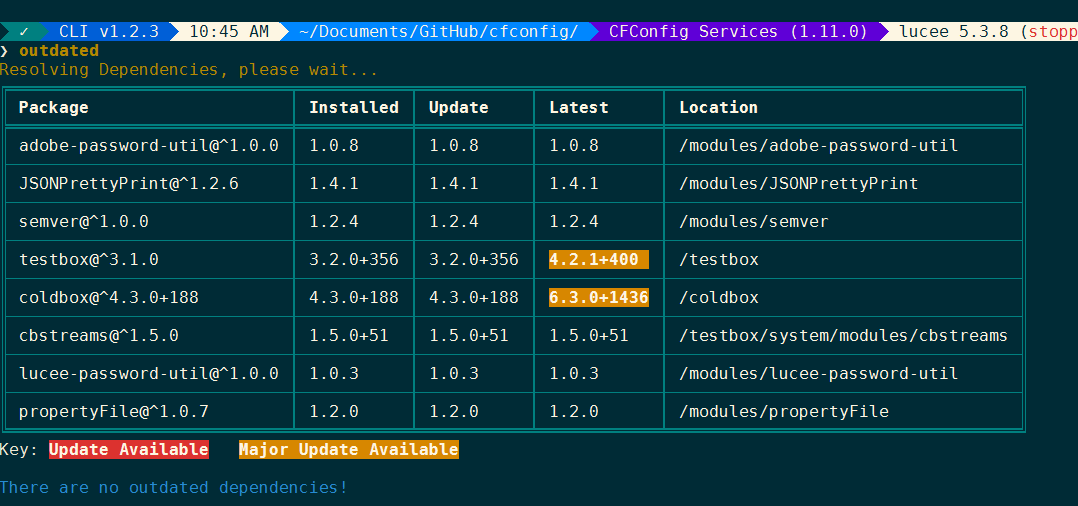
The print helper in commands and Task Runners has a new toy that will print ASCII representations of tabular data thanks to a pull request from Eric Peterson. You can see it in the output of the outdated command.
And you can use it in your Task Runners like so:
ColdBox Scaffolding for REST Handlers
When scaffolding ColdBox handlers, we have support for ColdBox 6.x REST Handlers now.
Experimental Server Features
You can enable extra Resource Manager Logging when troubleshooting file system issues:
You can force case sensitivity on a Windows server:
You can force case Insensitivity on a Linux server:
You can enable a cache of file system lookups of servlet paths. This is only for production and will eliminate repeated file system hits by your CF engine, such as checking for an Application.cfc file on every request, or testing where the servlet context root is. Standard Adobe ColdFusion installations have a similar cache of "real" paths from the servlet context that is tied to a setting in the administrator called "Cache Webserver paths" but that setting is not available and does not work on CommandBox servers for some reason. This setting would apply to any CF engine.
More Info:
HTTPS Redirect/HSTS
When using a CommandBox web server in production, you may wish to force your users to visit your site over HTTPS for security (and for HTTP/2 to work). However, it is desirable to still have your web server listening on HTTP so a user just typing your address in his browser can still connect to HTTP and then redirect. CommandBox can be configured to redirect all HTTP traffic over to HTTPS with the following setting.
If you want to go one step further, you can add a Strict-Transport-Security header to your site. This instructs the browser to automatically use HTTPS every time the user visits your site again.
More Info:
Force Colored Output in your Builds
CommandBox won't use ANSI color formatting when running inside of a non-interactive terminal. However, build servers such as Gitlab or Jenkins (via a plugin) support ANSI color sequences. You can force CommandBox to use colored text output with this new setting:
Loose Semantic Version Parsing
One of the common hangups for people dealing with Lucee Server and Adobe ColdFusion CF Engines versions, is that CommandBox follows the npm-flavor of the semantic version spec and expects
instead of
So we've loosened our sem ver library to treat the 4th number as a build ID if there is no plus sign in the version (instead of just discarding the 4th digit as the spec requires)
Support for "localhost subdomains"
Most modern browsers allow you to make up any subdomain you want before localhost such as mySite.localhost and will simply resolve them to localhost (127.0.0.1) even without a hosts file entry. CommandBox now supports using these domains and will bind your server's ports to localhost even without using the commandbox-hostupdater module.
More Info:
Relative CommandBox home
You can customize where CommandBox lives by placing a commandbox.properties file next to the box binary. We have better support for relative paths now so you can have portable CommandBox installations such as a thumb drive.
More Info:
Halt Server If Port In Use (Breaking Change)
The only known breaking change in this release is if you try to start two servers on the same HTTP port. Previously, CommandBox would just ignore the port on the second server and choose a random port. Due to the confusion that can cause, CommandBox will now throw an error. If you want to override an explicit port locally, set the port to an empty string or a 0 and CommandBox will choose a random port for you. For example, if you are using the commandbox-dotenv module, you can put this line in your project's .env file to override the port in your server.json
Relative Web Alias Behavior (regression)
If you have a server with the server.json outside of the web root and at least one relative web alias, the alias will not work on the first start of the server. The workaround is to change the web aliases to be relative to the folder that the server.json lives in.
Incompatibility with old DotEnv module
Some users receive the following error when starting CommandBox after updating:
If you see this, it means you have an older version of the commandbox-dotenv module installed that is not compatible with the new version of WireBox inside CommandBox. To fix, delete this folder out of your CommandBox home:
Now the CLI will start and you can install the latest version of dotenv.
Release notes
Here is the list of all tickets included in the 5.3.0 release.
Bug
web server aliases in server.json should be relative to the folder of the server.json
${Setting: serverinfo.foo not found} expansions don't work in a folder that's not the web root
Re-using same server.json with two names doesn't work
Corrupted WireBox metadata cache file will prevent CommandBox from starting
HTTP2 Additional Port Handling and Flexibility
REPL & Command highlighters don't handle square brackets [] well
box_server_profile=production

box_server_web_http_port=8080

# JSON which will be parsed
box_server_web_ssl={ "enabled" : true, "port": 443 }

# dot-delimited keys (Windows only)
box_server_web.http.port=8080

# array indexes too (Windows only)
box_server_web_rules[1]=path-suffix(/box.json) -> set-error(404)
box_server_web_rules[2]=disallowed-methods(trace)
server set web.http2.enable=true/false
# Return array of dependency names
package show | jq keys(dependencies)

# Find dependencies with "cb" in their name
package show | jq key_contains(dependencies,'cb')
config show jq:endpoints.forgebox.apiToken
# .. is the same as ...
config show endpoints.forgebox.apiToken

# or you can get fancy...
config show 'jq:keys(modules)'

# Impress your friends
package show "jq:[name,version]"

# Be the life of the party
package show "jq:contributors|split(@,' ')"