In no particular order...
Fix background colors not showing up in Powershell and Windows cmd
System Setting expansions not always working in server.json
testbox run no longer blindly assumes you're returning JSON.
Piping commands into box was broken since 4.0.0
Starting server with --debug didn't output logs on error.
Sorted by createUUID() DESC...
Custom commands have more control over their tab completion candidates.
Control how many levels deep package list displays
New versions of Lucee, JGit, JLine, and WireBox
More pack200 of the Lucee jar (and more improvements to come soon in the next version of Lucee)
The run command has been a pain over the last few versions as every "fix" has seemed to lead to another regression. We've made some more changes to try and get each use case working as expected with no annoying bash messages about "job control". Fingers crossed.
Single one-off command, streams output to console as it comes.
Piping output of native binary into another Command (output captured all together and not streamed).
Running interactive commands. No output at all really, standard input and output of CommandBox bound directly to native shell
You can now control the exit code that CommandBox (or your recipe) exits with. Remember, zero is successful, any other number is failure.
Access the Exit Code of the previous command via a System Setting expansion of**${exitCode}**.
Recipes now have better support for exit codes. If a command throws an error OR returns a non-zero exit code, the recipe will stop and the exit code of the last command will be returned as the exit code from the recipe command. And if it was a non-interactive shell, the exit code will flow all the way back to the operating system from the box binary. Also, running "exit" inside of a recipe will no longer exit the entire shell, but just that recipe execution. This give you a lot better control over your recipes.
Let's take a moment to review an existing but little known feature of CommandBox that we borrowed from bash. This is not new, but you need to know this for the following section to make any sense. Similar to bash, CommandBox allows you to chain multiple commands together on the same line and make them conditional on whether the previous command was successful or not.
You can use && to run the second command only if the previous one succeeded.
You can use || to run the second command only if the previous one failed.
You can use a single semicolon (;) to separate commands and each command will run regardless of the success or failure of the previous command.
With the above building blocks, we can get clever to create simple conditionals to only run commands if a condition is met. Or these can simply be used to cause recipes to stop execution or to fail builds based on a condition. The following commands output nothing, but they return an appropriate exit code based on their inputs.
Returns a passing (0) or failing (1) exit code whether the path exists.
You can specify if the path needs to be a file or a folder.
Returns a passing (0) or failing (1) exit code whether truthy parameter passed. Truthy values are "yes", "true" and positive integers. All other values are considered falsy
Returns a passing (0) or failing (1) exit code whether both parameters match. Comparison is case insensitive.
Big thanks to John Berquist and Dominic Watson for helping add this new feature. You can now install packages directly from S3, Amazon S3, Digital Ocean Spaces and Google Disk.
There are several different authentications mechanisms available too:
Per bucket credentials in your CommandBox endpoint settings
Global credentials in your CommandBox endpoint settings
Environment variables
AWS credentials file
The full docs are here:
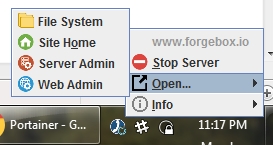
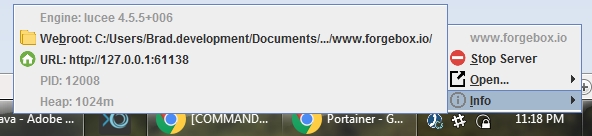
We've added 17 pieces of flair to our server tray menus to show you more information such as PID, webroot, and port as well as a new option to open up the web root in your file system explorer.
Here's the full list of everything that changed in CommandBox 4.2.0.
[] - .zip files in artifacts cache don't include empty folders
[] - "bash: no job control in this shell" error message (pull request)
[] - external commands/shells that are interactive (such as vi) are not working when executed from commandBox
[] - Allow arbitrary command params to have file/folder completion via annotation
[] - Allow custom completion UDFs to provide group and description
[] - New conditional commands pathExists, assertTrue and assertEqual
[] - Compact package listing
[] - Write a custom JGit progress updater that clears out at the end
[] - Hide JLine warning about dumb terminals
Automatic detection for build servers like Travis-CI to hide progress bar animations. Docs Here
Cloning Git repos during install has a nice new progress bar that plays well with interactive jobs
You can use the aforementioned progress bar for your own purposes in custom commands and Task Runners. Docs Here
IAM role
[COMMANDBOX-811] - System settings not always used in server.json
[COMMANDBOX-829] - "testbox run" formats outputfile as JSON even if it's not
[COMMANDBOX-833] - Piping input to CommandBox broken
[COMMANDBOX-834] - Bleeding edge upgrades show wrong URL after S3 artifacts move
[COMMANDBOX-835] - --debug doesn't dump job logs on error
[COMMANDBOX-841] - Allow user to exit shell with specific exit code
[COMMANDBOX-842] - Improve recipe handling of exitCodes
[COMMANDBOX-818] - Upgrade to JGit 5.0.1
[COMMANDBOX-819] - Upgrade to Launch4J 3.12
[COMMANDBOX-820] - Skip forgebox checks on server start with server home dir that's already installed.
[COMMANDBOX-821] - Upgrade to JLine 3.8.2
[COMMANDBOX-823] - Pack200 Lucee bundles
[COMMANDBOX-825] - Upgrade to Lucee 5.2.8.50
[COMMANDBOX-826] - Default rewrites support /pms servlet used for Adobe CF 2018 performance monitor
[COMMANDBOX-827] - Default nonInteractiveShell setting in commonly known build environments
[COMMANDBOX-828] - Improve messaging when initting private package
[COMMANDBOX-837] - Reorganize the tray menus
[COMMANDBOX-843] - Upgrade to Wirebox 5.1
!ping google.com!pwd | #listLast /!nano index.cfmexit 123echo ${exitCode}mkdir foo && cd foomkdir foo || echo "I couldn't create the directory"mkdir foo; echo "I always run"# Only run the package show command if the box.json file exists
pathExists box.json && package show# output server.json only if it exists
pathExists --file server.json && server show
# Create the dir foo only if it doesn't already exist
pathExists --directory foo || mkdir foo# If this package is private, then run a package script
assertTrue `package show private` && run-script foo
# If this env var is true, then run a command
assertTrue ${ENABLE_DOOM} && run-doom
# Use the boolean output of a native CFML function to control this echo
assertTrue `#fileExists foo.txt` && echo "it's there!"# If the name of our package isn't a specific string, only then set it
assertEqual `package show name` "My Package" || package set name="My Package"
# If this env var is the string "production", then perform a production install of dependencies
assertEqual ${ENVIRONMENT} production && install --productioninstall s3://my-private-bucket/myPackage.zip